Category Archives: stuff

Yahoo to adopt “semantic web”

Yahoo is going to adopt some of the key standards of the “semantic web” in order to improve the search experience for its users, reports the BBC.

The technology is widely seen as the next step for the world wide web and it involves a much richer understanding of the masses of data placed online.

Andy Powell Pete Johnston makes some additional observations on his blog entry:

It is worth bearing in mind the note of caution from Paul Miller that such an approach brings with it the challenges of dealing with malicious or mischievous attempts to spam rankings, and as I think Micah Dubinko’s post makes clear, this is not going to be an aggregator of all the RDF data on the Web.

Wikipedia on the semantic web.

Edit: Corrected who wrote the blog entry on eFoundations.

Please do not send 17MB Word attachments…

As per usual when I am out of the office for a while I get the usual “Your mailbox is over its size limit” as I do send and receive a large amount of e-mail (even more so when I am out of the office as it is my main form of communication).

Please do not send 17MB Word attachments…

Now it’s very difficult to archive from a remote location, so I do go through and trim a few e-mails and download and then delete large attachments.

However was very surprised to see literally one day after doing this he “Your mailbox is over its size limit” message again, I checked I hadn’t received any new BIG e-mails for a while, so I thought I know I suspect that an all staff e-mail with a large attachment had been sent round.

And boy was I right!

Somone (who shall remain nameless as this is a public blog) had sent for sending to all staff an e-mail with a single Word document as an attachment.

This Word document was a single page document, with some pictures on it.

This Word document in terms of file size was large, nay huge, nay really really BIG!

It was 17MB, that’s right seventeen MB!

17MB for a single page document!

Obviously the person who had created the document had taken some photographs with a digital camera and inserted them into the word document, resized them so they fit on the page, but not resized them in terms of file size!

17MB for a single page document!

Now with other a thousand staff, that means the mail server was choked with 20GB from a single e-mail!

I suspect I was not the only one who received the “Your mailbox is over its size limit” e-mail this weekend and I suspect that there will be a lot of people who will be very annoyed and will just delete the Word document without opening or downloading it.

Really that file should have never been sent, posted as a link perhaps (but would you download a 17MB Word document).

I did go ahead and print it as a PDF and got it down to 300KB without trying which is still large, but so much better than 17MB.

Maybe next time a simple text e-mail would have sufficed.

Learning on the Wii

A MoLeNET colleague of mine has been playing working hard on seeing how the Nintendo Wii can be used to support learners.

Learning on the Wii

http://www.xlearn.co.uk/2008/03/learning-on-wii.html

http://www.xlearn.co.uk/2008/03/getting-your-wii-on-net.html

I’ve finally got round to buying some points and downloading Opera on my Wii. I’m excited by quite a few possibilities in its use for education, especially since some colleges I know have bought them to support learners in their Entry Level courses for the Learning for Living and Work projects.

From my perspective this device can be used for mobile learning in addition to learning in college.

For some learners this is their “mobile” device.

If learning while mobile means learning at home using a console, that has to be an advantage over “not” learning at home.

If I am at home learning on the net on my wifi capable Nokia N95 is that more or less mobile than learning on the net on my 17″ MacBook Pro on Brighton beach using the free Pier to Pier wireless network?

Do you have to be at Starbucks using their wifi for it to be mobile learning?

Surely it is all about choice, and learner choice at that?

The latest street danger? Walking and texting

From the Guardian…

In case anyone reading this is one of the 68,000 individuals who apparently interfaced thus with street furniture in London last year (mostly resulting in cuts and bruises, but with a fair proportion of broken noses, cheekbones and one fractured skull in the mix too) and therefore is self-evidently stupid enough to need the problem further delineated, these are injuries caused by people who do not understand the importance of peripheral vision. Until, that is, they compromise it by texting as they walk along the street and into lampposts, signs, bollards and other pedestrians.

Read more.

The latest street danger? Walking and texting

When is an UMPC not an UMPC?

When is an UMPC not an UMPC?

When it’s a 9″ UMPC.

When is an UMPC not an UMPC?

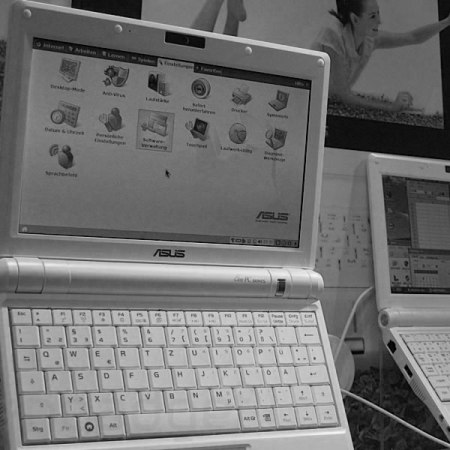
The infamous little EeePC is getting bigger by two whole inches.

Coming out next year with a bigger screen, the EeePC will still be running Linux but will also be available with Windows XP.

Compared to the original 7″ EeePC the 9″ model is not that much bigger, so will still be relatively just as portable.

Engadget on the 9″ EeePC, ASUS’ 9-inch Eee PC and Hands-on with the 9-inch Eee PC.

How will technology change teaching?

I really enjoyed reading Bill Thompson’s column on the BBC News website this week, where he wonders about how technology will change teaching.

If every student has a powerful network device that plugs them into the network, and work on digitising every book and other forms of knowledge has been successful, then what is the point of teaching “facts”?

He makes the very valid point.

Just as we try to encourage kids today to learn enough mental arithmetic to decide whether to believe the calculator’s answer, so we need those using tomorrow’s vast supercomputers to have a sense of what is going on that will allow them to judge the validity of the answers they get.

Overall an interesting column, well worth a read.

Adobe AIR

Adobe today announced the immediate availability of Adobe AIR, a new platform for building rich internet applications (RIAs) across different platforms, including Windows, Linux and Mac OS X.

Adobe AIR enables developers to create RIAs on the desktop using the skills and Web technologies — such as HTML, Ajax, PDF, Adobe Flash and Adobe Flex — they already employ. Applications deployed on Adobe AIR have the advantages of browser-based RIAs, such as speed of development, ease of use, and access from virtually anywhere. Yet they also have the benefits of desktop applications, such as the ability to read/write local files, work with other applications on a user’s computer and maintain local data storage on the desktop.

Adobe AIR

It’s an interesting variation on applications, some use desk bound applications such as Microsoft Office, whilst others use web based applications  such as Google Apps.

It’s looking like Adobe AIR will allow users to have the flexibility of web based applications with the backup of desk bound applications when there is no internet connection (such as on plane).

The £99 UMPC

The £99 UMPC

Elonex who I remember as a manufacturer of high end laptops according to the Times will be releasing a £99 umpc laptop at the Education Show later this month.

…it includes a free word processor and spreadsheet, a free web browser and free e-mail software. It has a 7in screen, a rubbery little keyboard and no CD drive. And it all runs on an ageing chip that was designed before its target audience of seven-year-olds were even born.

Read more at the Times. Elonex’s website. The news has even reached Engadget.