This week I posted a blog entry about the iPhone App, Classics.

For a limited period it is now free.
Classics (iTunes Store link)
Good time to check it out.

This week I posted a blog entry about the iPhone App, Classics.
For a limited period it is now free.
Classics (iTunes Store link)
Good time to check it out.
There are a couple of things to note, the drag and drop lesson planning, the sharing of content and ideas (look today at Twitter) and the learners using mobile devices to capture stuff (today we’re using mobile phones and PSPs with cameras).
I like watching these videos to see how far we haven’t come and how far we have.
Thanks to Martin Ebner for pointing this out.
Classics iPhone App of the Week
This is a regular feature of the blog looking at the various iPhone Apps available. Some of the apps will be useful for those involved in learning technologies, others will be useful in improving the way in which you work, whilst a few will be just plain fun! Some will be free, others will cost a little and one or two will be what some will think is quite expensive. Though called iPhone App of the Week, most of these apps will also work on the iPod touch.
This week’s App is Classics.
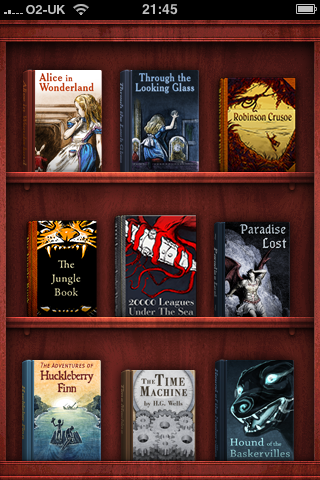
So you can download an e-book reader, Stanza (iTunes Store link) for free on your iPhone, you can then download hundreds of public domain books for free.

So why would you spend £1.79 on an iPhone book App with just 23 books in it, all of which can be downloaded using Stanza for free?
Well that is a good question.
I did in fact purchase Classics before Stanza was available so I could use that as the reason (or excuse). However I would still recommend that you get Classics and the reason is that the design of the App, the interface and user experience really make the most of the iPhone. If you ever need to show off what the iPhone can do, Classics is one App which really does impress people and makes them see that this is a device is more than a phone and a Twitter client, you can use it for reading and also learning.
It has a nice page turning effect, you can bookmark where you get to.

The selection is good, I am guessing that there is at least one book that you haven’t read!
It’s not the only book App in the iTunes Store and certainly it’s relatively expensive at £1.79 compared to other Apps, but it does look nice and does a really neat job of allowing you to use your iPhone to read books. It’s not an e-Book Reader as you can’t install other books, but for what it does, it does it well.
I’ve realised that I have not mentioned Screenr before except as one of my top ten web tools that didn’t quite make the top ten!
So what is Screenr?
It’s a web service that allows you to make screencasts quickly and easily, then have them posted to the web.
Once on the web, you can either share the URL, put it in an e-mail for example, or on Twitter.
You can embed the video into a webpage on a website or on a VLE. This is in the Flash format. What about if you have a smartphone or an iPhone, well Screenr ensures that the video is available in an MP4 format which will play on the iPhone, other smartphones and internet capable video devices.
Screenr also allows you to share your video on YouTube.
Finally one useful aspect is that you can download the video as an MP4 file. This can then be embedded into a PowerPoint presentation. You can also import this video file into iMovie and edit it, add titles, other video, to create a new video. If you have the appropriate MP4 codec on your Windows PC you can import it into Windows Movie Maker and do something similar.
What I like about Screenr over other similar tools (like Jing) is that it doesn’t require you to download an application or install anything. Go to the website, click create screencast and then everything is simple after that.
For example this video on the new Mac eBook Reader software was created using Screenr.
One note though is that the service works basically with a Twitter account. You don’t need to use the Twitter account, but just thought I would point it out.

With David Sugden, Ron Mitchell, Lilian Soon and James Clay.
This is the thirty first e-Learning Stuff Podcast, Store it, Tag it, Share it.
James, David, Ron and Lilian discuss various web tools that can be used to store your stuff; like documents, notes, files. Tools that allow you to tag your stuff and share your stuff. They talk about the tools they use with their stuff and they talk about how these tools can be used for learning.
Download the podcast in mp3 format: Store it, Tag it, Share it
Subscribe to the podcast in iTunes.
Shownotes
Photo source.
If you find yourself answering from learners the same questions over and over again, it can save time and make life easier for you and your learners to create a list of Frequently Asked Questions (or FAQ).
This can then be used to reference any questions asked by learners about the course and assignments. Learners who then ask the same or similar question again can be shown the FAQ. If they ask a new question, just add the question (and the answer) to the FAQ.
Hosting the FAQ on the VLE allows learners to access the FAQ before they even get to ask the question to you the tutor. If if has their question and an answer they will then go away satisfied without even needing to ask you the tutor a question. This saves both you and them time. It means they will get an answer quicker (very useful at weekends and in the evenings).
Rewiring Inclusion: Strategies, tools and techniques to promote barrier-free learning
A national one day conference in Nottingham at the National College on Tuesday 9 February 2010, with an optional evening session on 8 February. Organised jointly by the Association for Learning Technology and JISC TechDis.
With an outstanding range of workshop sessions, and plenary contributions from:
· Google’s Julian Harty – “Wave, Chrome OS, Online Docs, and Android.
What impact will they have on the environment for learning?”;
· Jane Seale from the University of Southampton;
· Yahoo! Europe’s Artur Ortega – “The Yahoo! approach to accessibility”;
· Dónal Fitzpatrick from the School of Computing at Dublin City University – “The contribution that computer science is making on inclusion”;
· Peter Hartley from Bradford University;
· Alison Mills from The Manchester College – “How a large urban college has taken inclusion to the heart of its operations”;
· James Clay from Gloucestershire College.
Full programme for the event [1 MB PDF]
A large print version is available.
The conference will focus in particular on browser technologies, Web2.0, e-learning, and mobile learning, and on the benefits these can offer to
all users, including those with disabilities or learning difficulties.
All sectors were represented in the workshop proposals and we are delighted that Independent Specialist Colleges were successful in being
selected to present alongside Universities, FE colleges, Project Consultants, and JISC Regional Support Centres.
Costs to attend:
£120 members of ALT
£160 non members of ALT
£100 dinner, bed and breakfast at the National College
Booking deadline:
Tuesday, 2 February 2010 – http://www.alt.ac.uk/conferences.php
WordPress iPhone App of the Week

I am hoping that this will be a regular feature of the blog looking at the various iPhone Apps available. Some of the apps will be useful for those involved in learning technologies, others will be useful in improving the way in which you work, whilst a few will be just plain fun! Some will be free, others will cost a little and one or two will be what some will think is quite expensive. Though called iPhone App of the Week, most of these apps will also work on the iPod touch.
This week’s App is WordPress (iTunes Store link)
I have written before on this blog about the WordPress App for the iPhone.
Back then I said
The interface is not fantastic, though having looked a little more into it, if you had an iPhone (it has a camera) you can add photos quite easily; from the iPod touch you can only (obviously) use images stored on the device.
I am reasonably impressed with the app and if it allows me to blog more easily and more often then that can only make my blog better (or will it).
In the end I have made use of it, as well as writing full blog entries I have also used it for ideas for blog posts which I can then use as drafts once I get behind a full size computer.
WordPress 2 is a revised version which looks and works better than the previous version. It also now supports password protected self-hosted blogs.
WordPress is blogging software, that you can either use free via WordPress.com (which is where this blog is hosted) or you can go to WordPress.org, download and install the software on your own server.
Once installed you can then post blog entries. One of the features of the software is you can either have a fully open blog or one with a password; a closed blog allows for example a learner and a tutor to reflect and communicate without letting the rest of the group (and the world) in on that conversation. A blog is different (better) than e-mail in that the reflections and conversations can be tagged, allowing both the learner and the tutor to collate and look at a group of blog entries. With e-mail they can get lost in amongst the body of e-mails we now get and many places limit how much e-mail you can store!
Since WordPress.com took advantage of the WPTouch theme, it can be much easier to view a WordPress blog on an iPhone (or other mobile device). You can also install WPTouch on your own WordPress installation if you are self-hosted.
The WordPress App on the iPhone allows you to post blog entries to your blog whilst on the move.
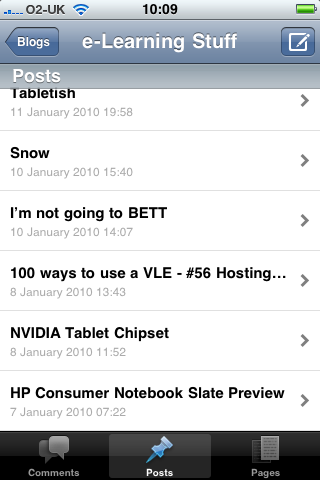
You can write entries, add images and then either publish direct, or save as a draft.
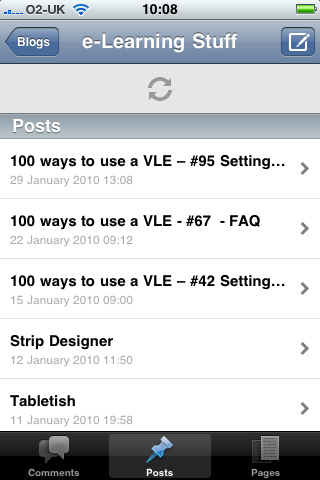
The App also works offline which makes it useful if you have the iPod touch, as you can write offline and then publish once you are in range of a wireless network.
Simple to use for just plain text, you can attach photographs, but can only embed them if you know soem HTML and already have the image somewhere already online! Not the easiest thing to do with an iPhone, though at least now we have copy and paste!
The WordPress App is a free app and WordPress.com can be used for free, so if you like free then this is one way that you can blog without needing to spend any money.
Blogging software is very much a personal thing, some like WordPress, others don’t. If you already and are happy using another service such as Blogger or Typepad then you are probably not going to swap to WordPress. However if you already use WordPress or are new to mobile blogging then the combination of the WordPress blogging software and the WordPress App has made it quick, easy and simple.
Apple has issued invitations to some (not me).

“Come see our latest creation.”
Hmm I wonder what that could be?
Well it has to be new.
So I think we will see an Apple Tablet type product of some description!

With David Sugden, Lilian Soon and James Clay.
This is the thirtieth e-Learning Stuff Podcast, Snow Joke Two. After a bit of break, well we’ve not had an episode since October, this is hopefully the first of a more regular podcast.
Download the podcast in mp3 format: Snow Joke Two
Subscribe to the podcast in iTunes.
Shownotes