100 ways to use a VLE – #19 Reading a book

A book, how on earth can you read a book on the VLE?

A book, a printed paper thing!

Well….

Of course we are talking about electronic books, e-books.

It doesn’t really matter whether you like or don’t like e-books as the issue isn’t about choosing one over the other, it’s about convenience and ease of use for the learner.

e-Books should really be seen not as an alternative to paper books, but as an addition an enhancement. Learners still may be given or buy a core text book, they will still have access to the library and that collection. Using e-books on the VLE is about increasing access to resources.

For any course, it is very useful for learners to have access to a reading list, a selection of useful books. Having access to those e-books via the VLE makes that reading list really useful.

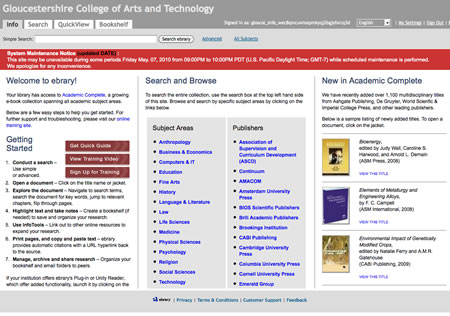
Generally most VLE platforms can not be used to host commercial e-books, so most of the time you will need to link to whichever e-book platform that your institution decides to subscribe to.
We use the JISC Collections e-Books for FE collection and this uses the Ebray platform. This allows us to link to individual pages within individual books, books and collections (bookself) of books.

We would never expect learners to just use e-books and never use any other books, however having access to e-books allows learners to access a (virtual) library at a time and place to suit them.

So, yes you can read a book on the VLE!

Picture source.

Google to have an e-book store

BBC News reports on Google Editions

Google is set to launch its own online e-book store in 2010.

Google Editions books will not be tied to a specific device, unlike rival e-book company Amazon.

The Amazon Kindle is linked to books from the company’s own store and similarly with Apple’s iBookstore.

The article takes account of the scanning done by Google

To date Google has scanned over 12 million books, both in-print and out-of-print, giving it a greater selection of material than either Apple or Amazon.

This action by Google reinforces my opinion about the growth of e-books and e-book readers that I outlined in this blog post.

Black & White Camera – iPhone App of the Week

Black & White Camera – iPhone App of the Week

This is a regular feature of the blog looking at the various iPhone Apps available. Some of the apps will be useful for those involved in learning technologies, others will be useful in improving the way in which you work, whilst a few will be just plain fun! Some will be free, others will cost a little and one or two will be what some will think is quite expensive. Though called iPhone App of the Week, most of these apps will also work on the iPod touch.

This week’s App is Black & White Camera.

If you love black and white photography, this is the app for you! Just take a photo or pick a picture from your photo library, you will get beautiful black and white art photos.

Features:

– Create black and white photos directly using iPhone
– Create black and white photos for pictures in photo library
– Automatically create and save to file
– Processed and saved in original size
– Fast processing & saving
– Polished UI, beautiful design

The pro version “Black & White Camera Pro” comes with flash to do fine grain brightness adjustment.

Free and £0.59 for the Pro Version.

I sometimes think the best Apps for the iPhone are the simple ones, the ones that do one thing well.

Black & White Camera is one of those Apps, you take a photograph, it converts it to Black & White and saves it as a new image to your camera roll.

Nothing more and nothing less.

It’s a free app, the pro version has a “flash” but that isn’t necessary for most photographs. If you want to use photographs from your photo library (for example on an iPod touch) then you can do that too.

Regular readers of the blog will know that I do like to use black and white images to illustrate posts. This App allows me to take a picture and use it in a blog article quickly and easily. The top image was created using this App.

Clean and tidy

One of the annoyances of using YouTube in the classroom is the “untidy” YouTube interface. It has got better recently, but one annoyance remains, the comments.

For some reason many people who comment on YouTube videos seem to have to use profanities or make weird or rude comments.

As a result when you are showing a YouTube video in a classroom or at a conference, people get distracted by the comments and miss the video.

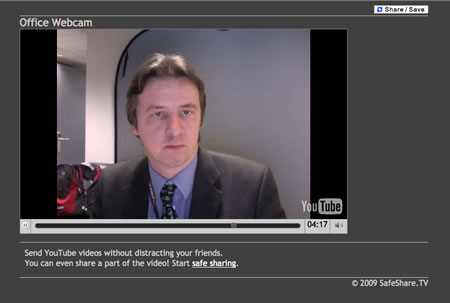
I did mention QuietTube in a post last week, I was recommended by Ellen to have a look at SafeShareTV.

Not only does SafeShareTV remove distracting and offensive elements around YouTube videos, but it also allows you to crop videos before sharing them.

A neat little idea to sending YouTube links by e-mail, or posting links in the VLE.

It helps avoid some of the distractions that the main YouTube sites offer and is in some ways better and easier than trying to embed the YouTube video.

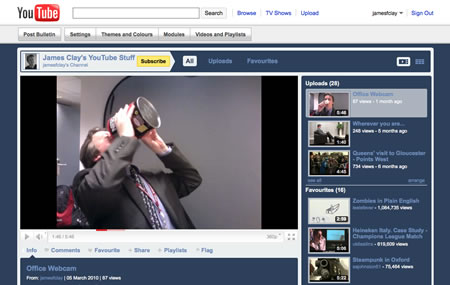
Another way of showing your videos in the classroom is to use the channel and find the videos that way rather than using the direct URL.

As you can see you also avoid the unecessary comments and distractions, but stil not as clean as SafeShare.

e-Learning Stuff Podcast #045: Brighton Rock

Personal responsibility, self-censorship, safeguarding, digital identity and Brighton!

James Clay, David Sugden and Col Hawksworth discuss many issues relating to digital identity and literacy in relation to the use of Web 2.0 tools and services.

With James Clay, David Sugden and Col Hawksworth.

This is the forty-fifth e-Learning Stuff Podcast, Brighton Rock

Download the podcast in mp3 format: Brighton Rock

Subscribe to the podcast in iTunes

Shownotes

I am not that bothered as Steve Jobs talks about Flash

In one of those rare moments Steve has posted his thoughts on Flash to the Apple website.

I wanted to jot down some of our thoughts on Adobe’s Flash products so that customers and critics may better understand why we do not allow Flash on iPhones, iPods and iPads.

Steve in his thoughts extols the virtues of HTML5 as a way of creating interactive websites and for online video.

Now I am no technical expert on Flash or HTML5 and therefore can only really comment from a personal perspective about which is better for the web and devices.

So it looks as though if you want an iPhone or an iPad you are going to have to get use to not having Flash. Having said that, if Apple and Steve decide not to use Flash on the iPhone, it’s not as though there aren’t other phones available. Likewise even though we have the iPad, if you read blogs you will know that there are many other tablets and slates available.

These devices offer more functionality than the iPad with USB ports and cameras, and these devices will support Flash if that’s want you want.

However it would appear from Twitter and blogs that people don’t want any old slate that has Flash, they specifically want an iPad with Flash.

Why?

Well the reason in my opinion is that people like the iPhone and the iPad not because of the hardware, but for the user interface and the usability of the device.

Even though the iPad has no camera, no USB, no SD card reader,; that’s not the reason that Apple have sold over a million of the devices, it’s in my opinion a combination of the “image” of the device, the availability and ease of access to thousands of Apps, and in my opinion the way the user interface “just works”.

Microsoft made Windows XP Tablet PC Edition nine years ago. A wonderful concept slightly ruined by the user interface. It was very difficult to use a GUI that required a mouse and keyboard when using a pen. I am sure if Microsoft had known what we know now, then Windows XP Tablet PC Edition would have had a very different interface. Look at what Microsoft have said about their phone OS.

The new Microsoft OS for the phone is a very different affair to what we had with Windows Mobile – which again was trying to be a desktop version of Windows on a touch screen. Though lots of people liked their PDAs, compared to the user experience on the iPhone it was always something of a challenge and not something that would appeal or sell to the general public. I think that may change with Windows Phone 7.

As I am talking about Microsoft, I was disappointed to see that they have canned their Courier project which isn’t too surprising, as I thought it had potential.

I am not disappointed to see that HP have abandoned their Windows 7 based Slate.

The device was first seen as CES 2010 when it was unveiled by Microsoft CEO Steve Ballmer and was supposed to go on sale in the middle of 2010.

It would appear that HP are not happy with using Windows 7 as the OS for their Slate.

However they HP don’t appear to be abandoning the form factor and have been looking at Android. HP’s purchase of Palm also gives them WebOS which was applauded on the Palm Pre even though it did not sell well.

I expect we will see either an WebOS Slate from HP or even an Android version! Regardless of which OS HP use, both will (according to Adobe) have Flash. So if you are looking for a tablet that has Flash you can either buy a Windows Tablet now, or wait a few months for an Android or WebOS Tablet.

So back to the iPad and the lack of Flash.

So what about Flash, how essential is that then really?

In terms of non-educational use of the web, Flash is predominantly used for video. Prior to YouTube, most people used Flash for splash screens, animation and the odd game. Today though Flash powered video is a key part of how people use the web.

Social networking sites, okay Facebook, also use Flash extensively for simple online games.

So what about educational use, as many educators have complained about the lack of Flash on the iPhone and iPods?

Well, yes there are lots of Flash based quizzes, diagrams and activities. Simple Flash games (and complicated Flash games) also have their place in education. It is these that just won’t play on the iPhone and iPad.

If these were created in-house then I also suspect that the in-house Flash developers are unlikely to have the necessary HTML5 skills to create new versions.

Most Flash games I have seen have actually been created using tools that then create Flash based quizzes using simple text input that any practitioner could utilise without needing to know Flash.

Now at this point I could argue that such activities and games can be created for the iPad (and are been by developers) however I don’t think this is an argument about whether we as educators demand Flash on a specific device.

Ten years ago, no one was using Flash for education or video. Things change and will continue to change.

At the end of the day it doesn’t matter what we think about this in our role as educators, practitioners and learning technologists. The real decision about this will be made by our learners and if we are sensible we will change how we do things in order to meet the needs of our learners. If our learners decide that they want to buy and use the iPad, then I believe as educators we should ensure that any learning content we provide should work on the iPad. I don’t see how we can dictate what devices learners should be buying. I also don’t think it is sustainable for educational institutions to be buying mobile devices for all learners just so that they can have a device that plays Flash!

If HTML5 is the future of the web, then we need to start preparing for that future and not try and fight it, as we have no chance of winning! Why, because the people we are fighting are not Apple or Adobe, they are our learners. They will make the choice, not us.

Technology changes, we need to have the culture and flexibility to accommodate those changes in order to provide the best enhanced and improved learning experience for our learners.


100 ways to use a VLE – #66 Glossary

From Wikipedia

A glossary is an alphabetical list of terms in a particular domain of knowledge with the definitions for those terms. Traditionally, a glossary appears at the end of a book and includes terms within that book which are either newly introduced or at least uncommon.

Most courses contain technical terms, jargon and just plain weird words that mean nothing outside that curriculum area!

You could create a simple alphabetical list of definitions on a page on the VLE. This will allow learners to refer to a detailed list of defined terms.

Having said that, why create a glossary when there are quite good ones already online?

Biz/Ed – Business and Economics Glossary

Physical Geography Glossary

Computer and Internet Glossary

Though a glossary list is useful many VLEs have a clever trick up their sleeves, an ability to create an integrated glossary into any learning content on the VLE.

All the learner needs to do then is click the highlighted text to read the definition, making life much simpler!

But isn’t creating a glossary hard work?

Well yes… but instead of creating your own, get the learners to create the definitions as part of an ongoing learning activity. A glossary built by the learners for the learners is going to be a excellent collaborative learning activity.

Learners could create multiple definitions and then rate them, with the highest rated being accepted for the final glossary.

They could use a wiki on the VLE or a discussion forum to create the glossary, or even a built-in glossary tool.

Another way to create a glossary would be work with colleagues across the country in creating a subject glossary.

A glossary on the VLE can be both a useful learning tool and the creation of one can be a stimulating learning activity.

Picture source.

Learning with AR

Learning with Augmented Reality.

LearnAR is a new learning tool that brings investigative, interactive and independent learning to life using Augmented Reality. It is a pack of ten curriculum resources for teachers and students to explore by combining the real world with virtual content using a web cam. The resource pack consists of interactive learning activities across English, maths, science, RE, physical education and languages that bring a wow-factor to the curriculum.

As noted on my Twitter community of practice some of these things work and some less so.

eLearning with AR. Hmm…I think the anatomy elements have potential but not convinced by the multi-choice quizzes as surely it would be much simpler to set that up in a browser and engage with it through a more traditional ICT way…?

I have to agree, some of the concepts need a little more work to be innovative, some are too much like replicating pen and paper!

What do you think? Does this have potential?

Using Moodle

A nice little presentation on using Moodle (the VLE).

Do you still think Moodle is boring?
Do you run out of ideas of how to use Moodle with your learners?
Do you want to improve retention and achievement?

This slideshow will give you fresh and new ideas to boost up your Moodle course.

Find out why you should use Moodle to promote learning, collaboration and communication, discover how to support and engage your learners and how to offer an interactive and rich learning experience.

After watching the slideshow, you will have an idea of what Moodle is capable of. Your next step is to learn how to create the activities suggested, such as Forums, Chats, Quizzes, internet embedded content, etc…

In the videos’ section you can find already a podcast that shows you the potential of a forum, how to use it with your learners and how to create it on Moodle.
There are more podcasts being created that will cover other activities.

Moodle is here because it saves us time and makes things much better for your learners.

If you want some more ideas, have a look at the 100 ways to use a VLE.

Tools for YouTube

YouTube has some great content, the tools described in this video will make it much easier to use YouTube in the classroom.

QuietTube – To watch web videos without the comments and stuff, just drag the button below to your browser’s bookmarks bar. On any of the supported video pages, click the bookmark button to watch in peace.

Tube Chop – TubeChop allows you to easily chop a funny or interesting section from any YouTube video and share it.

The final tool in the video, Keep Vid isn’t to be recommended as I explain in this blog post.

Via Simon Finch

news and views on e-learning, TEL and learning stuff in general…