Privacy has gone…

Do we have privacy anymore, do we have privacy with the internet now being so much part of our lives?

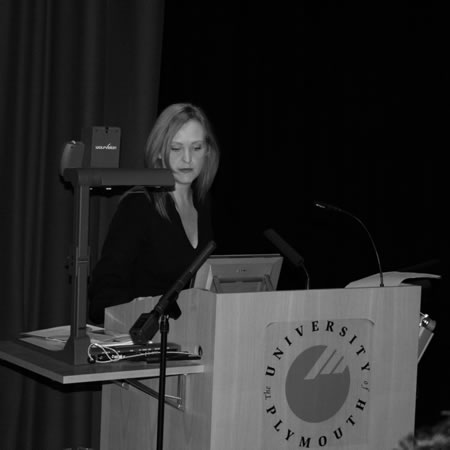
The opening keynote at the Plymouth e-Learning Conference 2010 was by Josie Fraser. She delivered an inspiring thought provoking keynote covering many different issues including digital identity, digital communities and communities of practice.

One of the key discussions was on privacy and the ability to control what I put online on services such as Twitter, this blog, Flickr or even (now and again) Facebook.

I can do lots to protect my identity.

I can decide what photographs I post to Flickr.

I can decide whether to include geo-data when I post to Twitter or use Audioboo.

What about the issue of other people infringing my privacy and putting details of my life online.

I can’t stop other people from broadcasting what I am doing…

I can’t stop them taking and posting photographs on me online.

I can’t stop them writing about what I am doing on services like Twitter and Facebook.

I can’t stop them uploading videos of me to YouTube.

I won’t be able to stop them adding geo-data to images or videos of me.

These services that people have used have take down policies, but unless the images, video or text are “not nice” then would the services taken them down because I don’t like them?

Of course I can ask, but they don’t need to say yes!

We seem to be at a stage where privacy is almost impossible to maintain if you go anywhere that others will be using cameras, online services such as Twitter or Facebook; even if I don’t use any of these things myself.

Josie in her keynote showed us the Ungooglable Man.

Does he exist? Probably?

Does he exist online? More than likely!

Even if he doesn’t use Myspace or Facebook, it is likely that friends and family do. They may place photographs of him online, they may talk about him, they may have videos of him. As a result he may be found online despite the fact that he is not online himself.

There are implications for those who have concerns about their own online identities that they may well have no power to stop others posting “stuff” about them online.

At the moment, many colleges are looking to work with learners on the concept of e-safety, part of which is digital identity. Colleges need to remind individuals that they are not the only person who needs to be concerned about what they post online, but that their friends and family need to be aware of the issues too.

Do you worry about what is posted about you online?

Do you know what others have posted about you online?

Should we care?

100 ways to use a VLE – #8 Assessment Feedback

In a previous entry in this series I wrote about how the VLE can be used for assignment submission and setting an assessment.

You can of course use the VLE to provide feedback on those submitted assignments or assessments.

Feedback is important to learners, it allows them to reflect on their work, to improve the current future work and improve their potential to finish and succeed on the course, module or programme of study.

Traditionally feedback was written onto the handwritten scripts that the learner submitted.

We have moved along a little since then, it is now, as already mentioned, very easy to set an assessment on the VLE and for the learner to submit their work on the VLE. It closes the circle if the feedback on the assessment is also on the VLE.

Though some practitioners like to write on scripts, this can be challenging if the submitted work is electronic, I know you can say print it off, but what about if the submitted work is a poster, a website, a presentation, a video, an audio recording… quite challenging to write feedback on an audio recording!

It makes much more sense to place this feedback where the learner can access it. Of course feedback needn’t always be textual, and using audio, video or screencasted feedback means the ideal home for this feedback is on the VLE. It needn’t get lost in the pile of papers that most learners carry or in the hundreds of e-mails if it was e-mailed. Most institutional e-mails have a limit on the size of the mailbox and this can cause issues not just for the learner who receives the e-mail but also the practitioner who sends feedback (and they will send it to a whole class).

Remember they may need to access it more than once, especially if they have to resubmit for example. Feedback is not a one off process it can be useful for reflective learners to re-read feedback on not just their latest piece of work, but also past pieces of work so that they can enhance and improve future pieces of work; demonstrate that they do understand and can apply the substance of the course.

Feedback is important, it doesn’t have to be on or live on the VLE, but the VLE can be a useful place to deliver and store feedback on assessments for learners.

Picture source.

PELC10 – Day 2

It’s day two of the Plymouth e-Learning Conference.

I am looking forward to Dave White’s keynote.

The education sector is constantly chasing the tail of the latest technology. Innovation ‘out there’ on the web generates paranoia that we might be missing the latest opportunity and the suspicion that our students are experts in everything. We create profiles on every new platform just in case they become ‘the next big thing’, collecting solutions-looking-for- problems and losing our focus on what students and staff might actually need.

Having seen him speak at the ALT-C Fringe I am expecting to enjoy his presentation.

After the coffee break, it will be time for the debate session I am taking part in, Floods? Snow? Swine flu? Terrorist threats? ‘Keep calm and carry on’.

Culturally, most institutions do not incorporate online or virtual learning into everyday working cultures, at any level: management, staff or students. Those who do not routinely use digital options can’t see that closing the physical institution need not have a significant impact on the business of the institution, if that business can be carried out at home or online. The issue is not to focus upon contingency planning, but to focus on changing the way people work when there isn’t snow and changing the way people think when there is. A

Also read my original blog post on the snow in January and my more recent post, “million-to-one chances happen nine times out of ten”.

After lunch I am chairing another debate, the great debate.

This forum will explore methods for categorising learners approach to online platforms and how this can influence edtech/pedagogic strategies. It will focus on Marc Prensky’s famous ‘Digital Native & Digital Immigrants’ trope and the more recent ‘Visitors & Residents’ idea proposed by David White.

Following the infamous Devon Cream Tea it will be the closing session and the prize draw! Overall a busy second day.

PELC10 – Day 1

So it’s the start of the Plymouth e-Learning Conference down here in, well… Plymouth.

A packed day with an excellent keynote expected from Josie Fraser.

The use of social media platforms, tools and practices are increasingly recognised as a critical way to facilitate learning and teaching and staff development. Josie Fraser explores how the shift towards more informal and less centrally controlled forms of communication and activity has come about.

Focusing on two critical concepts – digital identities and digital communities, Josie will explore the opportunities and issues that these present the education sector with, and the role they can play in designing and facilitating learning.

I am after the coffee break tempted by a couple of sessions. One of these is Twitter is dead: Reflections on student resistance to microblogging by Tony McNeill from Kingston University.

This paper will argue that Twitter occupies an awkward space: neither part of the institutionally supported digital environments and toolset accepted by students and used within their ‘curricular sphere of practice’ nor currently part of the digital services used in their ‘personal sphere of practice’. As such, Twitter initiatives risk being marginalised, falling outside the repertoire – both ‘imposed/top-down’ and ‘vernacular/bottom up’ – of the technology-enabled communicative practices of the students we wish to engage.

The other is Technologies Are Bad News for Adults Who Work With Children with Simon Finch of the Northern Grid for Learning.

Not so long ago if a teacher wanted to communicate with a student they would either speak with them or write a note in the learners’ book, or on their assignment. If they wanted to communicate with the learners’ parents, they would phone or write. Today, with increasingly accessible, affordable and usable social media, teachers and learners can communicate anytime, anyplace and anywhere. Digital cameras, mobile phones, micro projectors, and internet access can all be powerful tools to support learning and yet increasingly teachers struggle to manage their digital identities and interactions – sometimes with serious consequences.

As with many conferences there is another session on at the same time that I would also like to go to – ASSET: Enhancing feedback provision using video.

ASSET is a JISC-funded project led by the University of Reading which aims to tackle the sector-wide issue of improving feedback provision for students. ASSET uses Web 2.0 technologies to support staff in providing ‘feedforward’ and timely, quality feedback to students, via video and audio casts.

Another session I will go to, The Sage on the Video- Recorded Stage by Fiona Concannon and Sharon Flynn of the National University of Ireland.

This paper outlines a case study of the use of an automated lecture capture within an Irish university. It considers students’ reported experiences in using and viewing lecture recordings, and the implications of rolling out the service campus-wide.

Over lunch I hope to record (and stream) a live episode of the e-Learning Stuff Podcast as part of the Fringe.

Following lunch there are a couple of sessions that I quite like the idea of, the Learning Cafe which is looking to the future of learning. There is also an interesting sounding workshop, How to use social software to boost learning.

There is no doubt that web 2.0 and the use of social software has changed the way people use the Internet. The majority are familiar with tools like social networks, blogs and wikis. The fact that social software can support students while they are using an e-Learning environment or a personal learning environment is widely accepted.

But how exactly does social software support users? Which social software concepts should be used, and which should not? What can they be used for? And how can technologies, available today, help us to design a better education?

The goal of this workshop is to raise awareness that social software has to be integrated intelligently and as a form of connection between different techniques. It is not enough to add a specific gadget, there has to be a particular benefit. Educators have experiences on how to design lectures and computer scientists know what technologies are available to support learners. Interactive tasks will involve the audience to exchange experiences from a technical and an educational perspective.

Hmmm, choices, choices.

Later on, after the tea break, I think I will go to Fleur Corfield’s session, entitled, Supporting an Innovative Curriculum in a Traditional HE Environment.

Universities have a recognised need to react to a changing environment, from changes in the economy to government initiatives with a focus on widening participation. There is acknowledged need for them to fit this changing environment by taking a new approach to course/ product development.

There are a couple of sessions later that sound good, including Zak Mensah’s Methods and merits of good design practices for digital media.

Digital media: where to start? In this session we explore why you may wish to consider digital media, and how appropriate preparatory design of digital media supports the creation of good resources for teaching and learning. We focus on the challenges of using digital media, and offer suggestions for meeting these challenges.

Tonight is the conference dinner with Snorkel the Turtle, who is not on the menu, but will be swimming around the tanks of the National Aquarium.

PELC10 – Day 0

So it’s the day before the first day of the Plymouth e-Learning Conference (PELC10).

I have travelled down the day before, in the main as the conference starts quite early and I want to hear the opening keynote. Tonight I am hoping that there will be a Tweetup, a gathering of PELC10 delegates who are also on Twitter.

There isn’t a huge amount of Fringe activity planned at the conference, which is a pity, but at least the site gives people a chance to chat, share and work out where to eat and stay.

I did enjoy the conference last year, I ran two workshops, one on mobile devices and another on Web 2.0. This year I am chairing a debate on digital natives and taking part in another on emergency planning and use of web tools to support learning.

It’s nice to meet up with people from the region, but it should be noted that this is an international conference with delegates from all over the world.

iPhone Application Programming Training

There are many interesting and useful things on iTunes U.

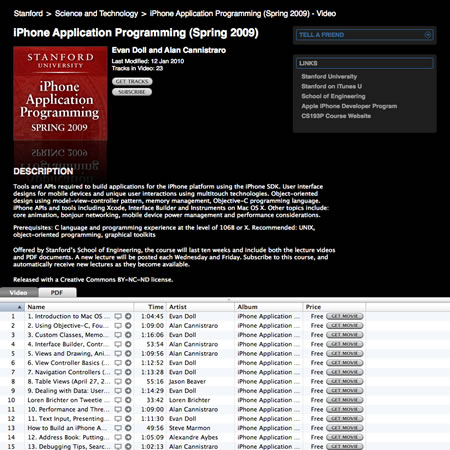
If you are thinking about writing an application for the new iPad or the iPhone then these resources from Stanford University on iTunes U may just fit the bill.

These are BIG files, most of the hour long videos are nearly 500MB in size and there are over twenty of them!

There are also accompany PDFs.

If I can find the time I am hoping to go through the materials and write my first iPhone App.

Saving Office Files to Moodle

I have to admit I am not sure if this is a logical next step or a backward one….

The following link was tweeted on Twitter about an Office Add-in for Moodle.

Uploading files to Moodle has never been easier.  The Office Add-in for Moodle (OAM) is an add-in for Microsoft Office (versions 2003 and 2007) that allows teachers to open and save Word, Excel, and PowerPoint documents to a Moodle website. Today, teachers who use Office and Moodle have to switch back and forth between their web browser and Office applications.  With the OAM, teachers can create, open, edit, and save Moodle documents from within the Office applications.  You no longer need to use your web browser when working with Office documents stored in Moodle.

So what do you need in order to start using the add-in?  OAM does not require anything to be installed on the Moodle server (but note we only tested against Moodle versions 1.X-1.X).  Anyone who is the teacher or owner of a Moodle course can install the add-in and access their documents.  Once installed, the add-in adds two menu items to your File menu (Office 2003) or the Office Button menu: Open from Moodle and Save to Moodle.  In order to browse course files on your Moodle you will need to first tell the add-in the address of your Moodle and the credentials you use to log in.  Once added you can view the list of courses you are enrolled in.  Naturally, students and others can access the content directly from Moodle as they normally would.

This makes it very simple for practitioners to add content to a Moodle course using tools they are familar with. They can  use Office in the usual way, open files…

…and then save those files direct to Moodle.

Now this is great for those staff who upload Office documents to their Moodle courses, now they don’t even need to use a Web Browser…

However I do wonder if this is a forward step in making it easier to use  VLE or a backward step with a focus on content and Office documents rather than open standards and engaging content.

What’s your verdict?

PhotoForge – iPhone App of the Week

PhotoForge – iPhone App of the Week


This is a regular feature of the blog looking at the various iPhone Apps available. Some of the apps will be useful for those involved in learning technologies, others will be useful in improving the way in which you work, whilst a few will be just plain fun! Some will be free, others will cost a little and one or two will be what some will think is quite expensive. Though called iPhone App of the Week, most of these apps will also work on the iPod touch.

This week’s App is PhotoForge.

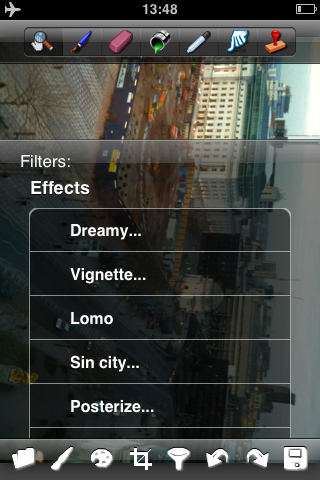
PhotoForge is a highly optimized editing and painting application designed for the iPhone and iPod touch. It can be used for image manipulation, retouching, effects, and color correction, as well as a painter’s tool. It is indispensable for creating original artwork, or editing photos on your mobile device.

PhotoForge is a superb photographer’s tool, providing digital darkroom capabilities that are second to none. It is also a tool for creating incredible works of art and illustrations. PhotoForge allows you to put together an image, combining filters, brushes, and effects. They may be hand-painted, or a composite of photographic images mixed with painting. The filters and effects can be layered to produce even more dynamic results.

£1.79

There are numerous art and photographic Apps in the iTunes Store, and I have bought a fair few of them. I like to edit photographs and though I will more often then not use my Mac, when I am out in the field, to be able to edit photographs taken with the iPhone ON the iPhone then these Apps make life really easy.

PhotoForge is one of the more complicated and advanced photo manipulation Apps on the iTunes Store, with lots of features and functionality. Sometimes you want a simple App and sometimes you want something with a bit more oomph.

Take this photograph that I took in Bristol recently. It has to be said that the camera on the iPhone (even on the iPhone 3GS) is not the best cameraphone I have used, the Nokia N95 took nice photographs, whilst the Google Nexus One takes really nice photographs. Anyhow so I took this image with the iPhone and as you can see the result was not brilliant, the sun was shining into the camera by the looks of it.

So using Photoforge, doing some cropping, changing levels and adding a few FX I got to this.

Now this is something I could use to illustrate a blog article or discussion forum on the VLE. It is the ability to create content, edit photographs on the iPhone that make the iPhone such an interesting and useful device for learning. It becomes more than just a phone, it becomes a tool that enables learning to happen, as well as lots of other things too.

There are numerous adjustments, tools and filters in the App. The main constraint will be how you can use the tools expertly enough with just your finger.

I am awaiting to see how I can use similar Apps on the iPad, though of course you will need to use the iPad Camera Connection Kit to get your photographs onto the iPad, though this does mean you can use a DSLR or other digital camera instead of the iPhone camera!

There are simpler Apps in the App Store and there are free Apps that do one thing (such as the B&W filter), however I do like PhotoForge, it is a powerful image editing tool and or what it can do on such a small device as the iPhone, it is well worth the £1.79 that it costs.

Packing my bag, actually my bags

This week I am off to the Plymouth e-Learning Conference and I am packing my bag (or bags). It’s a couple of days and I will be away a couple of nights.

These are a few things that will be useful or make life easier.

6 way gang – instead of fighting people for the power sockets, you can immediately make five friends! Also useful when you are back in your hotel room and need to charge the laptop, the phone, the iPod, use the hairdryer, etc…

Coffee – I can’t stand instant coffee and that’s what you generally find in hotel rooms. So I take some of those Coffee Bags you can buy or Rombout Coffee filters. Of course if you drink that tea stuff then you can bring your own bags of what you like and are use to. I always pop out and buy fresh milk too!

If you believe everything you see on the BBC then you might also want to take your own cup, actually I have a mug, because I like a large cup of coffee and not a piddly little cup of tea!

Snacks – room service can be very expensive, so a few snacks or fruit now and again to meet those hunger pangs. Having said that, I know that Sainsburys is next to my hotel, so I can always pop in there for extra supplies, saves having to carry them down, but with other conferences this isn’t always possible.

Chargers – don’t forget your chargers, easy to forget and a nightmare when your phone or laptop runs out of juice. Or you can’t use it for the conference. I find that conference activity can be power heavy on my mobile devices.

Velcro fixings – For your poster and bring enough because someone you know will have forgotten to bring theirs.

Camera – to take the odd photo or two, I use mine to take photographs of really good posters so I can review them later at my leisure. Amazing how much detail a 7.2MP image can capture of a poster. I also use it to capture slides in presentations (ie URLS and e-mail addresses), I even use it to photograph flyers so I can carry less.

MiFi or 3G Dongle – I am sure that the WiFi at the conference venue will be fine, however what about at the hotel, the dinner, the train… I will be bringing my new MiFi which allows me to connect to the internet over 3G, wirelessly through a wifi connection. The MiFi acts as a wireless access point for up to five clients – will probably make four new friends as a result of bringing it to the conference.

Business Cards – always useful to swap, play cards with, pass ones you have received to others who you don’t want to contact you…

USB Cables – you never know when you are going to need one.
Spare batteries – for your MP3 recorder, etc… Due to the differing sizes of USB, normal, micro and mini, I now carry three of them!

Spare SD card – in case you lose yours.

Spare USB Stick – for moving files around, taking copies of presentations, etc…

Paracetamol – some of those presentations do give you headaches…

What are you going to pack?

news and views on e-learning, TEL and learning stuff in general…