Category Archives: iphone

Why didn’t you buy an iPhone 4 ?

I seriously did consider buying the new iPhone 4 on the day of release.

However when I was faced with this…

I couldn’t face the idea of queuing. I also had to be somewhere else too…

I am still in two minds about buying the new iPhone now, or waiting until my contract ends.

Yes it has some great new features that I would like to see and try like the new camera; however part of me is thinking is this just because it is shiny or something new and different!

What about the reception left hander issues?

Personally I think, yes there may well be an issue, but is it really worth all the column inches that have covered this? There may be a design flaw, but all devices have design flaws, doesn’t mean they don’t work most of the time. My Google Nexus One for example, if it gets too hot (from being on for too long and doing stuff) the touchscreen stops working! My old LG Viewty kept turning itself off and the only way to turn it back on again was by removing the battery! Where was the Guardian and BBC on that issue?

Of course the iPhone is selling really really well. Some estimates say 1.5million of them have been sold. So that any flaw in the design is going to impact on a lot of people, a lot more people than the flaw in the LG Viewty! That’s probably the reason behind the column inches.

I do like that even though we have moved from analogue newspapers to online news sites, the term “column inches” still works. Thought I suspect a lot of people might think “inches” what are “inches”? Wonder what the metric or European term is for “column inches”.

Anyhow even with the reception issue, I don’t think that would stop me buying one.

I have already installed iOS4  on my iPhone 3GS and am finding it useful. I like the rotation lock. I like the quick App switching. Folders I am less keen on, but they do mean I can now see all the Apps on my iPhone, whereas before some were off the screen at the end! I like the spell checking (this is also on the iPad) and as someone who can’t spall it’s grteat! Not at all impressed with the digital zoom, but then I have never been impressed with any digital zoom. Less impressed with the home screen wallpaper, the first one I tried made the whole phone look cluttered… The Nexus One does seem to do this much better. Keyboard support may be useful in some instances, I do do a lot of writing.

So what will the iPhone 4 hardware provide that is so “essential”?

Facetime sounds great, but really we have been here before. My old Nokia N73 had a front facing camera and could do video calls over 3G. Well actually I never did do video calls, the main reason was that no one I knew did video calls, so I never had one. Also when I got the N95, I tried to call myself to just see how it worked, and it never worked! Facetime only works over wifi, if I have wifi I probably have a laptop or my iMac so I would be more likely to use Skype. Another big reason I wouldn’t use Facetime, is that very few people I would call in this way would have an iPhone 4. Like the idea, but can’t how it would benefit me at this time. Should I be buying two iPhone 4s then? No I think not.

I do like the concept of the retina display. I really like the display on the Nexus One which is sharp and looks great. The 3GS has a 480×320 resolution, the Nexus One has 800×480. The iPhone 4 has 960×640 which is to be honest incredible for the size of screen, but is not that far off the Nexus One. It would be interesting to compare all three.

I do like doing video, and though many phones I have had, can do video, none have really got there. The Nokia N95 which took great images had an okay video camera, but not fantastic.

This video was taken with the iPhone 3GS and is actually not bad, certainly much better than the N95.

If the video on the iPhone 4 is as good as the video that is been shown on the web, then I would be impressed. I also like the idea of the iMovie App. I must remember though I have ReelDirector on my iPhone, I have only used it once or twice in anger!

I do like the idea of a 5MP camera, as I do use my camera a lot on the iPhone 3GS for taking images (in the main for uploading to TwitPic). Of course 5MP is nothing new, I did the same for many years with the Nokia N95.

Of course the front facing camera on the iPhone 4 is only a 0.3MP camera like most other phones that have front facing cameras. Two 5MP cameras would have been nice…

No idea if the battery life is any better, the stats indicate it is, but I suspect that this may not reflect actual usage. 6 hours on 3G doesn’t really cut it for a full day in London at a conference and for the train home.

So at this time, I am in two minds about the iPhone 4. I think I would like one, but whether I would really like one right now, I don’t know.


National Trust – iPhone App of the Week

There is much debate at the moment about the growth of Apps versus the web. Especially paid apps versus free web content.

But, after 15 years as the net’s publishing platform of choice, a movement is growing that wants to put the web back in its box.

Blame the ‘app’. With little prior culture of mobile web consumption, publishers have barely given their HTML efforts five minutes in the sun before preferring to code snazzy, custom, closed interfaces instead in the likes of Xcode and Objective-C, in iPhone’s case.

This isn’t really the article for this debate (maybe later) however the reason I bring this up, is this week’s App of the Week, which is about an App that replaces a web site. I don’t think this is an issue, but does cloud the debate over Apps in that some Apps are there to complement web content and others replace it with an App that costs. Anyway onto the App…

National Trust – iPhone App of the Week

This is a regular feature of the blog looking at the various iPhone and iPad Apps available. Some of the apps will be useful for those involved in learning technologies, others will be useful in improving the way in which you work, whilst a few will be just plain fun! Some will be free, others will cost a little and one or two will be what some will think is quite expensive. Though called iPhone App of the Week, most of these apps will work on the iPod touch or the iPad, some will be iPad only apps.

This week’s App is National Trust

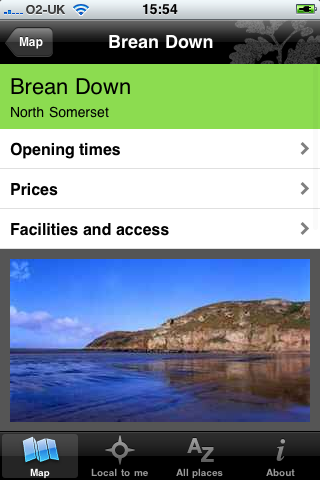
Fancy a day out and wondering where to go? Want to visit glorious coastline, wander through wild countryside, relax in exquisite gardens or explore historic houses? Find a National Trust place near you, wherever you are in England, Wales, and Northern Ireland. See it on the map, find out opening times, prices and facilities and access information. Find nearby places, or choose from an A-Z list.

Free

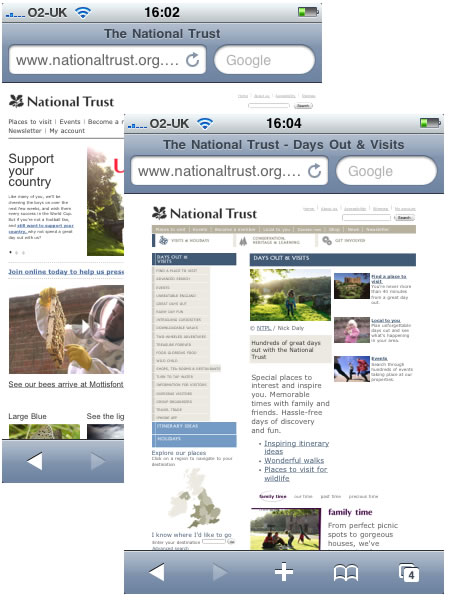
All the information in the App is available online through the National Trust website.

So why on earth would you use the App?

Well though the website is fine, it’s a complicated site and hasn’t really been designed for a small mobile screen, despite the superior browsing capability of the iPhone.

Using the App means not having to worry about the busy web site and can focus on the content.

Well if you have an iPod touch and no connectivity, then this App does work offline in a manner, though you can access all the information (so it’s like a virtual National Trust handbook), but the maps don’t work!

The main reason for using the App is that it is a better experience than using the web site.

The App will find National Trust properties close to your location, using the location based capability of the iPhone (and iPod touch), though as mentioned you will need an internet connection to “see” the map.

It will give you information about the property and details on the facilities on offer.

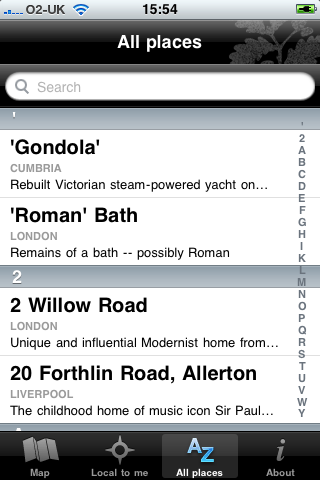
You can browse an alphabetical list too.

Of course this is one useful App if you are a member of the National Trust, it’s also useful for when you are on holiday.

However I also think it has the potential for travel and tourism courses on looking at particular properties for the basis of activies for that subject.

  • Create a marketing plan for a National Trust property.
  • Devise a tour of National Trust properties in a particular region.
  • Undertake a SWOT analysis for the National Trust on a property close to the college.

If you have other ideas please let us know in the comments.

Though if you live in Scotland (or are going on holiday there) do take note…

Please note, this app does not include information from the National Trust for Scotland (NTS). The National Trust and NTS are two separate charities, run independently of each other. Our app is built using the data from our handbook, and as this does not include any NTS properties, we are unable to include this information.

Ah well.

Overall a nice App that does what it does well.

WWDC 2010 Keynote

Today is Steve Jobs’ Keynote at WWDC. It will be on around 6pm here in the UK. There is no live feed and I expect to follow the key announcements via Twitter or Engadget.

Traditionally we get to hear about new products and new software.

As might be expected the web is rife with rumours about what we will hear about. I’ll let you Google them to find what they are.

I am expecting to see a new iPhone, and though I am pleased with my iPhone 3GS will be thinking about upgrading to the new one if it does more than the 3GS does. Key new features for me are not so much the multi-tasking that we will see in iPhone OS 4.0 as that will work on the 3GS, but new hardware features. I would like to see a new camera with a better lense. The 3G camera is rubbish compared to the 3GS, but many other phones have much better cameras and I do use the camera on my iPhone a lot. Prior to retirement I used the camera on the Nokia N95 a lot too.

I doubt we will see the portable wifi hotspot that Android 2.2 brought to the Nexus One which is a pity as that is such a useful feature of that phone. Now using it more than ever.

Will be interested to see if there are any details on a new version of OS X and what that will bring to my Mac.

Not long now…

NewsRack – iPhone App of the Week

NewsRack – iPhone App of the Week

This is a regular feature of the blog looking at the various iPhone Apps available. With the release of the iPad in the UK, this series will also now cover Apps for the iPad. Some of the apps will be useful for those involved in learning technologies, others will be useful in improving the way in which you work, whilst a few will be just plain fun! Some will be free, others will cost a little and one or two will be what some will think is quite expensive. Though called iPhone App of the Week, most of these apps will work on the iPod touch or the iPad, some will be iPad only apps.

This week’s App is NewsRack.

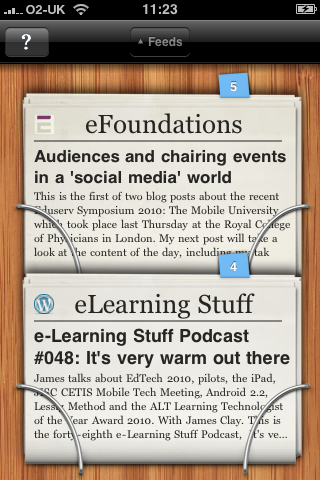
NewsRack is a full-featured RSS reader for iPhone and iPad with a unique interface. Skim over the latest headlines on a beautiful rack of newspapers or use the powerful classic interface to read and organize feeds.

£2.99

There is lots of stuff out there on the web, lots of news, blogs and other stuff. Stuff that I may find useful and stuff that I may want to pass onto others. I often get asked how I know about stuff, well I read a lot of stuff is basically the answer.

A key information skill is the ability to sort the wheat from the chaff in the sheer amount of information which is thrown at you on a daily basis. I often see my role within the use of ILT as a gatekeeper to ensure that important and relevant stuff gets to key people in the college without overloading them with either lots of stuff or what can happen loads of irrelevant and unuseful stuff.

Now I only have limited time, so I need to use tools to allow me to quickly and effortlessly sift through the information, picking out the gems and useful bits. I need to store some for later, others I will post out straight away.

A key way in which I do this is through the use of RSS feeds from the various blogs and news sites. These automatically update throughout the day so that I don’t need to go back to sites and check if there is anything new, the use of RSS feeds allows the news and articles to be pushed to me.

Even though I use RSS I don’t read everything, I just don’t have the time… when I do find a spare minute I will flick through the feeds to see what is interesting and new. I star things I think may be useful, interesting or to blog about later. I also will post URLs to Twitter or the VLE.

On the desktop I use Google Reader, but it’s also nice to be able to view the feeds on a mobile device. In the main as I am more likely to have time with my iPhone to read feeds than with the desktop. I have used a few apps in the past and some of these have relied on services that have come and gone. I use to use NewsGator and NetNewsWire

My current setup consists on Google Reader on the desktop and I now use NewsRack on the iPhone which was recommended to me by someone.

There is also an iPad version available too.

Now NewsRack is not a free App and there are ways of reading RSS feeds for free on the iPhone (through Safari bookmarks for example). What I like about NewsRack is that it syncs with Google Reader, so that any items I have read on the iPhone will be marked as read on the desktop and likewise articles I have starred on my iPhone will be available for reading again, linking, blogging, etc…

As a result of using a service like NewsRack I can quickly browse news and blog feeds and am able to pick out the relevant and useful news and articles I need to enhance and improve the way in which I work.

Yes the newspaper thing is a bit of a gimmick, but that wasn’t the reason I purchased the App. I like how it works and I like how it improves the way I work.

Shakespeare – iPhone App of the Week

Shakespeare – iPhone App of the Week

This is a regular feature of the blog looking at the various iPhone Apps available. Some of the apps will be useful for those involved in learning technologies, others will be useful in improving the way in which you work, whilst a few will be just plain fun! Some will be free, others will cost a little and one or two will be what some will think is quite expensive. Though called iPhone App of the Week, most of these apps will also work on the iPod touch.

This week’s App is Shakespeare.

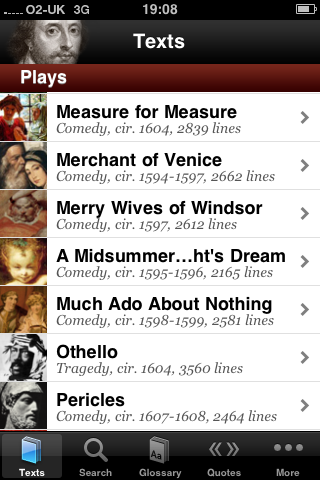
A cooperative project between Readdle and PlayShakespeare.com, the free Shakespeare application puts the complete works of William Shakespeare literally at your fingertips.

Free

This is a nice App that incorporates the complete works of Shakespeare.

All of his plays and sonnets in one iPhone App, accessible and searchable.

So reading books on the iPhone is not the best way of reading books according to most people I have spoken to. However I never see books on the iPhone as a direct replacement for paper books, but as an enhancement and enrichment of the printed book.

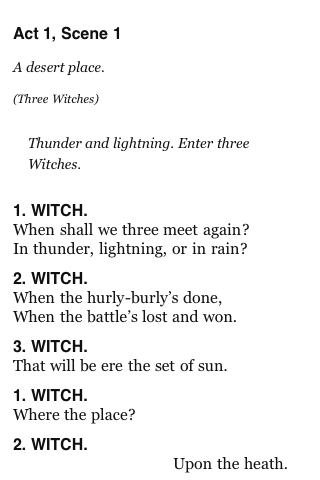
For example, imagine a learner is studying Macbeth (or the Scottish Play); more than likely they will buy a printed copy of the play to use for their studies, one they can read, refer to, annotate and make notes in. Where they will find the Shakespeare App useful is having immediate and easy access to the complete works to compare writing, characters or other plays.

Reading books on the iPhone is never going to replace the printed book, but books on the iPhone (and the iPad) is not about replacing the printed version, but providing access to books at a time and place to suit the reader.

A enhanced version Shakespeare Pro with added features is also available.

Photo source.

Black & White Camera – iPhone App of the Week

Black & White Camera – iPhone App of the Week

This is a regular feature of the blog looking at the various iPhone Apps available. Some of the apps will be useful for those involved in learning technologies, others will be useful in improving the way in which you work, whilst a few will be just plain fun! Some will be free, others will cost a little and one or two will be what some will think is quite expensive. Though called iPhone App of the Week, most of these apps will also work on the iPod touch.

This week’s App is Black & White Camera.

If you love black and white photography, this is the app for you! Just take a photo or pick a picture from your photo library, you will get beautiful black and white art photos.

Features:

– Create black and white photos directly using iPhone
– Create black and white photos for pictures in photo library
– Automatically create and save to file
– Processed and saved in original size
– Fast processing & saving
– Polished UI, beautiful design

The pro version “Black & White Camera Pro” comes with flash to do fine grain brightness adjustment.

Free and £0.59 for the Pro Version.

I sometimes think the best Apps for the iPhone are the simple ones, the ones that do one thing well.

Black & White Camera is one of those Apps, you take a photograph, it converts it to Black & White and saves it as a new image to your camera roll.

Nothing more and nothing less.

It’s a free app, the pro version has a “flash” but that isn’t necessary for most photographs. If you want to use photographs from your photo library (for example on an iPod touch) then you can do that too.

Regular readers of the blog will know that I do like to use black and white images to illustrate posts. This App allows me to take a picture and use it in a blog article quickly and easily. The top image was created using this App.

I am not that bothered as Steve Jobs talks about Flash

In one of those rare moments Steve has posted his thoughts on Flash to the Apple website.

I wanted to jot down some of our thoughts on Adobe’s Flash products so that customers and critics may better understand why we do not allow Flash on iPhones, iPods and iPads.

Steve in his thoughts extols the virtues of HTML5 as a way of creating interactive websites and for online video.

Now I am no technical expert on Flash or HTML5 and therefore can only really comment from a personal perspective about which is better for the web and devices.

So it looks as though if you want an iPhone or an iPad you are going to have to get use to not having Flash. Having said that, if Apple and Steve decide not to use Flash on the iPhone, it’s not as though there aren’t other phones available. Likewise even though we have the iPad, if you read blogs you will know that there are many other tablets and slates available.

These devices offer more functionality than the iPad with USB ports and cameras, and these devices will support Flash if that’s want you want.

However it would appear from Twitter and blogs that people don’t want any old slate that has Flash, they specifically want an iPad with Flash.

Why?

Well the reason in my opinion is that people like the iPhone and the iPad not because of the hardware, but for the user interface and the usability of the device.

Even though the iPad has no camera, no USB, no SD card reader,; that’s not the reason that Apple have sold over a million of the devices, it’s in my opinion a combination of the “image” of the device, the availability and ease of access to thousands of Apps, and in my opinion the way the user interface “just works”.

Microsoft made Windows XP Tablet PC Edition nine years ago. A wonderful concept slightly ruined by the user interface. It was very difficult to use a GUI that required a mouse and keyboard when using a pen. I am sure if Microsoft had known what we know now, then Windows XP Tablet PC Edition would have had a very different interface. Look at what Microsoft have said about their phone OS.

The new Microsoft OS for the phone is a very different affair to what we had with Windows Mobile – which again was trying to be a desktop version of Windows on a touch screen. Though lots of people liked their PDAs, compared to the user experience on the iPhone it was always something of a challenge and not something that would appeal or sell to the general public. I think that may change with Windows Phone 7.

As I am talking about Microsoft, I was disappointed to see that they have canned their Courier project which isn’t too surprising, as I thought it had potential.

I am not disappointed to see that HP have abandoned their Windows 7 based Slate.

The device was first seen as CES 2010 when it was unveiled by Microsoft CEO Steve Ballmer and was supposed to go on sale in the middle of 2010.

It would appear that HP are not happy with using Windows 7 as the OS for their Slate.

However they HP don’t appear to be abandoning the form factor and have been looking at Android. HP’s purchase of Palm also gives them WebOS which was applauded on the Palm Pre even though it did not sell well.

I expect we will see either an WebOS Slate from HP or even an Android version! Regardless of which OS HP use, both will (according to Adobe) have Flash. So if you are looking for a tablet that has Flash you can either buy a Windows Tablet now, or wait a few months for an Android or WebOS Tablet.

So back to the iPad and the lack of Flash.

So what about Flash, how essential is that then really?

In terms of non-educational use of the web, Flash is predominantly used for video. Prior to YouTube, most people used Flash for splash screens, animation and the odd game. Today though Flash powered video is a key part of how people use the web.

Social networking sites, okay Facebook, also use Flash extensively for simple online games.

So what about educational use, as many educators have complained about the lack of Flash on the iPhone and iPods?

Well, yes there are lots of Flash based quizzes, diagrams and activities. Simple Flash games (and complicated Flash games) also have their place in education. It is these that just won’t play on the iPhone and iPad.

If these were created in-house then I also suspect that the in-house Flash developers are unlikely to have the necessary HTML5 skills to create new versions.

Most Flash games I have seen have actually been created using tools that then create Flash based quizzes using simple text input that any practitioner could utilise without needing to know Flash.

Now at this point I could argue that such activities and games can be created for the iPad (and are been by developers) however I don’t think this is an argument about whether we as educators demand Flash on a specific device.

Ten years ago, no one was using Flash for education or video. Things change and will continue to change.

At the end of the day it doesn’t matter what we think about this in our role as educators, practitioners and learning technologists. The real decision about this will be made by our learners and if we are sensible we will change how we do things in order to meet the needs of our learners. If our learners decide that they want to buy and use the iPad, then I believe as educators we should ensure that any learning content we provide should work on the iPad. I don’t see how we can dictate what devices learners should be buying. I also don’t think it is sustainable for educational institutions to be buying mobile devices for all learners just so that they can have a device that plays Flash!

If HTML5 is the future of the web, then we need to start preparing for that future and not try and fight it, as we have no chance of winning! Why, because the people we are fighting are not Apple or Adobe, they are our learners. They will make the choice, not us.

Technology changes, we need to have the culture and flexibility to accommodate those changes in order to provide the best enhanced and improved learning experience for our learners.

TuneIn Radio – iPhone App of the Week

TuneIn Radio – iPhone App of the Week

This is a regular feature of the blog looking at the various iPhone Apps available. Some of the apps will be useful for those involved in learning technologies, others will be useful in improving the way in which you work, whilst a few will be just plain fun! Some will be free, others will cost a little and one or two will be what some will think is quite expensive. Though called iPhone App of the Week, most of these apps will also work on the iPod touch.

This week’s App is TuneIn Radio.

Listen to and record over 30,000 radio stations including thousands of AM/FM local stations on your iPhone or iPod touch with TuneIn Radio!

£1.19

Despite all the wonder, images and content that television and the internet brings to people’s lives, radio is still very much alive and listened to.

I suspect that the main reason for that is radio is something that can be combined with other activities. Whilst driving your car you can listen to the radio. Likewise when cooking, cleaning or gardening you can also listen to the radio. I am sure many learners will listen to the radio whilst studying, and I guess many staff have the radio on when marking.

The iPhone for all its features and functionality does not have a radio function. Some mobile phones do, but the iPhone does not.

So what does this all mean in the context of this series on iPhone Apps?

Well I was recommended to have a look at TuneIn Radio. This App allows you to stream various radio stations from the web.

As well as radio stations you have never heard of, it also allows you to listen to stations like Radio 4 or Five Live.

The App allows you to pause and rewind the stream, making it great when you want to not miss anything, but something more important comes up than the radio.

The App also allows you to record from the radio and listen later.

Now without multitasking on the iPhone, there are limitations in how you can do other stuff on the iPhone as you listen to the radio. Having said that the App has a built in web browser, allowing you to do web stuff whilst listening to the radio.

I have only really just started using this App, but even at this early stage I really like the ease of use, the way it works and what it allows me to do.

If you like listening to radio then this App is certainly one you should be looking at.

Get TuneIn Radion in the App Store.

Photo source.

Scrabble – iPhone App of the Week

Scrabble – iPhone App of the Week

This is a regular feature of the blog looking at the various iPhone Apps available. Some of the apps will be useful for those involved in learning technologies, others will be useful in improving the way in which you work, whilst a few will be just plain fun! Some will be free, others will cost a little and one or two will be what some will think is quite expensive. Though called iPhone App of the Week, most of these apps will also work on the iPod touch.

This week’s App is Scrabble.

Scrabble spells major F-U-N on your iPhone! Experience the realistic look and feel of Europe’s favorite board game.

£2.99

I recently discussed gaming and learning with Ron Mitchell and Kev Hickey in one of our podcasts.

Last week saw the Game Based Learning Conference, we didn’t go, but that didn’t stop us from talking about using games for learning and using gaming devices to enhance and enrich the learning process.

At the end of the recording we asked what was our favourite games, Scrabble came up twice!

Scrabble is a word game in which players get points for playing words on a board in a similar manner to a crossword.

Research from various universities has demonstrated that if learners play word and number games this can improve their literacy and numeracy skills. AS reported by The Telegraph:

Scrabble is just as good at improving mental sharpness as a Nintendo DS video games console and a copy of Dr Kawashima’s Brain Training, say researchers from the University of Rennes, Brittany.

Just on that article and research I have to admit I have always found it much easier to get 17 year olds to play games on the Nintendo DSi than I have getting them to play Scrabble!

Having said that I have “caught” learners in our Library playing Scrabble on the computers. I didn’t know if I should throw them off or congratulate them.

Scrabble requires players to use both word and number skills to maximise the points they earn, so has as demonstrated by the research to improve literacy and numeracy.

Scrabble on the iPhone can be played solo or with other players over wifi.

I quite like playing the game, even if the iPhone cheats and uses words that a) no one has ever heard of and b) no one would ever use!

When waiting for a train, or on a train, or to pass a few minutes away, Scrabble is a nicely executed iPhone game.

Annoyed with Apple

I am officially annoyed with Apple.

Why?

Yes you guessed it, a further delay on the iPad.

BBC News reports:

Apple is to delay the international release of its touchscreen tablet computer, the iPad, by one month.

It will now launch the device around the world, including the UK, at the end of May, and will begin accepting pre-orders on 10 May.

…and there I was expecting to get mine at the end of April!

As I have said before on this blog:

Part of me is sad that I didn’t go out to the states and buy an iPad, and part of me knows how sad that would be!

I have also discussed how I think I will be using the iPad too.

Since the iPad was announced and launched in the US, there have been numerous alternatives announced by other manufacturers and we also have Courier from Microsoft.

These “alternatives” have many more features than the iPad. They have cameras, front and back, built in SD card slots, USB ports, they can print, they can be tethered, they can tether, etc… etc…

So why oh why am I going to get an iPad then?

Firstly it’s not about the features its about the functionality and the user interface.

Despite many valiant attempts by other phone companies, none have come close to the way the user interface on the iPhone works. I remember getting the LG Viewty and feeling very short changed by the touch screen experience compared to the iPhone. Likewise, though I do like the Google Nexus One and it has compared to other touchscreen phones a fantastic touch screen and a very intuitive user interface, however even it does not match the iPhone interface. It is for this reason that the iPad will succeed over the alternative devices been proposed or released by other manufacturers will be the touch interface that Apple have managed to excel at on the iPhone and according to the reports from the US have likewise done with the iPad.

The Apps market, though a closed market seems to have been very successful. Though history says that open standards win over closed walled gardens (think of the internet versus AOL) proprietary closed markets do win now and again. Developers like the App Store and the ease by which consumers will purchase apps from it. The reason for this is quite simple, create one account, purchase from many developers. As a consumer I don’t want to have to create accounts everytime I want to buy an app and I certainly don’t want to do this using a mobile device if I can help it. Entering credit cards on my iPhone is something I would prefer not to do, on an iPad probably wouldn’t mind so much!

So even though this further delay in the iPad has annoyed me, I think I will still be getting one when they are eventually released in the UK!

Picture source.