Sorry no podcast this week…
I have been busy and out of the office a fair bit, so have not managed to record a new episode of e-Learning Stuff.

Sorry no podcast this week…
I have been busy and out of the office a fair bit, so have not managed to record a new episode of e-Learning Stuff.
Sometimes it is the little things that make a difference to the learner. One thing can often be the difference between a learner completing a programme of study and one deciding to drop out.
A key “little” thing is keeping a learner informed and up do date about where they are on their course and where they are going.
Research by the LSDA back in the 1990s showed that if learners were well informed about their course that they were more likely to stay on that course, in other words improve retention.
So what’s the easiest way to do that? Generally as well as other things a scheme of work for the course gives a learner a clearer idea of not only where they are going in their course but also where they have been.
Most practitioners I know give their learners a scheme of work at the beginning of the year. However learners will lose it or leave it at home. Likewise there is a good chance it will change, if it snows for example.
By placing the scheme of work on the VLE the learner can access it at any place and any time. If it is on the VLE then it is equally important for the practitioner to not just ignore it. It can be updated as and when needed. If you use a web page on the VLE you can add live links to lesson resources and online content making it a more useful document for learners looking for information.
A scheme of work is a valuable resource for learners. A dynamic updating interactive version on the VLE is a really valuable resource for learning.

Today we see the UK launch of the iPad. I was lucky in one respect that mine arrived yesterday. I was unlucky in that it arrived five minutes after I had left to go to a MoLeNET meeting in London. My wife phoned me on the train to let me know, she had a hint of glee in her voice.
I went for the 64GB WiFI model and didn’t buy the 3G version.
Why?
This is quite a complex question, you need to consider how and where you will be using the iPad. If using just at home and in the office then the WiFi version will probably suffice. If you travel a lot, on the train, at conferences and events then the WiFi + 3G model may be a better bet. If you are going to be using more than just the iPad out and about, say take your laptop with you too, then you might want to consider a MiFi and just get the WiFi iPad.
One of the reasons for getting the 3G model is that it comes with GPS whereas the WiFi model doesn’t. If you are keen on using location services on your iPad, then the GPS is a must. This is probably less of an issue for myself as I do have the iPhone 3GS so that has the GPS capability that I might need. That is probably a key factor on which model to get, is if you have an iPhone or not.
So what about size? 16GB, 32GB or 64GB?
I initially did consider getting a 16GB model as that should be enough for most activities, or so I thought. One thing that is coming out from the US is that iPad Apps are much bigger than most iPhone Apps and it is expected that they might get “bigger”. You can also watch HD movies on the iPad making use of the bigger screen and they are bigger than your average iPhone movie file. So the next consideration is 32Gb, but my first approach with any storage is think about what I might need and then double it. So 64Gb is probably the idea size for me.
I had prepared my computer for the arrival of the iPad, I had downloaded some iPad Apps that I wanted to use, I had updated various iPhone Apps to be universal so that they would work natively on the iPad.
After opening the box I connected the new iPad to my Mac and started the initial syncing process. The first thing I did was untick all the automatic syncing, I didn’t want to load everything onto it straight away, and there wouldn’t have been room anyhow.
I went through my audio, video, apps, podcasts and photographs deciding what I wanted on the iPad, enough to make it effective, but not too much so that I would be syncing all night!
So after syncing and charging, I was able to finally start using it…
Initial impressions were favourable. It connected easily to my wireless network and was pleased to see I could use the faster 802.11n speeds.
I tried Safari first, and though it has similarities to the iPhone browsing experience, the larger screen certainly makes it easier to view webpages without needing to zoom in. Accessing bookmarks was more Mac like and as these are synced from my Mac, I had access to all my bookmarks. Obviously sites requiring Flash didn’t work, but I am not going there…
I tried a few videos and was impressed with the quality and the experience. HD Videos looked really good and the audio wasn’t bad from the internal speakers. I also tried some iPhone quality video and it was good, but I could notice a “few” artefact issues. I am sure most people would be fine with the video. The “iPod” functionality looked good too, but I don’t think I will be using the iPad as an iPod in any big way – that’s what the iPod is for.
The Mail app was also nice, so much easier to view, read and reply to e-mail. This I can see as been my main way of dealing with e-mail on the move.
One App I was glad to see was the iBooks App as this was “missing” from the UK iPad webpages when the iPad was announced. Opening the App I was faced with an empty bookshelf, so into the iBooks store to find books. It’s annoying that the iBooks store is on the iPad and not available through the iTunes Store (or of it is I haven’t found it). As a result you have to download the books through the iPad. This did give me one issue. Last night I downloaded the Winnie the Pooh iBook and when I synced this morning, iTunes said that my Mac wasn’t authorised to view the book and deleted it from my iPad. So I had to “buy” the iBook again… now it was a free iBook, but I would have been very annoyed if I had paid £5.99 for a book! It has made me wary about buying books, media and apps ON the iPad.
Lots of Apps work well on the iPad, but those that are iPhone only are okay, the x2 works but don’t seem quite right. Trying to use Tweetie was interesting but didn’t take advantage of the screen space of the iPad. I have downloaded Tweetdeck and that looks a lot better on the iPad than a scaled up iPhone Twitter App.
I had a look, but not a real go on Pages and Keynote, but liked what I saw.
There are more things I want to try and look at, but these will need to happen later, and I will follow this blog post up with another one later on.
So at this stage what do I think? Well I had high expectations for this device and at this time it is meeting those expectations. It will be interesting to see what I think as time goes by.
It would appear that students at the University of Washington don’t like using the Kindle compared to use printed books.
In a report in The Seattle Times outlines how some students felt about the Kindle.
Wary of lugging a backpack full of textbooks on the University of Washington campus, Franzi Roesner couldn’t wait to get her hands on a new, lightweight e-reader from Amazon.com.
Soon after receiving a Kindle DX, however, something unexpected happened. Roesner began to miss thumbing through the pages of a printed textbook for the answer to a homework question.
She felt relieved several months later when required reading for one of her classes was unavailable on the Kindle, freeing her to use a regular textbook.
There were some interesting results and comments from the pilot. 80% would not recommend the Kindle as a classroom study aid for example. However 90% liked it for reading for pleasure.
The implication is that the Kindle did not work in the classroom, however as a device to read books it works fine.
The reason as outlined by Roesner is that:
“You don’t read textbooks in the same linear way as a novel.”
This is a lesson that educational publishers need to recognise when publishing content to platforms like the Kindle and the iPad. Though novels are linear and as a result eBook formats can “work” like a printed book, educational books are used differently and as a result eBook versions need to work differently. Students need to be able to move around quickly, annotate and bookmark.
The experiences at the University of Washington show that the issue wasn’t really with the Kindle, but was much more about the format of educational text books in the ebook format.
There were many interesting and informative papers and presentations at EdTech 2010.
One that caught my eye, was a paper on the use of Flip cameras brought to the fore the issue of technical barriers to the successful implementation of a new technology. Even despite these barriers, enthusiasm and perseverance paid off. The project demonstrated the importance of effective communication between all stakeholders.
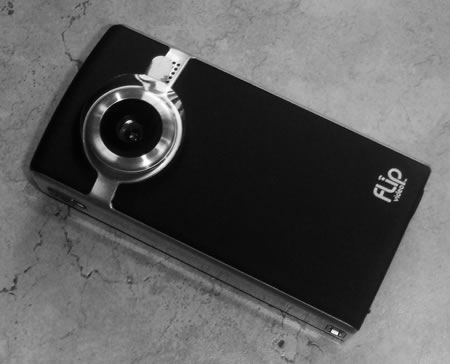
After the presentation I was discussing cameras with some of the other delegates, I had my Kodak Zi8 and a Sanyo Xacti with me and we were looking at the merits of these compared to the Flip. One of the delegates did say that she was interested in running a pilot in her institution.
Here’s a question how many Flip projects and pilots need to be run before we can accept that there is value in using these “cheap” cameras to enhance and enrich learning? How many duplicate lessons need to be learnt? How many learners need to experience the use of video before it is accepted that this does contribute to the learning experience? I can accept that every institution is different, but how different are they? We are in fact much more similar than we think.
If only a single small pilot has been run in the country, then yes there is probably sensible to run a pilot. But when we are talking about Flip cameras, hundreds of institutions have run pilots and projects involving these cameras, and other similar cameras. Papers have been written, presentations given, case studies disseminated.
Southwark College: The impact of low-cost video cameras across the curriculum
Gateshead College: Successful staff coaching through video footage analysis
West Kent College: Dance and IT capture evidence using pocket video camcorders
Flip Cameras arrive at Wisewood
Basic guide to using the Flip Digital Recorder
Move industry into the classroom and the classroom into industry Flip It
Web Video & Healthcare Case Studies & Best Practices
How many pilots do we need? Or is it more a question that we need to run a pilot at our institution before we think about “rolling” it out across all curriculum areas. I am also aware of successful pilots in one curriculum area which have been followed by virtually identical pilots in a second curriculum area… Why? Well the learners are different! Really! How different, they have two heads or something? That actually raises a question on any pilot, well successful pilots have resulted in a roll out across the whole institution?
We do see institutions that use tools such as Powerpoint across the institution, similarly we see some institutions have embedded the use of the VLE. However was this via projects and pilots? Or was it something different?
Do pilots actually help institutions move forward in using learning technologies or are they causing problems rather than solutions?
If we don’t learn from pilots that others do, is there any point in talking about pilots?
So is there a use for the pilot? I believe that we can use the lessons learned above to change how we use pilots in institutions and use them for staff development to improve the use of learning technologies.
Though it would appear from talking to delegates at EdTech and elsewhere that most institutions do not have consistent use of the VLE or other tools. This is down to many reasons, some are fear and apprehension.
However prejudice, lack of training, lack of understanding, lack of knowledge play their part too. Some staff perceive that some tools or technologies are “not suitable” for their learners. Some staff don’t have the skills to fully utilise the tools. Many staff have a lack of understanding about the capabilities and potential of technologies. Others have trouble transferring activities from say face to face to the internet.
Whenever I run training sessions at the college or as a MoLeNET mentor I often talk about a range of learning activities, new gadgets, tools and services; and I know for many this is overwhelming. I will usually tell the participants that they should take “just one thing” away with them and embed that into their practice and make a difference to their learners.
This brings us back to the pilot!
Generally in a lot of institutions pilots are run by the e-learning team or an enthusiastic individual. They try one pilot after another…
This doesn’t always get the holistic results they intended, very much seen as a get the project done, then move onto the next new technology… “…did I say I was going to get my iPad this week?”
Why not get all staff to run a pilot, everyone runs a pilot of some kind, evaluate the results, embed into their teaching and then start another pilot…
There is plenty of ideas, guidance and case studies on the web and from other institutions, so support is much simpler than it was say ten years ago.
Staff don’t need to be restricted to the pilots, but for many staff it will be a way of using a wider variety of learning technologies than they were before.
So next time you suggest a pilot, think is this necessary, is this going to work? Maybe we should get everyone to pilot something.
Photo source.
Hipstamatic – iPhone App of the Week

This is a regular feature of the blog looking at the various iPhone Apps available. Some of the apps will be useful for those involved in learning technologies, others will be useful in improving the way in which you work, whilst a few will be just plain fun! Some will be free, others will cost a little and one or two will be what some will think is quite expensive. Though called iPhone App of the Week, most of these apps will also work on the iPod touch.

This week’s App is Hipstamatic.
Digital photography never looked so analog. The Hipstamatic brings back the look, feel, unpredictable beauty, and fun of plastic toy cameras of the past! The Hipstamatic keeps the the quirks of shooting old school but gives you the ability to swap lenses, film, and flash settings all with the swipe of a finger. Characterized by vignettes, blurring, over saturation, discolored images, Hipstaprints have a casual and seemingly accidental snapshot feel. Pictures taken with the Hipstamatic have their very own look and unique character. Artistic and painted with light and quirk, Hipstamatic images are sometimes surprising and offer a delicate beauty turning any iPhone into an instant art making machine. Images can be uploaded directly to Facebook, Flickr, or emailed to your friends and family.
£1.19
This is one of the many camera or photo apps I own and is in the “fun” category. Basically it turns your iPhone into an old film camera from 1974!

Using a variety of lenses and “films” you can take some “old school” photographs.

It has a bit of a quirky interface that takes some getting use to.
I quite like the effects and can see some use for the types of images it produces.
Interesting (as is happening with many apps) you can purchase in-app upgrades.
Additional lenses, films, and flashes are bundled within the app as ‘Hipstapaks’ and start at 59p. Each Hipstapak includes multiple items.
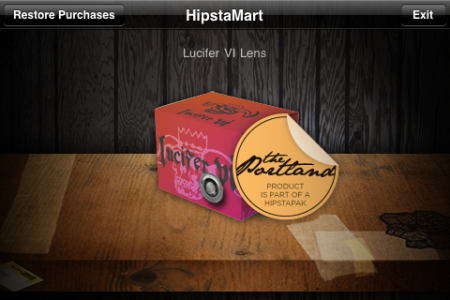
This is a two edged sword for me, it makes the core app cheaper (or even free) however means for added functionality and features you need to pay an upgrade. Fine if you own the phone, less so if you have an institutionally owned phone and don’t have access to the iTunes account for the phone.
I like Hipstamatic but it is quirky and won’t appeal to everyone.

Common Craft have made another one of their really nice videos, this one on Wikipedia.
Google last week announced the release of Android 2.2.
Unlike other phones I could mention, even though the update was announced my Google Nexus One said “it was up to date”. You have to wait until the phone provider sends out the update.
In my case that’s Google…
Waiting…
Certainly won’t be waiting as long as Motorola Droid users who had to wait six months for 2.1, but still waiting…
Then on Saturday night I noticed a post on Lifehacker.
Want to try out the neat new stuff in Android 2.2, a.k.a. FroYo, but haven’t lucked into an update notification yet? Follow these instructions to download a 2.2 update, install it, and get Flash up and running.
I downloaded the zip file and following these instructions updated my Nexus One on Sunday morning.
The first thing I wanted to do was try out the Flash player… specifically I wanted to see how BBC iPlayer would perform. My first site was BBC News and I was very pleased with how the live stream of BBC News worked on the Nexus One.
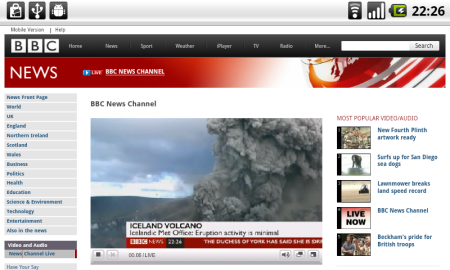
Very similar experience to the EyeTV App on the iPhone, but obviously streaming from the internet and no need for the Mac to be on. I then tried to watch a programme from the archive, the film Brazil as it happens and… well the site asked if I was old enough! And trying to zoom into the checkbox was not particularly easy. However it did work!
As did Doctor Who!
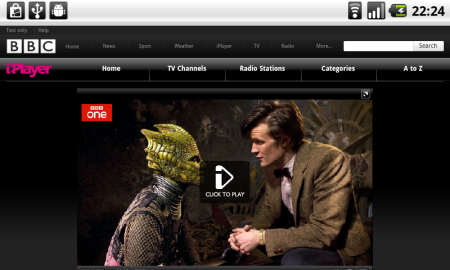
Android 2.2 does off a little more than just allow you to view Flash on the web.
Android now has Exchange support, this is a feature I have found very useful on the iPhone. Despite what you may think of Exchange, it is a service that many organisations and institutions use, so by having support on Android, it allows for Enterprise deployment of phones like the Nexus One.
You can also now use the Flash when shooting video, great for when there is little or no natural light.
The Nexus One with Android 2.2 can now be used as a portable WiFi hotspot. This is something I have been doing for some time with Joikuspot on the Nokia N95 and was one of the main things I missed from the Nexus One, missing it no longer.

This is also something that is missing from the iPhone and technically it would be able to do it…
The key improvement though of 2.2 is improved performance and I certainly have found my Nexus One to be a little more zippy and faster than before.
I would never recommend bypassing the traditional upgrade process, but when the update does come I would recommend upgrading.

James talks about EdTech 2010, pilots, the iPad, JISC CETIS Mobile Tech Meeting, Android 2.2, Lessig Method and the ALT Learning Technologist of the Year Award 2010.
With James Clay.
This is the forty-eighth e-Learning Stuff Podcast, It’s very warm out there
Download the podcast in mp3 format: It’s very warm out there
Subscribe to the podcast in iTunes
Shownotes
Death by Powerpoint has almost become a running joke at conferences and in education. Despite that, presentations are a staple of many conferences, courses and learning programmes.
it’s very easy to upload and link to a Powerpoint presentation, but does mean that not only does a learner need to click a link and download a file, but also (usually) needs Powerpoint on their computer. If they don’t then we might send them off to download OpenOffice another step and hurdle.
One service I am using much more now for my presentations is Slideshare. It allows you to upload a presentation and converts it into a Flash slideshow. This can either be viewed on the Slideshare website or can be embedded into a webpage. This means you can embed it into the VLE.
This allows learners to immediately access the presentation, without needing to wait for it to download. With larger presentations this can be a long wait on a slow connection. As Slideshare allows you to navigate to a specific slide, this means that learners who want to look at one slide can more easily than from a whole Powerpoint.
Of course there are a few downsides, the main one is that Slideshare is an open service, so your presentations are public and you may not want that. Though that’s also an advantage in that there are lots of presentations on the site that you can use and embed into the VLE.
Being Flash based this could cause issues if your learners have lots of iPhones and iPads, however Slideshare now provide an iPhone friendly service.
It is very simple to link to Powerpoint files, however using a service like Slideshare allows you to easily embed not just your presentations, but also other presentations from the site, straight into the VLE.