Battle of the mobile phone video streaming services

Robert Scoble on TechCrunch has written a well detailed and informative article on why he reckons that Kyte.tv will win over other services such as Qik in the mobile phone streaming live video arena.

Anyway, back to the fight between Kyte, Qik, and Flixwagon over your cell phone video experience. Last year I was Kyte’s top user too. Why did I switch to Qik? Because I saw that cell phone video would let me extend my brand into places no other video network was letting me get to. I was the only one doing cell phone videos from the World Economic Forum, for instance, something that got me a lot of attention and followers. I told Kyte’s CEO, Daniel Graf, tons of times over the past seven months to get video streaming into his product. At first he resisted, thinking it wasn’t that big a deal, but on Friday I finally tested it out on my cell phone and was impressed enough to give Kyte a second look.

Robert Scoble is one of the top (if not the top) streaming mobile phone video users and has done some really interesting stuff at events all over the world.

I have mentioned Qik before, for me it certainly has a lot of potential as a tool for learning (and likewise could be a legal minefield in terms of privacy and data protection).

Battle of the mobile phone video streaming services

Article is certainly interesting and well worth reading.

Wordle – a new way to look at tags

If you look to the right of this blog post you will see my tag cloud, which is basically a list, with the “importance” of tags (by number of times used) illustrated by the size of the font.

Wordle does something similar but looks very different.

Wordle - a new way to look at tags

Now unlike the tags on the right, the sizes here are not based on my blog, but some other indicator on the web; this is why windows is so large and molenet is so small compared to my own tag cloud.

However Wordle can use your del.icio.us tags, so the size of the tags is relevant to the number of bookmarks you have saved and the tags you have used.

Wordle - a new way to look at tags

It’s all just a bit of fun really, it really needs to be able to use other sites other than del.icio.us and the words need to be links.

Click either Wordle picture for a bigger version. Thanks to Helen.

e-Learning on your TV

So do you need an internet connected computer to “do” e-learning?

Well of course you don’t.

Back in 2006 I mentioned at an online conference about showing digital images on your TV. So there I was looking in the Guardian today when this advert caught my attention.

e-Learning on your TV

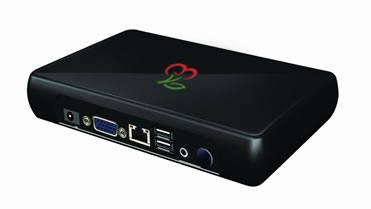
If you look closer at the features you see.

e-Learning on your TV

What this means is that if learning content is saved as a series of images onto an SD card then the learner will be able to view that content on their new HD TV as well as watch Freesat!

If they have a DVD player, say a £17 one from Tesco (or a console that can play DVDs) they could convert learning content, video, audio or presentation into a DVD format that can be burnt to DVD.

In fact the Mobile Learning on a VLE presentation I linked to above was also available (at the time) in various video formats for mobile devices, I also created a DVD version as well which worked really well on my TV.

A question for you: Can your learners easily convert learning content from whatever format you have it in and stored on the network (or on the VLE) into a format which will play on their TV or DVD player?

In a previous blog post I mentioned various digital video tools which allow learners to do just that.

Now a question you may have for me regarding interactivity; well watching content on a TV or through a DVD player may not be interactive at all, but this doesn’t mean that the learning activity as a whole needs to be non-interactive. A book is generally non-interactive, but that doesn’t stop it being used as part of a learning activity or scenario. The same can be done with content on a TV (and often is with a video shown in a classroom or on YouTube).

So is this mobile learning, well it’s not using a mobile device, but certainly is learning out of the college and the classroom and therefore the learner is learning whilst mobile in a “sitting on the sofa” kind of way. It is about the learner deciding to choose where they access their learning, whether that be in college, on a mobile device such as a phone, or at home sitting on the sofa in front of their 41″ HD television.

Finally who will be buying TVs like the one advertised, I think you will be surprised by who does.

“Facebook a valid educational tool”

Is your institution using Facebook?

\"Facebook a valid educational tool\"

According to a report, if you’re not then you could be missing out.

The Guardian reports:

Teachers and lecturers are getting the lowdown on how to use social networking sites such as Facebook and Bebo in an educational way.

Most schools and colleges in the UK block access to the websites but they are missing out on their potential for education, a government-funded guide says.

Have a look at the full report.

Those of you who read my blog will know that I am not a great fan of facebook, the more useful and serious sides of the social networking sites seem to be overshadowed by users throwing zombies and playing games. Though it should be noted that a huge number of people are on Facebook and using Facebook. In respect to Bebo, the same picture can be seen though more often it is the younger learner who is using Bebo.

Making screencasts on your Mac

I have been looking at screencasting software for the Mac.

Screencasting is a way of capturing what you do on the screen as a video file. The more advanced applications allow you to record an audio track on top, whilst others also allow you to annotate and add text to your screencast.

They are a very useful way of explaining how an application works, how a website works, how to do something or explaining a process in an application.

They can also be used with presentation software, such as PowerPoint or Keynote, to create videos of your presentations which can then be converted into video files. These video files can then be converted by learners (or practitioners) into formats which work on mobile devices, or home DVD players, etc…

One of the original applications for this kind of activity is Ambrosia’s Snapz Pro X.

Snapz Pro X allows you to effortlessly record anything on your screen, saving it as a QuickTime movie or screenshot that can be emailed, put up on the web, or passed around however you want.

Snapz Pro X works for me and I do use it quite a bit.

Snapz Pro X

ScreenFlow is pretty good too, but Leopard only.

Making screencasts on your Mac

It looks fantastic and unlike Snapz Pro X the resulting capture can be edited, annotated much more easily.

ScreenFlow is a complete workflow for creating screencasts: powerful enough to capture your desktop, video camera, microphone & computer audio at the same time.

Get Screenflow in the App Store.

IShowU is suppose to be very good. I did give it a go and seemed pretty easy to use.

Need to show something to someone? iShowU is your answer! iShowU is designed to record anything on your screen, instantly — both audio, and video!

I wasn’t too impressed with the results of capturing video, ScreenFlow and Snapz Pro X seeme better at that. However IShowU does have a range of capture option choices depending on what you want to show the video on.

Get IShowU in the App Store.

CamTwist can be used too, though the focus here is on web based video chat type video, so not something for high quality video or presentations. However for the web (ie via something like Ustream) it is ideal.

CamTwist is a software package that lets you add special effects to your video chats. It’s also possible to stream your desktop and still images.

CamTwist

One final option is to use screenshots (images) and iMovie. Capture a series of screenshots and then insert into iMovie and edit accordingly – though from experience this takes a lot longer than the above applications.

Get iMovie in the App Store

Overall there are many choices in screencasting on the Mac and of course with Parallels you can also now screencast Windows using the same software.

This is how I did the following screencast of Photostory.

Personally I like Snapz Pro X, but I think I might have a good look at ScreenFlow.

August 2011: Updated some links.
February 2015Updated some links.

Nokia buys Symbian and then gives it away…

Nokia has bought the rest of Symbian and has “given” it away to the community via the Symbian Foundation.

Nokia buys Symbian and then gives it away...

Probably in response to Apple’s iPhone and Google’s Android, Nokia has purchased the rest of Symbian and has announced, according to the The Register, that it will be then “giving it away”.

Nokia has bought up the bits of Symbian it didn’t already own and is chucking the OS into an open-source foundation along with the S60 UI layer, accompanied by Sony Ericsson and DoCoMo, who are throwing in UIQ and MOAP(S) respectively.

The BBC adds:

Nokia, which already owns 48% of the UK-based firm, intends to develop its software to compete with Google’s planned Android operating system.

This is an interesting response by Nokia to the “threat” posed by Android and the iPhone.

Jaiku? Why not?

I like Jaiku.

I also think you need to “do” Jaiku for a fair amount of time (and commitment) to get some real value from it.

There is value from incidental chat, what is incidental for me, may be new and innovative for you and vice versa.

Here’s an example of how useful Jaiku is to me.

Jaiku? Why not?

http://xlearn.jaiku.com/presence/3775764…

Lils mentioned Bluetooth which reminded me I had not got the link to some Bluetooth software that she had mentioned before in a (live) training session, so I asked her.

Not only did I get the link, but an affirmation from (Gary at) Weston College on how they were using it successfully.

Personally I think of it as a more informal Champions mailing list with the added benefit of RSS feeds.

MoLeNET Dissemination Conference – 18th September

If you check my tag cloud on the right you will see the tag MoLeNET and you may have wondered what that was about.

Well MoLeNET (which is short for Mobile Learning NETwork) is, to quote the LSN:

A unique collaborative approach to the implementation of mobile learning via supported shared cost mobile learning projects within a wider community of practitioners and experts.

Gloucestershire College has had a MoLeNET Project, the Glossy Project which has been looking at mobile learning.

MoLeNET Dissemination Conference - 18th September

Well on the 18th September there is a MoLeNET Dissemination Conference in London (see attached PDF).

The aims of the conference are:

  • To disseminate nationally the good practice, lessons learned, research and evaluation findings, tips, tools and advice arising out of the MoLeNET programme in 2007/08
  • To demonstrate technologies, systems, learning materials and techniques
  • To provide a platform for practitioners to share and an opportunity for networking and building of future partnerships

I do expect to be there in one form or another, so if you are coming do come and say hello.

MoLeNET Dissemination Conference (PDF)

3G usage rises as prices fall

So you lower the price of 3G data plans and what happens, the number of 3G users doubles!

Duh!

3G usage rises as prices fall

BBC reports on a survey which has found this out.

Price cuts and the popularity of 3G are prompting Europeans to use mobile data like never before, says a survey.

The GSM Association survey shows that European data roaming traffic grew by 75% between April 2007 and 2008.

Over the same period the numbers of 3G users doubled and the average price of data roaming services fell by 25%.

Read more.

When I first used 3G in June 2004, I was paying £100 per month for 1GB of data per month, this went down to £75 pretty quickly. A year later it was just £45 per month and by 2006 it was just £25 per month.

Now you can get 3G for just £10 per month with as much as a 3GB fair usage limit, and as part of a phone plan it can be as little as £5 per month!

Also we are seeing an explosion in speed (just don’t tell O2 who are still stuck on 128Kbps), back in 2004, I was lucky to get 384Kbps, today with my Vodafone 3G dongle I can achieve 7.2Mbps (well I can in London, less so in Gloucester).

These fast speeds and low prices start to make 3G a viable option for many people and as a result we are seeing an increase in demand and users.

As mentioned earlier on this blog 3G usage is increasing really fast.

Now for all the economists out there, does this mean that the demand for 3G is elastic or inelastic in demand?

Photo source.

news and views on e-learning, TEL and learning stuff in general…