Google Street View now in the UK

Today Google launched their infamous Street View here in the UK, covering 25 UK cities including Bristol (but not Gloucester or Cheltenham).

Google Street View now in the UK

Google today announced the launch of Street View for 25 cities in the UK, allowing users to view and navigate 360 degree street-level imagery for places including Belfast, Cardiff, Edinburgh, Leeds, London, Manchester, Oxford and many more (full list below).

Street View was first launched in May 2007 and is hugely popular worldwide with imagery available in the United States, Japan, Australia, New Zealand, France, Spain, Italy and from today the UK and Netherlands. It is also available in Google Earth and on Google Maps for Mobile.

In areas where Street View is available, you can access street-level imagery by zooming into the lowest level on Google Maps, or by dragging the orange “Pegman” icon on the left-hand side of the map onto a blue highlighted street. You can check out a restaurant before arriving, make travel plans, arrange meeting points, get a helping hand with geography homework, or just explore and get to know your town better.

So if you are ever going to a conference or an event, Google Street View allows you to see what the place looks like from the street (hence street view).

Still thinking about the possible learning activites which could use this function of Google. If you have any ideas, please post a comment (or two).

Mobile Presentations

I have liked Slideshare as a place to put my presentations and store them online and show them online.

One problem was that they used Flash which of course did not work on mobile devices such as the iPod touch or the iPhone.

Today Slideshare announced a mobile version of their website.

We’re quite excited to announce the new SlideShare Mobile website today. Visit http://m.slideshare.com on your mobile phone and you can view any presentation, search through presentations, login to save favorites and even download to your mobile phone!

Impress that client you bump into somewhere by running a quick pitch off your phone! Or review the latest conference presentations you missed while travelling!

As a result it is now easier to put presentations on mobile devices.

Handbook of Emerging Technologies for Learning

New technologies emerge all the time, feeling confused by it all then this is the handbook for you.

Over the last decade, in seminars, conferences, and workshops, Peter Tittenberger and I have had the opportunity to explore the role of technology in transforming learning.

From conversations during these engagements, a set of concerns has emerged:

Educators express interest in improving their teaching and learning practices, particularly emphasizing the need to improve engagement of learners (online or in-class).

While concerned about improving teaching and learning, educators generally resist:

  • Advanced pedagogical discussions that are not readily transferable to the online or face-to-face classroom
  • Technology-heavy hype and suggestions that the social element of learning can somehow be replaced.

This Handbook of Emerging Technologies for Learning (HETL) has been designed as a resource for educators planning to incorporate technologies in their teaching and learning activities.

It is written by the well respected George Siemens and Peter Tittenberger.

Via Andy Black’s blog.

It was mobile and was glossy

On the 5th February I presented a workshop at the LSIS eCPD launch event. I did blog about this before I gave my workshop and we also discussed it on our snow podcast.

Though it was a workshop, I did have a short presentation that went alongside it.

<<For some reason Slideshare have removed the presentation>>

You can read about the workshop and the background in the “Old Stuff” part of the blog.

e-Learning Stuff Podcast #017: Pedagogically Sound

James and David Sugden talk about pedagogy, e-learning, learning technologies and stuff.

This is the seventeenth e-Learning Stuff Podcast, Pedagogically Sound.

Download the podcast in mp3 format: Pedagogically Sound

Subscribe to the podcast in iTunes.

James is joined by David Sugden.

e-Learning Stuff Podcast #017: Pedagogically Sound

Shownotes

  • James’ blog post on the Nintendo DS.
  • Research from the University of Rennes has concluded that using the Nintendo DS Brain Training game “does no such thing” as reported in The Telegraph. The BBC reports on the Which article about Brain Training.
  • The use of Brain Training on the Nintendo DS in Scotland had better results.
  • Charles Dickens’ literary style.
  • The telephone.

Photo source.

Transforming the World

A quarter of the world use the internet and half the world now has a mobile phone.

The Guardian has an interesting article on an UN report.

The speed and scale of the world’s love affair with mobile phones was revealed yesterday in a UN report that showed more than half the global population now pay to use one.

The survey, by the International Telecommunications Union (ITU), an agency of the UN, also found that nearly a quarter of the world’s 6.7 billion people use the internet.

I assume that if you are reading this that you more than likely have access to the internet (unless some kind soul prints out my blog articles for you to read) and if you do have access to the internet then more than equally likely you have a mobile phone.

The world is changing and the world is changing fast.

Transforming the World

We can’t as a sector afford to stand still, nor is it merely a matter of moving from one state to another. Society and our learners are changing and we need to ensure that not only we keep up with the technological changes, but that we also support our learners to keep up too.

The problem with ILT and e-Learning is that it will never be a place we can get to, it is much more a moving target and we need to keep moving to keep up.

For example new services come and go.

I use to demonstrate Gabcast which was a fantastic free podcasting tool, now it is no longer free. Should you stop using it, well no, it might cost money, but it might be money well spent. College systems may need to change in order to make it simpler for them to pay for services such as Gabcast, but the issue is less money (colleges spend money on lots of things) and more about processes and procedures.

This doesn’t mean that you should never use Web 2.0 and other free services.At the end of the day, things change, things close down.

My view is that institutions and individuals need to be more flexible, responsive and robust in how they use services and resources so that when things do change, break, close, or whatever, it has a minimal impact on the end user, the learner.

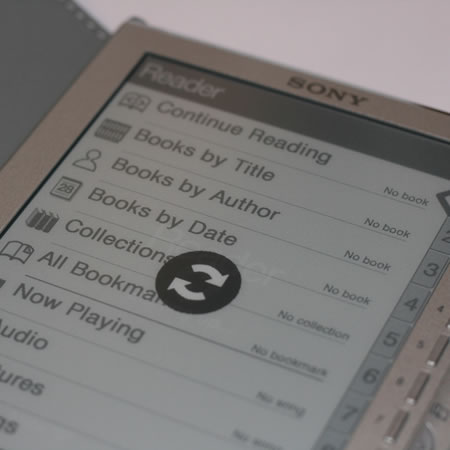
Sony eBook Reader – First Impressions

Though I would have preferred a Kindle, in the end (as the Kindle is not available in the UK) we ordered some Sony eBook readers for assesment and evaluation at the college to see if they would be of any use for our learners. We got the Sony PRS 505 eBook Reader model.

Sony eBook Reader - First Impressions

So what are my first impressions then?

I did like the size and weight and the fact that it came with a leather case. It felt right and looked good.

Then I was initially disappointed that there was no native Mac support. Sony eBook Library is not officially supported on Mac OS X or Linux based systems, although when the device is connected it grants access to its internal flash memory as though it were a USB Mass Storage device allowing the user to transfer files directly. There are some third party applications and I have found (but not yet tried) Docudesk PRS Browser for the Mac.

So once I had access to a Windows PC, I installed the software, though I had to charge the device first. The device is charged by USB, though it has a 5V charging socket, it does not come with a charger (but the PSP one fits and works fine, not sure if I should recommend that).

After configuring I installed the “free” hundred classic books which come with the device and at this point not worry about buying any eBooks. I have been recommended to use WHSmith over Waterstones as WHSmith is “cheaper”.

The process of reading a book is quite simple and the screen is easy to read. I haven’t had a chance to read a whole book, but initial impressions was that the screen was not going to be too hard on the eyes. The controls are relatively simple, but there is no touchscreen (and as I am use to PDAs and the iPod touch) it was difficult not to touch or swipe the screen.

The Sony Reader can also show pictures (admittedly in greyscale) and play audio files.

So why would you want to use an eBook reader?

Well though you can use eBooks on a regular computer or laptop, the battery life on eBook readers is a lot longer and therefore will probably last the week unlike a laptop which would probably only last the morning.

It should also be possible (with SD Card and Memory Stick slots) to “give” students all their learning materials, assignments, etc as eBooks so there would be no need to download stuff from the institutional VLE.

Why would you use this over a laptop?

Personally I wouldn’t. I would more likely use it in conjunction with a laptop, using the Reader to read source material and the laptop to write it. I also think this would stop or deter the learner from potentially plagiarising a source by copying and pasting.

Overall my first impressions are very positive and I think it is a great device. Whether I will use it and use it extensively has yet to be seen.

Engadget does not like Windows Mobile 6.5

Engadget, the gadget blog really doesn’t like Windows Mobile 6.5 operating system.

Still, some of us at Engadget (well, one of us, at least), feel like the folks in Redmond missed the mark by a longshot. Instead of demonstrating its technical prowess and vast resources, Microsoft limped out a half-hearted rehash of an OS we’ve seen all too much of, and managed to blind most onlookers with a storm of big time partnerships and bloated PR.

They go on to give ten reasons why Windows Mobile 6.5 misses the mark!

Read the article in full.

I will say that I am not a great fan of Windows Mobile, for many years I used an iPaq as a PDA, but recently (an Acer c530 for GPS and Satnav aside) I have been using either my Nokia phone or an iPod touch as my personal organiser.

news and views on e-learning, TEL and learning stuff in general…