Using iPads for field Research

Later this year students at Duke University will be giving iPads to enable the students to college and analyse data in the field.

In the past data gathered in the field would not be analysed until the researcher was back on a computer off site, the iPad changes all that allow on site analysis.

From TUAW:

The primary goal, according to sociologist Jen’nan Ghazal Read who will be teaching the course, is to equip students with tools allowing them to make the most of their time in the field and master the complex methods on which they will base their research.

Yes of course laptops and tablets in the past also allowed for field research, however the iPad’s ten hour battery life certainly will allow for wider use in remote locations compared to your typical laptop (and certainly your typical £500 laptop).

Can a joke be copyrighted?

Interesting article on the BBC News website on copyright and jokes. No not jokes about copyright, but more if you repeat a joke are you infringing copyright.

Matthew Harris of intellectual property specialists Waterfront Solicitors say that, in theory, a joke can be copyrighted – but with shorter, snappier gags which rely on abstract ideas rather than specific plots, any infringement would be difficult to prove in an English court.

“The joke would have to be more than just a few words long,” he says.

“As long as it’s not word-for-word identical, there would have to be a relatively detailed plot [for it to breach copyright]. And if that plot were so abstract as to fall within the general field of comedic tools, that’s fairly debatable.

“I think a one-liner would fall on the cusp of what’s covered by the law.”

Read more.

So here is a question if you repeat a joke you heard on TV, radio or on Twitter, in the classroom are you in breach of copyright?

No.

From the Copyright Act:

The performance of a literary, dramatic or musical work before an audience consisting of teachers and pupils at an educational establishment and other persons directly connected with the activities of the establishment

(a) by a teacher or pupil in the course of the activities of the establishment, or

(b) at the establishment by any person for the purposes of instruction,

is not a public performance for the purposes of infringement of copyright.

However this is only the case if the joke is for the purpose of instruction and not say entertainment.

The age of mobile is now

I have been talking about using mobile devices for a long time now, well before I started working at Gloucestershire College (and all that MoLeNET stuff), well before my time at the Western Colleges Consortium (and that Mobile on a VLE presentation).

Despite protestations about screen sizes, lack of power, inferior operating systems, we are now seeing the rise of the mobile device as the next big step in computing.

The first computers were BIG and clunky and you didn’t just use them, you booked time slots to use them.

“I think there is a world market for maybe five computers!”
Attributed to Thomas Watson of IBM, but in fact no evidence to say he ever said it.

Computers then became the mainstay of business, something to do business on.

“There is no reason anyone would want a computer in their home.”
Ken Olson, president/founder of Digital Equipment Corp., 1977.

With the rise of the personal computer and importantly the explosion of the internet in the late 1990s, not only did we see computers in the home, we also saw a lot more personal computers in education.

Laptops at this time were expensive, but small portable ones were available, I really liked the Toshiba Libretto that I bought at that time.

In 2000 I was working at @Bristol in the centre of the Bristol Harbourside, one project we worked on was using the HP Jornada  and using JetSend technology to “squirt” URLs to the device that would then access the webpage over (what was then) a spiffy wireless network.

It was at this point that I could really see some real benefits of using mobile devices for learning, and using devices that weren’t laptops.

Over that decade we did see the emergence of the laptop over the desktop, more and more people would buy a laptop rather than a desktop for their main computer.

During that time I did a lot more work on using mobile devices for learning, focusing on multimedia content on devices such as PDAs, Media Players and mobile phones.

I remember in about 2001 driving up the M5 and getting stuck in one of those traffic jams in the early evening. My wife was watching the Matrix on my iPAQ PDA. I had converted a ripped DVD (uh oh I know) that I had converted into a MPEG1 video file, placed on an IBM Compact Flash Microdrive and played it back on the iPAQ using PocketTV. As she watched the film people in the cars looked into ours in awe and curiosity about what was that glowing light in our car. Of course today everyone can do this, but at the time it was both clever and geeky!

“I’m not convinced people want to watch movies on a tiny little screen.”
Steve Jobs of Apple in 2003.

The seminal presentation of mine, Mobile Learning on a VLE, at the JISC 2006 Online Conference really got a lot of people thinking about using mobile devices and put my name out there as a leader in mobile learning.

There were many others at that time who were also following the same journey as myself, people like Mick Mullane, Lilian Soon, David Sugden and others. We were all very passionate about using mobile devices for learning.

Despite our passion, we still heard the resistance from practitioners (and sometimes from learners, but usually practitioners) that the screens were too small, they weren’t powerful enough, battery life was too short.

We, with others, were very much involved in the MoLeNET programme and that has had a huge impact in FE in kick starting the use of mobile devices for learning.

Mobile devices in the last few years have also dramatically changed too. Mobile phones have moved on from phones that just made calls and SMS, to mobile computers. Apple have also changed the landscape, first with the iPhone, then the iPod touch and now the iPad.

“There are no plans to make a tablet, it turns out people want keyboards…. We look at the tablet, and we think it is going to fail.”
Steve Jobs of Apple in 2003.

Innovation now is in the mobile sector of the market, these are the devices that our learners are buying and using.

The age of mobile is now.

FlickStackr – iPhone App of the Week

FlickStackr – iPhone App of the Week

This is a regular feature of the blog looking at the various iPhone and iPad Apps available. Some of the apps will be useful for those involved in learning technologies, others will be useful in improving the way in which you work, whilst a few will be just plain fun! Some will be free, others will cost a little and one or two will be what some will think is quite expensive. Though called iPhone App of the Week, most of these apps will work on the iPod touch or the iPad, some will be iPad only apps.

This week’s App is FlickStackr.

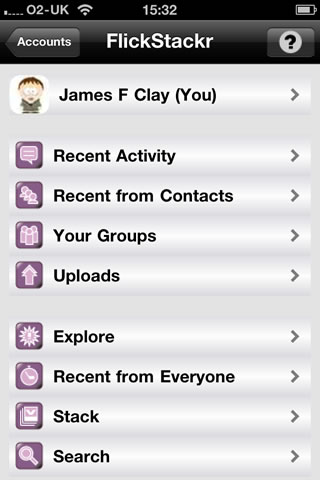
FlickStackr brings Flickr photo sharing to the iPad. Designed from the ground up for the larger screen, it allows you to BROWSE photos in the Flickr universe. UPLOAD photos and EDIT your photos’ metadata.

£1.19

There is a free Flickr App for the iPhone (which I do have) however when I came to look for a Flickr App for the iPad, I wanted something that used all that lovely screen rather than the x2 of the Flickr iPhone App. I came across FlickrStackr and decided to try it out.

Now before you start shouting at me that the “iPad doesn’t have a camera” let me just remind you that there are quite a few photo editing Apps available for the iPad and you can also get a camera connector kit for the iPad that allows you to upload onto the iPad, photographs from a “proper” camera!

FlickStackr is an universal App and therefore if you get it for the iPad it will also be available on the iPhone in an iPhone version. This is (as you might expect) similar to the Flickr App for the iPhone. It allows you to go through Flickr as you would on the website through a standard browser, but is a much better experience than using mobile Flickr through the mobile Safari browser and that is the main reason to use the App over just using the web interface.

I can browse my photostream and find images. These I can then download onto the iPhone if needed.

I might be doing this if wanting to send images to another service, or attach to a blog posting using the WordPress App.

I can also go through my sets, this is useful If I was wanting to show some of my photographs to someone, I have sets of my Library and of the facilities in my college for example.

I can also use the App to upload photographs, and with the much better camera in the iPhone 4 I suspect I will be taking more photographs with it than I did with the 3GS.

The original reason I bought the App was that it was a dedicated iPad App and it does work very well on the iPad. I can view my photostream.

I can view individual images.

Browsing images is easy and quick.

Overall if you take photographs with the iPhone, or you have the camera connector on the iPad, and you have a Flickr account, it makes sense to have some kind of Flickr App on your iPhone or iPad.

The free Flickr App is going to be fine for what most people need, however if you want something a little better and £1.19 is not exactly going to break the bank, then I would recommend FlickStackr.

Get FlickStackr in the iTunes App Store.

More cuts

It was interesting reading a press release from BIS yesterday about closing more quangos.

The Strategic Advisory Board for Intellectual Property policy (SABIP), SITPRO (Simplifying International Trade) and the Waste Electrical and Electronic Equipment Advisory Body (WAB) will all close in the next year. The British Shipbuilders Corporation will be abolished next year.

What was more interesting were the footnotes.

Within the main body of the press release it said:

The announcement comes as part of the Government’s commitment to reducing the number and cost of quangos and builds on the 13 Public Bodies closures that have already been announced.

In the footnotes it said and my emphasis.

The abolition, merger or termination of BIS funding of 13 Public Bodies was announced on 24 May 2010. Those bodies are: seven Regional Industrial Development Boards: UfI/Learndirect; Learning & Skills Improvement Service; Institute for Learning; Standards and Verification UK; IiP UK; and Hearing Aid Council.

There were three press releases on the 24th May relating to the cuts in funding:

None of these went into any detail about which Quangos would be cut, one of them said:

£80m from closing the British Educational Communications and Technology Agency (BECTA) and other savings in Department for Education quangos.

I have searched previous press releases from BIS and there is no detail on any of the savings to be made.

There is nothing (that I can find) on the LSIS or IfL websites about the cuts in funding.

Thanks to Bob and Seb for the noticing the footnote.

Edit: Screengrab in  case it disappears…

…also frozen the page using FreezePage.

e-Learning Stuff Podcast #054: I haz iPad too

David and James talk about the iPad, iPad Apps and the uses of it for learning.

This is the fifty fourth e-Learning Stuff Podcast, I haz iPad too

Download the podcast in mp3 format: I haz iPad too

Subscribe to the podcast in iTunes

Shownotes

  • iPhone App of the Week : This is a regular feature of the blog looking at the various iPhone and iPad Apps available. Some of the apps will be useful for those involved in learning technologies, others will be useful in improving the way in which you work, whilst a few will be just plain fun! Some will be free, others will cost a little and one or two will be what some will think is quite expensive. Though called iPhone App of the Week, most of these apps will work on the iPod touch or the iPad, some will be iPad only apps.
  • AudioNote
  • DocumentsToGo
  • David Sugden’s blog post on his iPad
  • Pages for iPad
  • Keynote for iPad
  • Numbers for iPad
  • Star Trek Tricorder
  • Google Earth for iPad
  • Leather Case for iPad

iPhone 4 issues

So is the iPhone antenna issue real?

Well this is my iPhone 4 and me.

Is the issue really worth all the column inches, rolls of film, metres of video tape?

To be honest no!

This is an issue with the iPhone and every phone I have ever used has had issues.

I had an LG Viewty that would just crash and the only way to reset was to remove and replace the battery.

I had a Sony Ericsson that would turn itself off when it felt like it.

I have a Google Nexus One that every so often decides that it can’t find the wifi or the 3G network and needs to be rebooted. Sometimes the screen won’t unlock unless you reboot. If you use it for watching video or similar and it gets too hot, then the touchscreen stops working!

All phones have their issues and problems.

So would I recommend the iPhone 4?

Yes I would.

Would I recommend the Nexus One?

Yes I would?

Would I recomend the LG Viewty?

Nope!

100 ways to use a VLE – #79 Lesson feedback

In the long and distant past, getting feedback on learners was something that just didn’t happen… the only real feedback that any practitioner got was through assessment. Though assessment is useful to get feedback on whether learners have learnt anything, it doesn’t help very much in getting feedback from learners if the process of learning is working. Would learners who get a C grade have got a B grade if the teaching had been more engaging? Would the learners who dropped out (failed) been a success if the teaching was more suited to their needs?

Getting feedback is important part of any learning process to ensure future success.

In the recent past, feedback has often been obtained through end of year or course surveys, or slightly better end of term surveys. Problem with any paper based survey is that someone has to crunch the results. That can take time, so you probably do it rarely.

A VLE can be used quite easily to host a feedback survey. Many feedback tools can be replicated so that they can be copied (or refreshed) for each lesson. This means it can not only be easy to setup, but quick and easy to copy for each lesson.

The feedback can be on how the learners felt about the lesson or what they learnt. This can then be used by the practitioner to improve future lessons or to change activities and assessments. Aggregated feedback from all the lessons and across the curriculum area can also be used to feed into any self-assessment process.

Moodle has a Feedback module that allows a series of questions to be posed to learners. This will collate the responses that can then be exported to Excel if required. Another module on Moodle that can be used is EasyVoter for a more immediate response in the lesson itself. Though of course all the learners need to have a computer to take advantage of this feature. The advantage of the Feedback module is that it can be done later at home, in the Library, or in a coffee shop.

There are other uses for EasyVoter, Feedback or other similar tools within the VLE, but lesson feedback is a useful way of using the VLE to improve the quality of the learner experience.

Playing the iPad

I am sure most people are aware of the many music “instrument” apps for the iPhone and the iPad.

I was talking to one of our music technology lecturers the other day and she was asking if we could get some iPads so that her learners could play a set with them.

This is not something that hasn’t been done before as can be seen from these two videos of iPads and iPhones been used with real instruments.

Certainly shows how gadgets like the iPad can be used for things that you wouldn’t think were even possible.

news and views on e-learning, TEL and learning stuff in general…