So you want to move files between different iPhones?
Well how about doing it like this?
The application is called Mover.
Found via TUAW.

So you want to move files between different iPhones?
Well how about doing it like this?
The application is called Mover.
Found via TUAW.
Mashable reports on an interesting statistic that 60% of new Twitter users quit after the first month.
But like many social networks, it seems many people lose steam with the service. Stat tracking firm Nielsen reports today that a full 60% of users who sign up fail to return the following month. And in the 12 months “pre-Oprah”, retention rates were even lower: only 30% returned the next month. That’s good news, to some degree: retention rates have increased over time.
I am sure that a lot of these quitter are people who don’t yet “get Twitter“, but I do wonder though how the factors I mentioned earlier this week may be causing the reported lower retention rate compared to Facebook and MySpace.
Compare it to the two heavily-touted behemoths of social networking when they were just starting out…we found that even when Facebook and MySpace were emerging networks like Twitter is now, their retention rates were twice as high.
Steve Wheeler in his blog also talks about the demise of Twitter and brings in the celebrity issues (one issue I didn’t cover in my original blog article). In that article he says he has closed his Bebo account and nearly closed his Facebook account. I never had a Bebo account, and here in my college, the use by students has fallen dramatically, most learners these days appear to be using Facebook. I now rarely use Facebook, generally as all I ever see in there are updates from peoples’ Twitter status updates.
Twitter is not the easiest social networking site to explain to people, looking at it, you can’t get it, even trying it out doesn’t mean you’ll get it either. Generally you need to try it for a fair while before you appreciate the benefits it brings in terms of networking, communication, the conversation and not forgetting the coffee.
I have spent the day in Birmingham at the FENC Symposium. Colleges who had submitted Beacon applications for the FENC award were invited to show and tell what was in their application.
Our original submission was on how we had embedded the use of Interactive Whiteboards across the college to enhance and enrich the learning experience for our learners.
At the Symposium thanks to Promethean we had a mobile board in place and we were able to show and explain not only how we had embedded the practice of using the boards, but we also could demonstrate the board itself.
Quite a few colleges were presenting and had stands. A few caught my eye. Telford College reminded me that not everyone can read text and using images for navigation can be a useful way of presenting course information, especially course information for courses that teach people how to read, or ESOL or EFL courses.
Dumfries and Galloway College showed how they were using WordPress for ILPs. A simple way to allow students to post information about their learning.
Overall an interesting day and again realising that it is never about the technology, it is all about the people, learners, staff development and key figures moving things forward.
It is a fact known to all that use Web 2.0 tools and services that one day they will no longer be flavour of the month, or will be swamped by spam, cons and hustlers. We have just seen the death of Geocities and services such as Friendster and Friends Reunited are not once what they were.
The same will, one day happen to Twitter!

One day we will no longer be using Twitter and when that is, no one really knows, but if it continues along it’s current roadmap it will be sooner than we think.
Why do I think that, well here are the ten reasons (in no particular order) why Twitter will eventually wither and die…
1. Spam
Spam is already an issue on Twitter, though it doesn’t generally affect the majority of Twitter users, only those who use other tools such as Twitter Search,Twitterfall and any tool which you use to search the Twitter stream.
From what I have seen at recent e-learning events and conferences, the conference or event tag has become a trend on Twitter (I would suspect partly down to the number of Twitter users at the event or conference and the fact that most of America is asleep when the conference starts here in the UK).
What you see happening is that initially the only Tweets you see are from conference delegates or interested parties elsewhere, but before long spammers come along and corrupt the feed of Tweets containing the conference hashtag with lots of spam. I am surprised that this doesn’t happen more quickly as I would have thought the process was automated, but if your conference hashtag trends on Twitter, expect spam to follow.
The spammers realise that people use these tools to see what people are talking about on Twitter and then they “flood” Twitter with their postings which contain a link (usually to an undesirable site) and all the keywords which are trending on Twitter.
You can see this happening already on Twitterfall.

The spammer “floods” the stream with their posts containing their link and trending hashtags.
As this starts to happen more and more, we will find that searching for keywords or hashtags on Twitter will become a waste of time as the only stuff we will see will be spam and at this point we will start to look for other tools.
2. Terrible Jokes
We all like to have a laugh and one of the attractions of Twitter can be the humour that you find there. However some people takes jokes a little too far and this can annoy people, especially conference organisers who don’t want their Twitter stream “corrupted” by inappropriate humour.
This actually happened at the JISC Conference 2009, within the stream of #jisc09 tweets were a few from a Twitter user called Misc 09, who posted a series of (quite vulgar and infantile) joke postings.

Some people smiled at them, others got annoyed.
One of the issues with joke postings like this, especially if they get out of hand, is that conference organisers will stop using and publicising Twitter, so the usefulness of Twitter as a back channel at a conference will be diminished and other tools would probably start to be used such asCoveritlive or Etherpad. As a result Twitter will become less useful as a business or learning tool and will remain in the realm of the joker.
3. Fake RTs
Hasn’t happened to me, but did happen to @billt (the real Bill Thompson). To RT or to re-tweet means to completely copy and post what someone else has posted before. Generally a way of getting information around Twitter quite fast and for highlighting important information or sites.
So how does the Fake RT work, basically someone posts a tweet like this RT @jamesclay Found this really interesting site http://youknowit.is/spam others who respect @jamesclay then follow the link or even worse retweet (RT) the spam tweet.
Your reputation on Twitter will then start to fall, and as a result you may start getting blocked or ignored.
Not only will people get annoyed with the RT spam, they may start to “block” you if you RT to avoid it, so the whole benefit of the RT will be lost due to the Fake RT.
4. The Hustle
One of the disadvantages of Twitter is the 140 character limit means that posting long URLs or web addresses is generally out of the question and as a result either Twitter will reduce the size of the URL using TinyURL.com or as is happening much more Twitter clients or Twitter users are using other services to compress URLs. Personally (for example) I use is.gd to shorten the URLs I post.
However there is a problem with shortened URLs and that is you don’t know where you are going as the URL gives no indication. This unknown factor will allowunscrupulous Twitter users to send other users to spam sites, or more worryingly phishing sites or sites with a virus or trojan download.
Once this happens to too many people then people will stop clicking links and the value of Twitter as a way of disseminating good blog posts, news articles will diminish.
It has to be said that some Twitter clients will automatically decipher the actual location of a web site from a shortened URL, or people can use a URL shortening service which previews the site you are going to, it has to be remembered that one of the biggest cause of viruses is people clicking links in e-mails or on websites, just because you are careful doesn’t mean everyone is, and if they get bitten they may well stop using Twitter. Once too many people stop using Twitter, the less useful it becomes.
5. Identity Theft
We know out there there are real celebrities and there are fake ones. For whatever reasons some people like to pretend they are a celebrity and post as though they are that celebrity. Now in terms of someone like Darth Vader it can be quite amusing, however for others including you, having someone post as you through a fake Twitter account could cause damage to your online reputation. It could also result in damage to your offline reputation.
6. Cons and Scams
There are some unscrupulous people out there and it won’t be long before there are lots of them on Twitter trying to con you out of your money. We already know about the 491 scams out there, the lottery scams, the freeipods and other cons that we get in our e-mail. True most sensible people know that these are scams, they ignore these cons, but unfortunately enough people don’t, so thescammers and con artists keep trying. Once they “discover” Twitter expect to see the 491 cons, the lottery scams and all similar things start to appear in your Twitter feed. Either we’ll get fed up with the stream of pointless cons and scams and leave, or weaccidentally get our fingers burnt and never trust Twitter again.
7. Trojans and Worms
As with the hustles, it won’t be long before more unscrupulous people start populating Twitter with links to malware, Trojans and video sites which require downloading a codec (which as it happens is a nasty piece of malware). Or infecting profiles with worms and other nasty things…
Well I say it won’t be long, we’re already there!
Over the Easter weekend as reported by ZD Net
During the weekend and early Monday, at least four separate variants of the original StalkDaily.com XSS worm hit the popular micro-blogging site Twitter, automatically hijacking accounts and advertising the author’s web site by posting tweets on behalf of the account holders, by exploiting cross site scripting flaws at the site.
What this shows is that Twitter is already under attack from worms and trojans.
As Twitter becomes more and more popular, it won’t be long before it gets swamped by worms and trojans. Once we’ve been infected we probably won’t go back and one day it might be too much for us all and we’re all go and leave and move onto the next thing.
8. Fashion
At the moment young people don’t get Twitter and use Facebook instead. But we don’t have to go too far back when they were all using Bebo and it was the older generation that were using Facebook. Once the Google Generation (I know I shouldn’t use that term, but it fits here) got hold of Facebook, it all went a bit pear shaped. As a result I am seeing less and less people use Facebook for professional conversations and support their work and more of them using Twitter. But soon that Google Generation will “discover” Twitter and move enmasse to this “new” service and swamp it.
What does this mean, well look at Digg. When the social bookmarking site Digg started, the real focus was on tech news, though you could find the odd story here and there. As Digg got more popular and more successful, many felt that the “quality” of the front page stories was diminished and swamped by “popular” stories. Many Digg users moved on and the teens moved in. Once you start looking at the comments in Digg you start to realise the age of the users and feel old. This could happen to Twitter, as it becomes fashionable, the teens move in and the core users move out. What then happens is when the teens move on to the next fashionable site, well there’s no one left using Twitter.
9. Feature Creep
One of the reasons I started to dislike Facebook was the feature creep (I know some would argue that this was the reason for the increase in popularity of Facebook). I found the increase in social, gaming and downright weird features and applications made Facebook less useful as a communication and networking tool. After having had too many zombies thrown at me, poked to the point of pointlessness, asked to join obscure groups and fan pages, requested to take the same Quiz on Indiana Jones at least a dozen times; I took the decision to useFacebook less and less. I probably now log into Facebook about once or twice a week.
So what has this got to do with Twitter, well one of the reasons as far as I am concerned that made Twitter successful was the simplicity of the concept. Post what you’re doing in 140 characters (or less). No zombies, no poking, no quizzes, just plain communication and conversation.
However this is not enough for some people and we’re starting to see added features, though these in the main don’t come from Twitter but come from third party developers. We had Twitter Groups and I like others felt that this was an extra “feature” that we didn’t need, others disagreed. Problem was that my Twitter stream started to fill with requests to join various groups rather than the conversation I was use to. As we get more from third party developers (over 600 Twitter tools out there now) we start to see a large number of tweets within the Twitter stream which are not presence statements or conversations, but purely automated postings from third party tools that say one thing or another…It’s not just third party tools, it’s also services that people use that automatically post to Twitter, for some this is signal and for others they’re noise, but we can all agree that if that was all we ever saw in Twitter we might as well not use Twitter and use a proper RSS reader.
One of the features that Twitter doesn’t have is a filter, you can either block someone or not, no way to filter your stream easily (there are third party tools that do allow you to do this).
Once too many people start using these tools, you may find that your Twitter stream becomes just a stream of announcements from people using these tools, and as a result you may well stop using Twitter as it will have outlived its usefulness.
10. Spam Followers
Though some of us are more discerning about who we follow, a lot of users on Twitter are not. I discussed in a previous blog post about whom and why I follow people. However there are lots of Twitter users who if you follow them, they will follow you back.
Spam Followers know this so follow lots and lots of people, knowing that a fair few will automatically follow them back. Of course what they then do is start posting their spam links to their Twitter stream, this appears of course in the stream of the poor Twitter users who follow the Spam Follower and before they know it they are clicking spam links.
Another problem with Spam Followers is they start to send lots of direct messages to you as well, again with links to spam sites.
Part of the issue is the current focus on the number of followers that you have, it would appear that people feel the more followers you have the more kudos you have on Twitter, it has become competitive even outside the celebrity circles.
Conclusions
So will Twitter fail and disappear completely?
Eventually, yes Twitter will go the same way as other services have in the past, some diehard users will continue to use the service, but doesn’t mean it will always be there. Where is Geocities now?
None of the above are the result or fault of Twitter itself, just the result of a great and popular service. The time it will take will depend on how Twitter can slow down or stop any of the above happening, but it is not a question of if the above will happen, it is a question of when.
Unlike a lot of FE Colleges using Facebook is not blocked in my college. Why do we do this, well we don’t block social interaction in physical environments, actually we actively encourage it in the FE sectors which cafe and coffee places, dining rooms, student social areas, common rooms, etc…
I had an interesting conversation with students using Facebook in our Library recently which I would like to share with you.
I asked them if they were using Facebook to support their learning (well what I actually asked if they were using Facebook to communicate and collaborate on their assignments). Their answer was quite interesting, not only did they use the Facebook communication tools (the messaging and live chat) to talk about their learning, but they used them (in the Library) so they wouldn’t disturb others in the Library through talking and discussing.
Now we don’t ban talking and discussing in the Library, but we do like to create a quiet learning environment. So the learrners are using online communication tools to support their learning. The fact that the learners want to use the tools in Facebook rather than the tools we provide is not surprising to me, but may be surprising to others. Learners will often choose their own tools over the provided tools from the institution.
This week was the ILT Champions Conference at Gloucestershire College a national event that had ILT Champions from across the UK descending on the college to share what they do.
Unlike other conferences which have a strict agenda with keynotes, presentations and the odd workshop. We decided (well more I decided) to do something different, to run an unconference.
With this kind of event it is the delegates (the audience) decide the agenda and what will be presented.
I did consider that this may have one downside in that what we want to see and discuss might not always correlate with what we need to see and discuss. This is not so much about dictating what the audience should see, but ensure that they are informed about issues and subjects which they may have not considered fully or dismissed as not relevant (though it might be).
This is something I may consider for future events, combine free flowing sessions with some more formal presentations. This still brings up the question is how and who decides the content for the formal presentations.
Today I was at the JISC Teaching and Learning Experts Group Meeting in Birmingham.

I always enjoy these meetings as you get a huge wealth of expertise, knowledge and examples to take away with you back to your own institution.
We used Twitter quite a bit today, so much so that the tag #jiscexperts09 became a trending tag on Twitter.
Lots of comments, discussions and conversations. Some went off tag and continued outside the event.
A really useful and interesting back channel to what was happening in front of us.
By the afternoon the stream of Twitter had declined considerably, in the main as we were in smaller groups with a lot more face to face interaction and conversations. We’re not talking about a small drop off, but a considerable drop, about 95%, in use of Twitter.
It’s not as though we weren’t finding Twitter useful, one delegate said to me that he saw me using Twitter as a way of asking a question without needing to put my hand up.
It did make me start thinking about how we use Twitter and the reasons for using Twitter.
In the morning session with presentations from the front, while we were a “passive” audience some of us were using Twitter to communicate what we were seeing to the Twitter community, discussing between ourselves and initiating conversations with other people not at the event.
Now were we doing this because we found the presenters boring? No because they weren’t, their presentations were very interesting. Much more as we were an audience we found the time to engage with Twitter and the Twitter community. Listening means that we can often add commentary and 140 characters means that it doesn’t take long or captures our attention away from the formal presentation at the front.
In the afternoon we split into smaller groups and discussed the three key areas, e-assessment, learning spaces and social software. As we discussed there was very little or no interaction on Twitter. We were “too busy” interacting and discussing.
Now this didn’t mean we didn’t want to share with Twitter, much more we were so busy we didn’t have the time.
What does this mean though when using Twitter at an event?
You do need to consider why you are using Twitter at an event. If using it as a record of the event, then it is a very poor tool for that, need to record an event then use a different tool.
If you are using Twitter to allow the delegates to converse about the event in a kind of back channel then the fact they are not using it, is probably not a bad thing, as they are probably interacting face to face. However the lack of Tweets in the afternoon in our session meant that I had very little idea what happened in the other parallel sessions. As for people outside the event, they had even less idea!
There may be an opportunity here to have (what I am going to call) social reporters in breakout sessions to record thoughts and discussions on Twitter. Downside for this is that Twitter is very much about the here and now and not really suited for looking back over or for engaging and interacting with even 15 minutes after an event. However will be useful for those outside the event.
One of the downsides of Twitter (which is also a plus point) is that it is just text and only 140 characters of just text. If you did use social reporters then they could also use other tools to help capture the event for both the delegates and others. They could be uploading presentations to Slideshare, posting photographs to Flickr, pushing videos to YouTube, broadcasting live using Qik, blogging, recording to Audioboo, etc…
You can often rely on the delegates to amplify a conference or an event through the use of Web 2.0 tools, should you be supporting the process with social reporting?
Well I have started packing for the Plymouth e-Learning Conference. Well less packing and more charging. I seem to take more and more equipment to conferences these days. Some of it will be used in my workshops, some I will use to blog and twitter, and some I will bring because I think I might use it, but generally don’t.
Apart from the workshop equipment I usually like to have the following on me at conferences (and a jacket with big pockets to carry it all).
Laptop – though I have a selection of micro-laptops or UMPCs I generally always fall back on my reliable MacBook Pro. In the main as it has a decent keyboard, partly as I have a spare battery for it and it has a built in camera.
Phones – normally two, this year three. Not for making phone calls mind you. I have my work Nokia which is what people at work will be able to call and SMS me on. I have my home T-Mobile Nokia N95 which I use for internet, either on the device or configured as a wireless router, a digital camera, a video camera and a broadcast camera using QIK. This year I will also be bringing an iPhone!
Digital Camera – despite having the 5MP Nokia N95 I do like to have a proper digital camera with a proper lense. I would love to bring my Canon DSLR, but it’s too heavy, so I have a little Sony pocket camera which does the job.
Video Camera – I have found my little Panasonic HD camera a great tool for conferences, at the ALT Conference I used it to create a little video that I then edited on my MacBook Pro (another reason to carry that around). Quick and easy to use, and records to SD cards so video clips can be easily transferred to the computer.
MP3 Recorder – I always carry this, thinking I should record some podcasts when I am at the conference and never seem to get round to it… this conference I hope will be different.
Chargers – as batteries never seem to last as long as the conference.
So what do you bring to a conference?
Nice little BBC news item on the growing market for applications for smartphones.
Sales in the world’s mobile phone industry are expected to fall this year but downloads of phone applications is one area which is thriving.
Applications create new things to do on a phone and almost a billion of them have been downloaded to Apple’s iPhone.
Rory Cellan-Jones examines the emerging new trend.

At the RSC Eastern Mobile Learning Event, James Clay considers the future of learning…
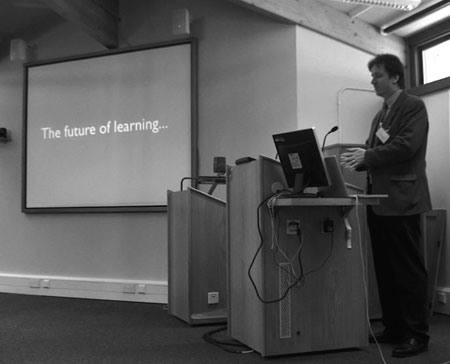
This is the twentieth e-Learning Stuff Podcast, The future of learning…
Download the podcast in mp3 format: The future of learning…
Subscribe to the podcast in iTunes.
Watch the video…
Shownotes
Presentation