But I have to read everything…

Using tools like Google Reader or Twitter it can become pretty compulsive to read everything. If you use iTunes and subscribe to lots of podcasts you can feel you need to listen to them all.

The more RSS feeds you subscribe to, or the more people you follow on Twitter, the larger the number of those unread messages becomes… Likewise with a lot of podcast subscriptions you can find the number of podcasts you have not listened to growing…

Then after a while you feel you are not coping or those unread feeds and Tweets are always there…

Waiting…

The number also gets larger… and larger…

You start to set yourself targets, you will read all your feeds by Sunday night! You will catch up with Twitter over dinner!

You go away to a conference or on holiday and when you get back the list is even bigger!

Eventually it will reach the point that you have to give up. Then you mark all as read and start again down this downward spiral.

Is this a wise course of action?

Of course no it isn’t.

The key in my opinion dealing with tools like Twitter and Google Reader is to rethink them as streams of information rather than as an email inbox.

In the same way that you don’t watch every TV channel or even watch ALL of your favourite TV channel.

Or reading the weekend paper, you don’t attempt to read every article in every section. Likewise if you didn’t read the paper yesterday, do you read it before you read today’s paper?

Or continually listening to Radio 4 all day long… well I know some people who do that, but you know what I mean!

It doesn’t matter that you don’t read every Tweet posted. It won’t be the end of the world if you don’t manage to catch every article in your newsfeed. So what if you miss a podcast?

What is the worse that could happen?

Well yes something bad could happen, but not very likely! But every day because you didn’t read all the Tweets in your Twitter stream, something bad would happen, no I don’t think so.

To be honest nothing bad is going to happen.

So what if you miss an exciting blog post on a subject you care about?

Does it really matter that you missed out on an interesting conversation on Twitter about PLEs?

The thing is you miss stuff all the time outside RSS and Twitter. More often than not, the good stuff resurfaces again and again (well it certainly does on services like Digg).

You need to treat Google Reader, Twitter and iTunes all in the same way. When you have time dip into the Twitter stream. Allocate time during the day To peruse your aggregated feeds in your newsreader. Listen to the most recent podcast, not the one from three weeks ago.

This is a much easier way to manage the huge amount of information that comes into our lives. Yes you will miss stuff, but the stuff you don’t will not be rushed, it will be perused with care and attention not just glanced over because you need to ensure that all your articles in the RSS feed are read.

It’s never about all the stuff it’s about the right stuff.

Now should we talk about e-mail?
iThoughtsHD – iPad App of the Week

iThoughtsHD – iPad App of the Week

This is a regular feature of the blog looking at the various iPhone and iPad Apps available. Some of the apps will be useful for those involved in learning technologies, others will be useful in improving the way in which you work, whilst a few will be just plain fun! Some will be free, others will cost a little and one or two will be what some will think is quite expensive. Though called iPhone App of the Week, most of these apps will work on the iPod touch or the iPad, some will be iPad only apps.

This week’s App is iThoughtsHD.

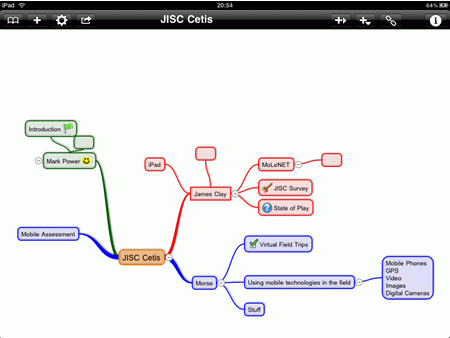
iThoughtsHD is a mind mapping tool for the iPad. It is based on and compatible with iThoughts for the iPhone.

Mindmapping enables you to visually organise your thoughts, ideas and information.

Product Highlights:

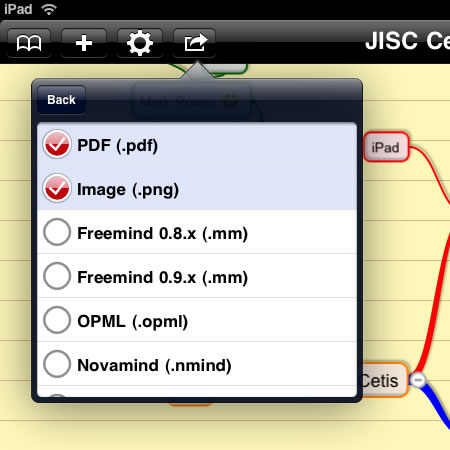
• Import and Export Freemind, Novamind, Mindmanager, XMind, iMindmap, Mindview and OPML format maps.
• Export as PDF or PNG images.
• Wirelessly upload/download mind maps using a web browser.
• Email maps as attachments (in all supported formats.)
• Open email attachments in iThoughtsHD.
• Integrated with box.net online collaboration service.
• Topic attributes (colour, icon, shape)
• Topic notes (with hyperlinks)
• Task Management (due date, percent complete.)
• Relationships (links between topics)
• Collapsible branches.
• Cut, copy, paste, move and merge topics and branches.
• Auto align and arrange topics relative to each other (automatically if desired.)
• Pan and Zoom (out)
• Work in landscape and portrait mode.
• Support for very large maps (with a canvas that is 600x the standard screen size)
• Configurable canvas backgrounds.

£4.99

I will say at this point that I am not a great mind mapping user. I don’t generally use it, but that’s not say that what I personally think matters. We have MindGenius at work and this is used by learners and practitioners. One of my team does all the training for that.

However I did buy iThoughtsHD, which is a mind mapping App for the iPad. There is also an iPhone version. This is though a separate App rather than a single Universal App that you can install on both your iPhone and iPad, so you will need to buy it “twice” if you have both an iPhone and an iPad and want the App on both! Now this is not a “cheap” app, at £4.99, but I do wonder why we think £4.99 is expensive for iPad software, but £100 is cheap for PC software!

Now as I am not a mind mapping expert or heavy user it is difficult to say whether this is excellent or rubbish, which is one reason why I included the list of features from the App description.

I do find it easy to use, very simple to create branches, colour them, add icons. You can add relationships too.

You can change the colour of the canvas too.

One feature I would like to see is an Undo button, sometimes you can create multiple branches accidentally, you have to select and delete each one, rather than just click an undo button. Likewise if you accidentally delete something, you can’t get it back.

It is quite simple to export the mindmap, either into another mind mapping format or in PDF or an image format.

I also like how I can export over the wireless network.

From my limited mind mapping expertise I like the app and it may even get me using the technique more often. Would be interested to know what mind mapping users think.

Get iThoughts HD in the iTunes App Store.

Create Android Apps (easily)

Google today announced the App Inventor for Android.

To use App Inventor, you do not need to be a developer. App Inventor requires NO programming knowledge. This is because instead of writing code, you visually design the way the app looks and use blocks to specify the app’s behavior.

Lots of practitioners have wanted to create Apps (in the main for the iPhone it has to be said) but when they download the SDKs they suddenly realise how out of their depth they are. This tool looks like it will be much much easier to create Android Apps.

I found the following comment interesting.

You can create a quiz app to help you and your classmates study for a test.

It would appear form this that Google are aiming the app not just at teachers but also learners.

Though the iPhone has been very successful and had a lot of publicity, in terms of sales Android has sold a lot more phones. So it is more likely that our learners will have Android phones in the future.

An interesting development in my opinion.

Video of the App Inventor in action.

Photo source

100 ways to use a VLE – #57 Linking to a podcast

Podcasts are an effective mechanism to support learning. Due to the audio format, learners can download and listen to them on an mp3 player (such as the iPod) as they walk to college, or catch the bus. Likewise mp3 files can be burnt to CD and a learner could listen to them in their car, or on their home music system. Though portable, learners can also access podcasts direct through a computer and listen to them via the computer speakers (or headphones).

Teaching is an oral tradition, we have been “listening” to lectures and conversations for years; podcasting allows learners to listen when, how and where they want to. The other key advantage is that podcasts can be listened to more than once, enabling a learning objective to be reinforced or for revision purposes.

If you have a search of the iTunes store there are thousands of Podcasts on many different subjects.

There are also “podcasts” available through iTunes U.

There are also podcasts available from other sources that aren’t on the iTunes store.

You can link to a series of podcasts on the VLE quite easily by just adding a link to the podcast homepage. From there the learner can just click on the link for any of the episodes available. This implies that all the podcasts are easily available from that homepage, this is not always the case.

What is useful now is that many of the iTunes podcast pages will open in the browser, so the learner won’t need to install iTunes to see and play the podcasts.

You could link direct to an episode of the podcast, by linking direct to the audio file. Though this is in theory “okay” it is considered poor internet etiquette as it is deep linking. Most podcasts should have a webpage for each episode; the e-Learning Stuff Podcast does for example and you could link to that page. This method is most useful when you want to link to a specific episode of a podcast.

Another more efficient way is to embed the podcast RSS feed direct into the VLE. This way, as episodes are added, they are automatically added to the VLE page, and the learners can click on new episodes as and when they are published.

One problem you may come across is if you link to a podcast like the BBC podcasts, is that previous episodes are “removed” from the web. This generally isn’t a problem for casual listening, can be an issue if the podcast is considered to be a core part of the course. You would think you could just download the podcast from the original source and upload to the VLE, wouldn’t you? Well life is never that simple. Though you can download the podcast, keep it, play it back in a classroom for the purposes of instruction; there is a problem with some podcasts if you upload it to the VLE, as this can be considered to be “re-broadcasting” or distribution which would be in breach of copyright. For BBC podcasts of radio programmes, the solution would be to record the BBC Radio broadcast, and then with an ERA+ Licence you would be able to then allow learners to access the recording through the VLE.

Many podcasts are licensed under a Creative Commons licence, these generally can be uploaded to the VLE for re-distribution.

Linking to podcasts through the VLE is one more way in which you can use the VLE to enhance and enrich learning.

Photo source.

Blackboard buys stuff

Blackboard announced today they have bought two similar companies, Wimba and Elluminate. With an aim to integrate into their Blackboard LMS, Blackboard have also stated that they want to retain both Wimba and Elluminate as standalone products.

An interesting move in many ways, there has been a growing interest and increase in use of synchronous tools such as Wimba and Elluminate, as though asynchronous tools that you could use are too “difficult” or “challenging” to use.

Both Wimba and Elluminate reinforce the use of the lecture as a way of delivering learning. Whereas VLE tools such as discussion forums and blogs are much more about learners “delivering” the learning through collaboration and discussion.

However I do wonder of the growth of tools like Wimba and Elluminate is less of a move away from asynchronous tools, but more as a result of an increase in practitioners embracing new technologies. These new users of technology are more comfortable with a technology that replicates what they are use to, rather than try the new pedagogies and ways of working that unknown technologies require.

So what of the Blackboard acquisition? Well technologies come and go, we will have to see what happens! Where is WebCT now?

Mobile Boot Camp Reflection

On Tuesday we ran a Mobile Learning Boot Camp as part of our Open Day for the Technology Exemplar Network. Combining our skills and experience in mobile learning, we as part of our commitment to sharing through our TEN, running an informal boot camp was our way of doing this.

The plan for the day was quite simple, a semi-formal introduction, a short one hour session on possibilities, whilst the rest of the day was about letting delegates getting on sharing, networking and importantly building mobile learning content and activities.

I covered a fair few technologies and ideas during the event and feedback from delegates was very positive.

We looked at the PSP with GO!Cam camera, Sanyo MP4 video camera, Kodak Zi8 video/still camera, iPod, iPad, iPhone, Audioboo, Posterous, iPadio, iTunes, iMovie, Garageband, Turbo.264HD, Screenr, podcasting, Edirol R-09HR and many other bits and pieces.

I think though if I was going to run it again, I would ask people to show and share at the end of the event.

The Early Edition – iPad App of the Week

The Early Edition – iPad App of the Week

This is a regular feature of the blog looking at the various iPhone and iPad Apps available. Some of the apps will be useful for those involved in learning technologies, others will be useful in improving the way in which you work, whilst a few will be just plain fun! Some will be free, others will cost a little and one or two will be what some will think is quite expensive. Though called iPhone App of the Week, most of these apps will work on the iPod touch or the iPad, some will be iPad only apps.

This week’s App is The Early Edition.

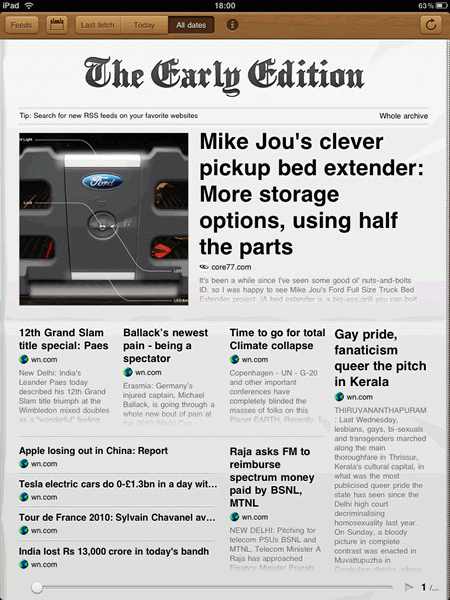
Finally – your own personal, daily newspaper! The Early Edition takes all of the news sources that you enjoy and presents their content in a format which is familiar, stylish and intuitive.

£2.99

One of the useful things that both the iPhone and iPad allow you to do is with certain Apps, aggregate RSS feeds and bring the news right to your device. Saves you having to visit the different websites and or news services.

In this series I have mentioned NewsRack that I use as my main RSS reader, in the main as it syncs with Google Reader allowing me to read the news either on the iPad, on the iPhone or on the web, without having to re-read stories I have already read.

So why did I buy The Early Edition?

Well apart from my making my blog look nice…

Actually there is a simpler reason, The Early Edition is a really nice way to find and read news stories. The way I use it is to access sites that I browse now and again on diverse subjects.

Another way to look at this is I use NewsRack as my daily newspaper, whilst The Early Edition is my Sunday paper.

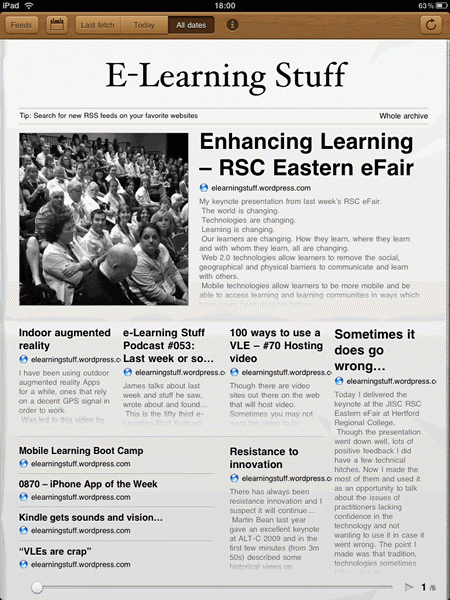
The Early Edition allows you to import RSS feeds from various sources, including if you want from Google Reader. However unlike NewsRack it doesn’t sync back to Google Reader. Another reason is that RSS readers if they have lots of feeds can be slow. Sometimes I just want the important news not the fluff!

There are quite a few RSS readers on the App store for the iPad, like Reeder and Pulse. Not sure how many RSS news readers I need, but at the moment two are sufficient for me.

Get The Early Edition in the iTunes App Store.

Enhancing Learning – RSC Eastern eFair

My keynote presentation from last week’s RSC eFair.

The world is changing.

Technologies are changing.

Learning is changing.

Our learners are changing. How they learn, where they learn and with whom they learn, all are changing.

Web 2.0 technologies allow learners to remove the social, geographical and physical barriers to communicate and learn with others.

Mobile technologies allow learners to be more mobile and be able to access learning and learning communities in ways which have never been possible before.

Both allow for an enhanced and enriched learning experience.

James Clay has extensive experience of mobile learning and has a vision that goes beyond mobile technologies and focuses on the mobility of the learner, blurring the demarcation between formal and informal learning. His current vision for education encompasses the use of Web 2.0 technologies embedded into an institutional VLE which can be accessed through mobile technologies. Allowing learners a focal point for their studying, whilst allowing the depth and breadth of Web 2.0 to bring a personalised learning experience to students at a time and space to suit them.

For the future, James hopes that institutions and others will allow for a flexible, personalised, accessible learning experience for all.

View the section of Martin Bean’s ALT-C 2009 keynote that deals with resistance to innovation.

Indoor augmented reality

I have been using outdoor augmented reality Apps for a while, ones that rely on a decent GPS signal in order to work.

Was led to this video by Mark Power on Junaio, an indoor augmented reality App.

The KIOSK EUROPE EXPO 2010 Channel is the first real life implementation of junaio®’s advanced indoor navigation capabilities on your smartphone, presenting an interactive mobile guide to the world’s largest trade fair on electronic self-service and innovative retail solutions. junaio® is the first augmented reality platform to overcome the accuracy limitations of GPS navigation, offering pinpoint indoor navigation services. Point, click and view information on individual exhibits or find directions to interesting events and locations. Available for iPhone and Android.

Certainly looks like it could be a useful idea for educational institutions.

e-Learning Stuff Podcast #053: Last week or so…

James talks about last week and stuff he saw, wrote about and found…

This is the fifty third e-Learning Stuff Podcast, Last week or so…

Download the podcast in mp3 format: Last week or so…

Subscribe to the podcast in iTunes

Shownotes

news and views on e-learning, TEL and learning stuff in general…