Wonderful corporate video for the Polaroid SX-70.
Look out for the person photographing a picture in a book, tut, tut.

Wonderful corporate video for the Polaroid SX-70.
Look out for the person photographing a picture in a book, tut, tut.

via xkcd
Interesting article on the BBC News website on copyright and jokes. No not jokes about copyright, but more if you repeat a joke are you infringing copyright.
Matthew Harris of intellectual property specialists Waterfront Solicitors say that, in theory, a joke can be copyrighted – but with shorter, snappier gags which rely on abstract ideas rather than specific plots, any infringement would be difficult to prove in an English court.
“The joke would have to be more than just a few words long,” he says.
“As long as it’s not word-for-word identical, there would have to be a relatively detailed plot [for it to breach copyright]. And if that plot were so abstract as to fall within the general field of comedic tools, that’s fairly debatable.
“I think a one-liner would fall on the cusp of what’s covered by the law.”
So here is a question if you repeat a joke you heard on TV, radio or on Twitter, in the classroom are you in breach of copyright?
No.
From the Copyright Act:
The performance of a literary, dramatic or musical work before an audience consisting of teachers and pupils at an educational establishment and other persons directly connected with the activities of the establishment
(a) by a teacher or pupil in the course of the activities of the establishment, or
(b) at the establishment by any person for the purposes of instruction,
is not a public performance for the purposes of infringement of copyright.
However this is only the case if the joke is for the purpose of instruction and not say entertainment.
Is your Library cool?
Made me smile.
So is the iPhone antenna issue real?
Well this is my iPhone 4 and me.
Is the issue really worth all the column inches, rolls of film, metres of video tape?
To be honest no!
This is an issue with the iPhone and every phone I have ever used has had issues.
I had an LG Viewty that would just crash and the only way to reset was to remove and replace the battery.
I had a Sony Ericsson that would turn itself off when it felt like it.
I have a Google Nexus One that every so often decides that it can’t find the wifi or the 3G network and needs to be rebooted. Sometimes the screen won’t unlock unless you reboot. If you use it for watching video or similar and it gets too hot, then the touchscreen stops working!
All phones have their issues and problems.
So would I recommend the iPhone 4?
Yes I would.
Would I recommend the Nexus One?
Yes I would?
Would I recomend the LG Viewty?
Nope!

Google today announced the App Inventor for Android.
To use App Inventor, you do not need to be a developer. App Inventor requires NO programming knowledge. This is because instead of writing code, you visually design the way the app looks and use blocks to specify the app’s behavior.
Lots of practitioners have wanted to create Apps (in the main for the iPhone it has to be said) but when they download the SDKs they suddenly realise how out of their depth they are. This tool looks like it will be much much easier to create Android Apps.
I found the following comment interesting.
You can create a quiz app to help you and your classmates study for a test.
It would appear form this that Google are aiming the app not just at teachers but also learners.
Though the iPhone has been very successful and had a lot of publicity, in terms of sales Android has sold a lot more phones. So it is more likely that our learners will have Android phones in the future.
An interesting development in my opinion.
Video of the App Inventor in action.

The future of mobile learning has to be in user owned technology.
From a sustainability perspective, no educational institutions (especially in the current economic climate) would be able to provide all learners with a mobile device or a laptop – even if they are getting cheaper!
However… sometimes the question of PAT testing student equipment arises from someone within the organisation. It is then decided that students can only bring in their laptops if they have been properly PAT tested or they can bring their devices in, but can not plug them in or in extreme examples students will be banned from bringing in their own devices.
I have read and checked the relevant legislation and I have phoned the HSE to confirm this.
There is NO legal requirement to PAT test student equipment, a formal visual inspection is sufficient under the current legislation.
See more details in this HSE leaflet.

The HSE were quite clear that they would not expect colleges to PAT test student devices.
Think about hotels for example, who NEVER PAT test guests personal laptops. Read this leaflet which has more information.
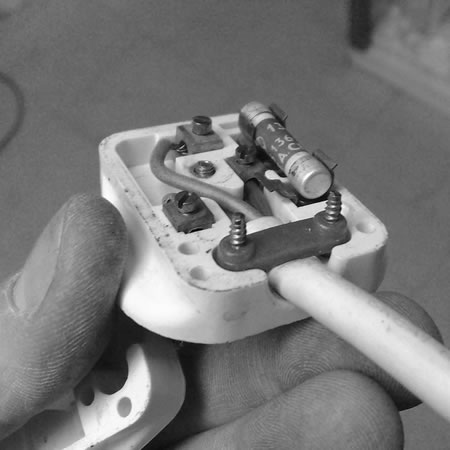
However… having said all that there may be good reasons to ensure that student equipment is PAT tested.
If you have an old building with rubbish wiring, it might make sense (from a risk assessment perspective) to PAT test.
Some insurance companies REQUIRE PAT testing, but check with your insurance company.
The answer to your H&S Officer is provide them with a proper risk assessment and the documentation from the HSE. Ask them to then explain why PAT testing is required beyond what is required under the legislation?
Or…
Ask H&S to set up PAT testing sessions for students, they want to do it, let them do it. Give them an indication of the session frequency required.
Or…
It actually doesn’t take that long or too much effort to train people to PAT test equipment, even the testing equipment isn’t that expensive. Train all relevant staff, Learning Resources, IT Technicians, other Technicians, teaching staff!!!! and get them to do the PAT testing.
Finally ignore all the “smart” people who tell you that PAT testing is an example of redundant acronym syndrome syndrome.
Disclaimer: ALL information containing in my post is for informational purposes only and should never be construed as legal advice. For proper legal advice you should consult a lawyer.
Google last week announced the release of Android 2.2.
Unlike other phones I could mention, even though the update was announced my Google Nexus One said “it was up to date”. You have to wait until the phone provider sends out the update.
In my case that’s Google…
Waiting…
Certainly won’t be waiting as long as Motorola Droid users who had to wait six months for 2.1, but still waiting…
Then on Saturday night I noticed a post on Lifehacker.
Want to try out the neat new stuff in Android 2.2, a.k.a. FroYo, but haven’t lucked into an update notification yet? Follow these instructions to download a 2.2 update, install it, and get Flash up and running.
I downloaded the zip file and following these instructions updated my Nexus One on Sunday morning.
The first thing I wanted to do was try out the Flash player… specifically I wanted to see how BBC iPlayer would perform. My first site was BBC News and I was very pleased with how the live stream of BBC News worked on the Nexus One.
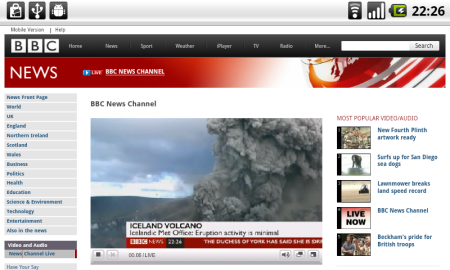
Very similar experience to the EyeTV App on the iPhone, but obviously streaming from the internet and no need for the Mac to be on. I then tried to watch a programme from the archive, the film Brazil as it happens and… well the site asked if I was old enough! And trying to zoom into the checkbox was not particularly easy. However it did work!
As did Doctor Who!
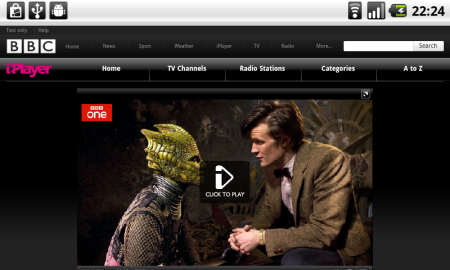
Android 2.2 does off a little more than just allow you to view Flash on the web.
Android now has Exchange support, this is a feature I have found very useful on the iPhone. Despite what you may think of Exchange, it is a service that many organisations and institutions use, so by having support on Android, it allows for Enterprise deployment of phones like the Nexus One.
You can also now use the Flash when shooting video, great for when there is little or no natural light.
The Nexus One with Android 2.2 can now be used as a portable WiFi hotspot. This is something I have been doing for some time with Joikuspot on the Nokia N95 and was one of the main things I missed from the Nexus One, missing it no longer.

This is also something that is missing from the iPhone and technically it would be able to do it…
The key improvement though of 2.2 is improved performance and I certainly have found my Nexus One to be a little more zippy and faster than before.
I would never recommend bypassing the traditional upgrade process, but when the update does come I would recommend upgrading.
EdTech 2010 has now finished and I have left Athlone. I opened the conference with my keynote, entitled Cultural Shifts.
The keynote looked at the importance of culture and changing culture if we are to not just embed the use of learning technologies, but create a culture that embraces new technologies and pedagogies, rather than resist them.
The feedback I got was that it went down well with the delegates at the conference and created a buzz and conversations throughout the conference.
It was my first time to EdTech and I enjoyed the conference.
I have found that attending learning technology conferences always provide something new and interesting to take away. Even if the conference is based on a different sector or in a different country, there are lessons that have been learnt that we can learn from. Despite the differences the issues and challenges we face in different countries and different sectors, what we know and what we learn is more often than not transferable and easily adapted to our own institutions and learners.
There were some really useful and interesting presentations and talks and I hope to blog about them later.
Here are the slides from my EdTech 2010 Keynote.
I hope to be able to link to the recording later.