Category Archives: podcasting

MoLeNET Podcasting Workshop – 8th December 2010

I am leading a Podcasting Workshop on the 8th December 2010 between 10.00am to 4.00pm at the Gloucestershire College MoLeNET Academy at the Gloucester Campus of Gloucestershire College.

This is a hands on workshop looking at the process of:

  • Planning
  • Recording
  • Editing
  • Publication
  • Distribution
  • Marketing

of Podcasts for teaching and learning.

The workshop will look at:

  • Content of podcasts, what works and what doesn’t.
  • Recording, tools and tips, use of Skype, mp3 recorders, Audioboo, iPadio.
  • Editing podcasts using tools such as Audacity or Garageband.
  • Publishing your podcasts using blogging, FTP.
  • Distribution, looking at creating and using RSS Feeds. Will also look at iTunes, the iTunes Store and iTunes U.
  • Marketing, how you get your learners to listen to your podcast.

The day starts at 10.00am and will finish at 4.00pm, lunch will be provided.

The event will be led by James Clay and will be working with Di Dawson.

Travel

Gloucester is well served by rail networks from across the UK and the college is a 15 minute walk from the railway station.

Gloucester is on the M5 and can be accessed from Junction 12 from the South and Junction 11 from the North. Please note that there is NO PARKING available at the college, though pay and display car parks are close by.

Booking

Please book online at RSC South West.

The event is FREE to any member of the MoLeNET community, in other words your college has led or been a partner in any MoLeNET project.

Background

Gloucestershire College has a wealth of experience in the use of mobile devices to support assessment. With three successful MoLeNET projects and a MoLeNET Academy, the college is using podcasting, video and audio to support and enhance learning and assessment.

James Clay is an experienced podcaster with a well respected weekly podcast, e-Learning Stuff. James is and has been passionate about the use of learning technologies to enhance and enrich the learning experience since 1991. James has been ILT & Learning Resources Manager at Gloucestershire College since November 2006. He is responsible for the VLE, the use of learning technologies, e-learning, mobile learning, the libraries, digital and online resources and the strategic direction of the college in relation to the use of learning technologies.James has extensive experience of mobile learning and has a vision that goes beyond mobile technologies and focuses on the mobility of the learner, blurring the demarcation between formal and informal learning.

Di Dawson is an LSN MoLeNET Mentor and a gadget lover and she brings expertise to the day in the form of enthusiasm for mobile technologies and as a teacher trainer. She likes to link teaching theories to practice and explains how activities can be designed to make the learners think deeper and therefore broaden their learning. Di loves gaming technologies and she enjoys enthusing teaching staff to look ‘beyond the play’ and see the potential for learning. Di has written various books on the use of computers and handheld technology and delivers online training to education and business establishments. Technology has certainly changed since Di started as an IT tutor 20 years ago.

Photo source.
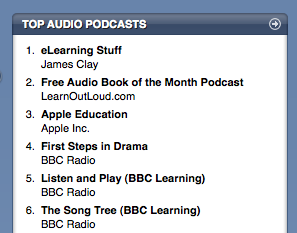
In at number one!

Those of you who read the blog of a regular basis will know that as well as the blog I also (with a group of e-learning friends) record a podcast.

You can listen to the podcast on the blog, there is a simple Flash based player, so you don’t need to download it to listen to it.

You can download the mp3 file from the blog which then allows you to transfer it to a mp3 player, an iPod, burn it to CD, listen to it on your computer, or on your phone.

You can also subscribe to the podcast, either through the blog RSS feed (which incorporates all the blog postings and media files uploaded) or through the podcast RSS feed. You can subscribe via applications such as iTunes, Juice or your browser.

Finally you can subscribe to the podcast through the Apple iTunes Store. I submitted the podcast to the iTunes Store in October 2008 to the Educational Technology Podcasts section of the store.

It is proving reasonably popular and the podcast is generally always in the top twenty, quite pleased though today to see it is in at number one!

Now if you go and look I suspect we may have dropped a fair few places, the top podcasts list does change on a daily basis dependent on how many subscribers you have and how many new people subscribe.

I am working on a workflow document which describes the process I use for recording the podcast, it is currently a work in progress but you can view it here.

Since Christmas I have been putting an episode out every week, which is a lot more challenging than you would think

Always interested to hear about topics people would like us to talk about or even those who would be interested in taking part.

AudioBoo – iPhone App of the Week

AudioBoo – iPhone App of the Week

This is a regular feature of the blog looking at the various iPhone Apps available. Some of the apps will be useful for those involved in learning technologies, others will be useful in improving the way in which you work, whilst a few will be just plain fun! Some will be free, others will cost a little and one or two will be what some will think is quite expensive. Though called iPhone App of the Week, most of these apps will also work on the iPod touch.

This week’s App is AudioBoo.

Update: App is now called AudioBoom.

Audioboo is an application for recording and sharing your voice with the world. This free version allows you to create audio up to 5 minutes in length and post that to your own account on the web. You can add titles, tags, geolocation info and a photo to the recording before you upload it and we’ll save all that with the file. The audio can then be shared with your followers or via Facebook, Twitter & more social networks by managing your account at http://audioboo.fm.

In addition, you can also listen to featured, followed, popular, recent and nearby boos in the app and view photo & location details if attached.

All audio is converted to an mp3. You don’t need to create an account to start recording but it’ll certainly help you keep track of your boos in the future.

Free

This has been one fun app to use on the iPhone. So what is Audioboo? Well it’s a service I first saw demonstrated at the All Together Now event at Channel 4.

To put it simply it is an App on your iPhone that allows you to record an audio recording, add your location, a picture, tags and upload the lot to a website.

This has some real  potential for learning activities. As you have an account on the website (not essential but recommended) your recordings are kept together and also have an RSS feed as well, which people can subscribe to via iTunes or other podcasting applications.

For example, imagine that your Travel and Tourism students are out on a field trip, they can record an image of each tourist destination, they can record a description,  add relevant tags, the iPhone adds GPS coordinates, and the lot is uploaded to the web. Back at college they can create a media rich presentation using the recordings and images and create a map using the geo-data.

It also acts as a simple mp3 recorder, and these mp3 files are then available to download from the Audioboo website.

I have mainly used Audioboo to show people what Audioboo can do. I hope to in 2010 use Audioboo to do a regular short podcast.

I do like Audioboo, it is such a simple concept, but executed really nicely and has the potential to be a very effective tool for learning.

Update: App is now called AudioBoom.

100 ways to use a VLE – #56 Hosting a podcast

Creating podcasts can be relatively simple, however when created where do you host them? You can “buy” hosting space, you could put them on a “free” web host or you could put them on the VLE. Of course by placing them on the VLE you do create issues about learners who wish to subscribe (via RSS) to the content through iTunes or Juice or similar, though that is not insurmountable. The VLE can also just have a link to the podcast files and the podcast subscription instead.

Podcasts are an effective mechanism to support learning. Due to the audio format, learners can download and listen to them on an mp3 player (such as the iPod) as they walk to college, or catch the bus. Likewise mp3 files can be burnt to CD and a learner could listen to them in their car, or on their home music system. Though portable, learners can also access podcasts direct through a computer and listen to them via the computer speakers (or headphones).

Teaching is an oral tradition, we have been “listening” to lectures and conversations for years; podcasting allows learners to listen when, how and where they want to. The other key advantage is that podcasts can be listened to more than once, enabling a learning objective to be reinforced or for revision purposes.

Recording podcasts can be relatively easy; though it does make sense to try and get good quality audio.

What is generally more difficult is getting the content right, so that learners listen to the podcast. Monologues and recordings of lectures are often better than no recording, but dialogues and conversations often are more interesting to listen to.

Podcasts do not need to be length affairs, ten to fifteen minutes is more than ample for more educationally orientated podcasts.

Podcasts do not need to be in a single place, so for example you may host the podcasts on a WordPress.com blog and use that RSS feed, you may then also link direct to the podcast file or upload it again to the VLE so that learners who wish to can access it that way.

Podcasting through the VLE is one more way in which you can use the VLE to enhance and enrich learning.

Photo source.

Publishing Podcasts

On Friday the 27th March I gave a couple of online presentations (conferences) for the MoLeNET programme.

So you’ve been making podcasts, how do you publish them, how do you get them out there, how do your learners subscribe to them? Covering more than just iTunes with a look at a range of technologies that allow you to distribute your podcasts.

A few of the links we talked about in the presentation.

e-Learning Stuff Podcast – this is the podcast of this blog. You can also access the iTunes Store link for the e-Learning Stuff Podcast

Juice Podcast Software is an application which just downloads podcasts, available for Windows, OS X and Linux

There are various blogging sites out there includingBlogger, WordPress.com. If you have your own server you can install the WordPress software yourself from WordPress.org

Feedburner allows you to enhance and enrich an RSS feed from say WordPress.

Switchpod is a podcast hosting service, which will automatically generate a podcast RSS feed.

New College Swindon created a podcast server using Episode and OS X Server.

QIA learning object on podcasting

Audioboo.fm/ is a new audio recording and publishing service for the iPhone.

In at number two…

Those of you who read the blog of a regular basis will know that as well as the blog I also (with a group of e-learning friends) record a podcast.

You can listen to the podcast on the blog, there is a simple Flash based player, so you don’t need to download it to listen to it.

You can download the mp3 file from the blog which then allows you to transfer it to a mp3 player, an iPod, burn it to CD, listen to it on your computer, or on your phone.

You can also subscribe to the podcast, either through the blog RSS feed (which incorporates all the blog postings and media files uploaded) or through the podcast RSS feed. You can subscribe via applications such as iTunes, Juice or your browser.

Finally you can subscribe to the podcast through the Apple iTunes Store. I submitted the podcast to the iTunes Store last October to the Educational Technology Podcasts section of the store.

It is proving reasonably popular and the podcast is generally always in the top twenty, quite pleased though today to see it is in at number two!

In at number two...

Now if you go and look I suspect we may have dropped a fair few places, the top podcasts list does change on a daily basis dependent on how many subscribers you have and how many new people subscribe.

I am working on a workflow document which describes the process I use for recording the podcast, it is currently a work in progress but you can view it here.

Apart from an (extra long) break over Christmas I am tying to post the podcast on a weekly basis, every Sunday. Always interested to hear about topics people would like us to talk about.