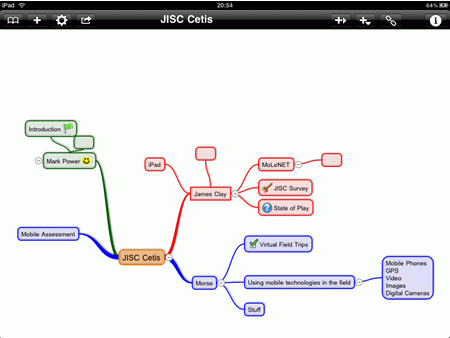
My presentation on Mobile: The State of Play (featuring MoLeNET) at the JISC Cetis Mobile Tech Event at The University of Bolton on the 15th June 2010.
So can you design informal learning?
No!
There we go that was easy wasn’t it.
You see when you design informal learning, you formalise it and as a result it becomes formal learning.
Okay?
But….
There is always a but…
You see informal learning is such a valuable way of learning for learners that institutions are often thinking about how to design informal learning activities… of course as we know, that means it becomes a formal learning activity.
It might be useful at this point to define what I mean by informal learning, how it differs from formal learning and the implication of using the term as opposed to non-formal learning.
Formal learning is is learning that happens within a structure prescribed by an institution. This learning may happen within a classroom or lecture theatre, but could also happen outside the institutions. It will involve set tasks and activities and a timeframe. Examples could include:
Formal learning is very much about learning that is planned, organised and assessed. There is structure, constraints and expectations.
Non-formal learning is learning that happens not just outside the confines of the institution, but also outside the qualificational framework. This learning is often ad hoc and unplanned. Examples could include:
Informal learning in my opinion is learning that happens outside the “control” of the institution, but is part of the learning towards a qualification that a learner will undertake. This learning may happen within the institution, but will also happen outside at home, at work or in a coffee shop. Examples could include:
This definition of informal learning differs from non-formal learning in that the activity of learning is still tied to the institution and the qualification, but is not a proscribed or set activity as set down by a practitioner.
So can practitioners design informal learning activities?
No!
You see when you design informal learning, you formalise it and as a result it becomes formal learning.
It’s not about designing informal learning, it’s about institutions facilitating and encouraging informal learning. If this happens then, with encouragement from practitioners (rather than setting activities) we should see more learners learning informally.
So how should institutions encourage informal learning?
Well the key really is to think about what actually facilitates and encourages informal learning.
It’s a combination of factors and can include design of learning spaces and the learning activities undertaken by the learners.
If learning activities are dependent on learners learning knowledge and demonstrating that they understand and can apply that knowledge through an essay or an assignment, then traditional learning spaces are usually going to be sufficient. Learning at home on a desk is probably quite normal for this kind of individual activity.
However once practitioners think more creatively about learning activities and learners are given more choice and control about how they undertake their learning, then the space in which the learning takes place becomes much more important.
The learning space and importantly the informal learning space is really important if learners are to take advantage of the time and space to learn. Learners will learn in a variety of places both in and out of the institution.
Inside the institution, we need to consider how the spaces we provide allow for informal learning. In the past we generally divided spaces into learning spaces such as the library and social spaces like the refectory or cafe. If we are to encourage informal learning, then we need to create social learning spaces. Usually (in the past) libraries were silent working areas, recently quiet working is now the norm. Good library design allows for a variety of learning activities from quiet individual work, to collaborative group work. Space needs to allow for the use of both new technologies, user owned technologies and traditional resources such as books and journals.

Questions you need to ask about your learning spaces?
Are the computers all in one place in the learning centre? Or are they spread about the space to encourage group working, working with non-digital (traditional) resources and individual working.
Do you provide a wireless network to allow users to use their own devices? Does the wireless network “work” with mobile devices such as the iPhone or other smartphones? What barriers are in the way when a learner brings in their device? Do they need to register the device? Have it PAT tested? Are there power points for user owned devices? How simple is it for users to charge their devices?
Can learners access digital and online resources via the wireless network? Can they access online storage?
Are users allowed to use their mobile phones in the learning space? Not for loud conversations, but for internet, SMS or listening to audio and video content.
What about the coffee?

Likewise what about the traditional social space? The focus is probably on moving people through the space as quickly as possible through a short lunch hour! They are probably designed for eating and drinking and not studying. They are probably loud noisy places, some may even have loud music!
These spaces are fully utilised during refreshment breaks and are designed to ensure as many people as possible can get something to eat and drink before they then move onto the next lesson or workshop. That obviously means at other times, the space is quieter and accessible for learning; but is it accessible and accomodating to those learners who want to use the space for learning?
Are they fully open plan? Are there spaces for small group working? Do you divide the space out or are there no divisions?
Are there different kinds of furniture to cater for different needs? Are there chairs, tables, sofas?
Are there different areas for different activities? Quiet spaces for individual working or reflection? Group spaces for discussion and collaboration? Open spaces for debate?
Are there charging points for learner owned devices?
Is it purely a self-clear area, or do the staff take pride to ensure that the space is attractive and conducive to study and learning?
Has any consideration been given to the sort of food and drink available? Are healthy snacks promoted?
What about the coffee?
Yes it is easier to design spaces for learning and design spaces for social use. It is more challenging to create learning spaces that encourage informal and social learning. As demands on space continues to grow and demand for more learner-led learning, it is important that institutions consider much more how their spaces can be used for informal learning.
James’ keynote recording from the CoFHE Mid West Circle summer event. He talks about eBooks and eBook Readers and the future of reading.
With James Clay.
This is the fifthieth e-Learning Stuff Podcast, Do you like books or do you like reading?
Download the podcast in mp3 format: Do you like books or do you like reading?
I have never been a big fan of Second Life. I have discussed this before, here on the blog and in various conferences and events, such as the JISC Online Conference. I have been to Second Life and I am actually in this screenshot from the 2008 JISC Online Conference.
Many proponents of Second Life have been saying for a fair few years now how “next year” will be the year of Second Life.
However this year they may well be right.
This is the time for Second Life to make that breakthrough that it needs to be accepted as a mainstream technology for learning.
If it doesn’t do it now, in my opinion it will never do it.
So what is making the difference this year?
Well first the bad news, Linden Labs the people behind Second Life are laying off 30% of their staff in a restructuring. This includes closing the UK office.
These cuts are possible as Linden are going to take Second Life in a new direction, one I think gives Second Life the potential that has been talked about for years.
Linden is going to work on making the virtual world accessible from a web browser. In the past you have needed to download software, install it and open various ports.
As the press release says:
First, the company aims to create a browser-based virtual world experience, eliminating the need to download software.
Now installing software was always a barrier, especially if you were trying to do so in an institutional environment with IT departments often wary or unwilling to install the software. The other major barrier was the technical requirements for Second Life, most of the cheap beige boxes (ideal for word processing and spreadsheets) were pretty useless for wonderful 3D environments. There are still possible issues if the browser rendering requirements are high, though at this time we just don’t know.
If Linden are successful they may also move into mobile browsers and this will open up more possibilities.
I am less sure about the following though.
Secondly, Linden Lab will look to extend the Second Life experience into popular social networks.
Read “popular social networks” as Facebook. Other companies have tried to “move” into Facebook, some with success like Farmville, but others less so. Similarily can you see how Second Life and Twitter work together! Tweets abounding in a Second Life environment perhaps.
However back the browser, by making Second Life more accessible, this is the one opportunity that Second Life has in becoming a core learning technology that many people use day to day, rather than where we are at this moment, with many people having tried it, or more likely attempted to try it and some keen enthusiasts. If a browser based Second Life doesn’t take off, I can’t see it ever taking off.
This new direction from Linden will provide many opportunities for practitioners and learners to experience and use Second Life on a more regular basis and as a result come up with useful and exciting ways to use it to enhance and enrich learning….
…or will they just build virtual classrooms!
Debating is a really useful way of enhancing learning, whether it be a formalised classroom debate, or an informal discussion arising from a presentation or a video.
How many though consider the needs of different learners and learning styles when organising debates? Some learners are reflective and they need to time to think and reflect on the debate. Some learners may be working or on online courses won’t be able to join a face to face debate.
A live debate using a chat facility on the VLE is one option that facilitates a debate in a way which allows quieter learners to contribute. A live online chat facility is a useful tool, and as the VLE itself handles the authentication process, learners needn’t worry about creating new user accounts or remembering passwords for when chat is used.
A moderator (or chair) may want to be appointed to allow learners an opportunity to make their point, to avoid the chat becoming a free for all. This is similar to the role of chair during a face to face debate.
Another way of undertaking a debate on the VLE is through a discussion forum. As with the chat, the VLE itself handles the authentication process, again learners needn’t worry about creating new user accounts or remembering passwords. In many ways this can be a different debating experience with the opportunity for all learners to make their point.
You may want to indicate how long the learners have to make their points (over a week for example) and close the debate with learners making a summary of the debate’s key points.
It is not an either or situation, it’s not about having just online debates in the same way as it is not just about having all face to face debates, it’s much more about allowing a range of debates using different mediums to reflect the different needs and learning styles of different learners.
Online debates are not difficult, but do require (in the same way that a face to face debates do) some planning and facilitation. It also helps if you try out a debate as a user first.
First you need to decide on a motion and nominating specific learners to put forward a view that supports the motion and learners to argue against the motion.
You may also need to put down some guidelines on how the learners should participate to ensure that the debate doesn’t degenerate into personal attacks. Also you may want to provide guidance on how learners should participate and what expectations you have for those learners.
Debates are a great way of discussing topics in many subjects, an online debate on the VLE is just one way in which this can be facilitated.
I have been interested and using QR Codes for a while now. I mentioned them on this blog nearly three years ago.
You then take a photograph of the barcode, and with special reader software you are able to convert the barcode into information, which could be a link to a website or just plain information.
Since then I have used them myself a fair few times. I used them at ALT-C 2009 to allow people to more easily vote for my poster (didn’t win by the way).
In presentations I have used them for titles or to share my contact details (though to be honest in the main to show people the potential of them).
We are using them in the Library at our Gloucester Campus to allow learners to access more information, links and further resources.
With the advent of Augemented Reality (AR) with Apps like Layar on the iPhone and Android, I have been wondering if there is a real future for mobile phone 3D barcodes.
There seemed to be very little use of them made in the mainstream public environment. Though interestingly Mashable reports today on how the City of New York has “outfitted Times Square with giant QR codes”.

[img credits: NYC Media]
To celebrate Internet Week 2010, the City of New York outfitted Times Square with giant QR codes earlier today. It’s called “The City at Your Fingerprints” and eleven New York agencies participated in the interactive billboard initiative.
Times Square denizens could use their smartphone barcode scanning app to scan the QR codes — which were featured in an animated sequence on the Thomson Reuters building in Times Square from 11 a.m. to 2 p.m. ET — and pull up information relating to specific agencies being featured.
Some mobile phones come with a reader built in, I think my Nexus One did, and the Nokia N95 certainly did. Other phones don’t and need to have an app downloaded, I use Optiscan on my iPhone for example.
So where are we with QR Codes?
The University of Bath have been doing some extensive work on using QR Codes in education and their blog is well worth a read.
They are not mainstream and I know if I show them outside the mobile learning community and geekdom that most people have no idea what they are.
Are we at a point where they will take off?
Probably not.
I am sure AR will mature more and will be more useful.
I recently gave a keynote at the CoFHE Circle Mid West event.
Do you like books or do you like reading?
eBooks and eBook Readers bring new challenges and new opportunities for learning technologists. Sony has the eReader, Amazon the Kindle and now Apple has the iPad. Publishers are now offering more titles as eBooks. There is a huge growth and interest in this new medium.
Some learners prefer physical books and the feel of paper, but do eBooks have the potential to offer more to the reader? Are eBooks a new way for learners to access information and learning? Are they just a digital version of print, ignoring the affordances of new technologies?
How can we use eBooks and eBook Readers? How do we promote their use with learners?
Posted by Peter Kilcoyne
ILT Director
Worcester College of Technology
Thanks again to James for asking me to post something about the work I’ve been doing in Africa in partnership with Computer Aid.
I’ve recently returned from a weeks visit to Lusaka where I worked with staff from Universities from Zimbabwe, Zambia, Liberia and Nigeria as well as organisations supporting the use of ICT in schools in Zambia.
The training was set up and organised by Computer Aid as part of their support to organisations to which they supply refurbished computers that have been donated by schools, colleges, universities and businesses in the UK.
The training covered planning an organisational implementation strategy for introducing elearning and Moodle and a full train the trainers package to enable delegates to return to their own organisations and deliver Moodle training. All delegates were given zipped up Moodle training courses and a number of sample courses from different curriculum areas at Worcester College of Technology.
Some Pictures from the Training Session
Most of the delegates were new to using a VLE and there was a great deal of excitement about the potential that Moodle would have to enhance learning in their institutions and for providing new learning opportunities for students across their countries through online earning.
I hope this enthusiasm is reflected in these two short videos of Precious from the University of Zimbabwe and Fatoye from the National Teachers Institute in Nigeria
I’d also like to share a clip from the end of the training where Gladys the Kenyan representative from Computer Aid led a traditional African thank you.
e-learning has huge potential benefits in Africa where access to University is much more limited than in the UK. However institutions wishing to implement it have serious barriers to overcome. These include compared with the UK lower levels of staff and students ICT skills and confidence, less access to PCs and slower connectivity.
I’d like to finish this posting by asking readers to look at what happens to your organisations ICT equipment when it’s no longer needed and to consider donating it to Computer Aid. www.computeraid.org
If you have any questions about this post please contact me at
Kryten on Copyright and YouTube
WIRED Magazine – iPad App of the Week

This is a regular feature of the blog looking at the various iPhone Apps available. This series will also now cover Apps for the iPad. Some of the apps will be useful for those involved in learning technologies, others will be useful in improving the way in which you work, whilst a few will be just plain fun! Some will be free, others will cost a little and one or two will be what some will think is quite expensive. Though called iPhone App of the Week, most of these apps will work on the iPod touch or the iPad, some will be iPad only apps.
This week’s App is WIRED Magazine.

Download WIRED and be the first to experience this groundbreaking magazine with exclusive iPad content. Go behind the scenes of Pixar’s Toy Story 3. Spin our interactive Mars map to see the human impact on the Red Planet. Hang out in the recording studio with Nine Inch Nails frontman Trent Reznor. See the greatest special effects in modern film—all in one reel. It’s the WIRED vision of how technology is changing the world—and it’s only on the iPad.
WIRED: It’s a look into the future of science, culture, business, and entertainment. Get connected. Get WIRED.
£2.99
Certainly this App for the iPad (and this is an iPad only App) has been making the news.
So what did I think?
Back in January I posted a YouTube video showing how a magazine could work on a tablet type device. This was before Apple announced the iPad.
Here we are in June and I have now managed to get my hands on something similar, WIRED Magazine for the iPad.
Now I do buy WIRED magazine now and again, usually if I am going to fly or take a Cross Country Voyager train, somewhere with no connectivity or not allowed to or easy to use a laptop.
I enjoy reading the articles and much of the tech is not computer tech but very specialist and geeky tech.
I was slightly hesitant about spending £2.99 on what is basically an online magazine, I like many others, am very accustomed to free online content. I did however want to try out this App (magazine) as it was going to be indicative of what was possible for the iPad in terms of providing content.
I did write a week or so back about problems people had had with academic text books on the Kindle.
This is a lesson that educational publishers need to recognise when publishing content to platforms like the Kindle and the iPad. Though novels are linear and as a result eBook formats can “work” like a printed book, educational books are used differently and as a result eBook versions need to work differently. Students need to be able to move around quickly, annotate and bookmark.
I have also talked about how e-Books could make a big difference to learning.
e-Books are not about replacing books, in the same way that online news sites don’t totally replace physical newspapers, or YouTube replaces TV.
Likewise e-Book Readers don’t replace computers; what both e-Books and e-Book Readers do is allow reading to happen at a time and place to suit the reader.
So I think I had quite high expectations about WIRED Magazine and was looking forward to reading it on the iPad.
First impressions were quite favourable with the pages looking wonderful on the iPad screen.

I did like the use of animated and interactive graphics in certain articles. These really made it easy to see what the diagram was trying to demonstrate.
I also liked the use of video, this did enhance many of the articles. I liked the one used for the ILM Turns 35 article which showed clips from many of the films ILM has created effects for.
With both of these I am sure this is because they were “new” and “shiny” I did miss a few of them, well I wasn’t looking for them. The same can be said for some of the images that could be swapped about.
It was useful that the App remembered where you had go to and you could (using a movie type scrubber) move quickly between different areas of the magazine.
The text was easy to read and many of the articles were quite interesting.

There were though issues with some aspects.
I didn’t like the navigation, sometimes you had to swipe left and right to move between pages and sometimes up and down to access more of an article. It wasn’t always clear where you would be going next. Having said that, the App was quite good at moving between portait and landscape mode.

My main issue was the quantity of advertising. Yes I know it’s a magazine, but two adverts between each page of content! I paid £2.99 for this App and it’s also advertising supported. A very few adverts had interactivity, others were just typical magazine adverts. Note that they were all US based so most were not relevant.
Upon reflection I was quite impressed and enjoyed the reading experience. In many ways it was a similar experience to reading WIRED magazine, but the enhancements did add to the experience.
This is still very much old media trying to use new tools to sell a traditional old media type experience.
Was it worth £2.99? This I am less sure about. Though this issue of WIRED sold well, it will be interesting to see if the next issue sells just as well.
Update: link changed to reflect current offering in App Store.