Do pens still have a future?

Do pens still have a future?
aSmart HUD – iPhone App of the Week

This is a regular feature of the blog looking at the various iPhone and iPad Apps available. Some of the apps will be useful for those involved in learning technologies, others will be useful in improving the way in which you work, whilst a few will be just plain fun! Some will be free, others will cost a little and one or two will be what some will think is quite expensive. Though called iPhone App of the Week, most of these apps will work on the iPod touch or the iPad, some will be iPad only apps.

This week’s App is aSmart HUD.
aSmartHUD is simple and clear vehicle digital dashboard.
£0.59
This App provides a simple heads up display that gives you an indication of your speed, direction and position.
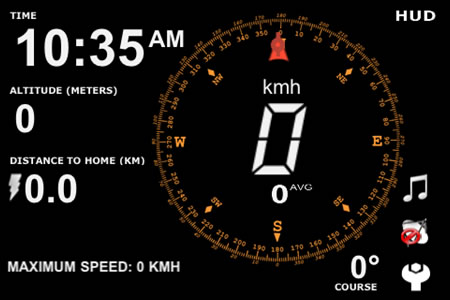
It is designed so that you can “reflect” it onto your windscreen so you can pretend your car is a fighter jet!
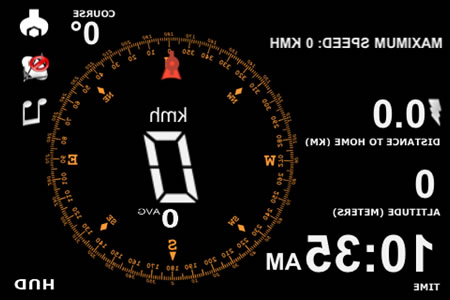
A bit of fun really.

Keeping the content on the VLE current, topical and updated can be a real challenge for many practitioners. It can be both time consuming and if you are new to adding regular additional content to the VLE it can be easily forgotten that you said to yourself that you would regularly add content.
Of course for virtually all subjects there are loads of other people out there creating new, current and topical content. On blogs and news sites, lots of relevant and interesting content is being created.
The key is to ensure that the learners are made aware of that content quickly and easily.
You can of course copy and paste links and content into the VLE, but this has to be done manually and sometimes you are busy or just plain forget…
So that’s where RSS comes in.
What’s RSS?
Really Simple Syndication!
What’s Really Simple Syndication?
I knew you might ask me that!
The simple explanation is that RSS allows for content to be easily used and shared (syndicated) onto other web sites automatically. As that content is updated, the RSS ensures that the updated content is made available on the other web sites.
When content sites (like the BBC) update their content, they update their RSS feed. This feed can then be “added” to the VLE ensuring that when the content (and the RSS feed) is updated, the content on the VLE is automatically updated.
So by adding RSS feeds into the VLE, you can easily add new and exciting content into the VLE that update automatically without either the practitioners or learners needing to do anything.
I should point out that a few learners may want to subscribe to the RSS feed direct using a browser or feed reader. They may for example have a feed reader on their iPad or other mobile device.
So how do you add an RSS Feed into the VLE?
Well different VLEs do it in different ways. On Moodle the easiest way is via the Remote RSS Feeds Block.
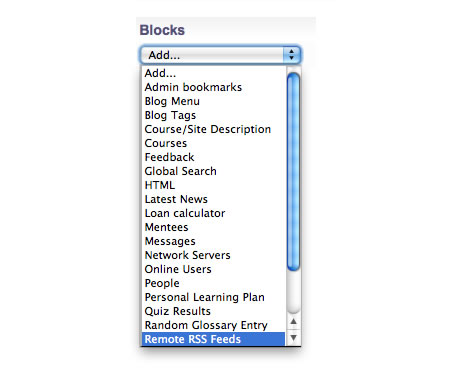
This then allows you to add an RSS feed (like the feed from this blog) into the VLE.
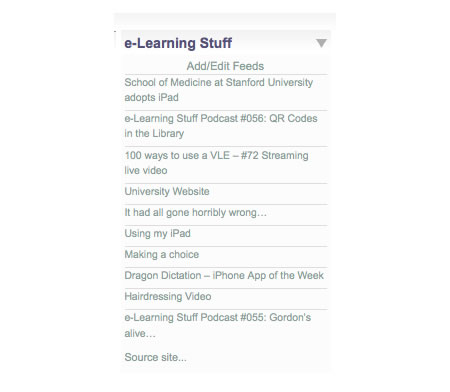
The next question is I know, how do you know where the RSS feed is?
Well the address for the feeds will look something like this.
http://feeds.bbci.co.uk/news/technology/rss.xml
https://elearningstuff.net/feed/
http://screenr.com/user/jamesclay/rss
http://audioboo.fm/users/2631/boos.atom
As you can see it’s not just news and blogs that have RSS feeds, you can also find RSS feeds for services like Screenr, Flickr and Audioboo.
So when you visit a page with an RSS feed on most modern browsers they will have an RSS icon.

Click the RSS icon to see the feed. Another way of describing an RSS feed is as content without the formatting.

In this example the feed is in the address bar.
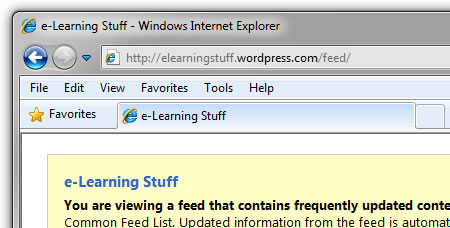
Copy that into the Add a news feed URL field on the VLE.

This will allow you to embed the RSS feed into the VLE.
What’s nice about the Moodle Embed RSS block is that you can add multiple feeds into a single block.
Adding an RSS feed to the VLE can be for many practitioners quite a complex and challenging task, mainly as it can be difficult for many of them to understand what RSS is and means. However once you get past that hurdle it is then a quick and easy way to add current and topical content to your course on the VLE automatically.
Photo source.
A few Music Technology staff at the college have approached me (as they do) and asked for some iPads to allow their students to create some music.
I have already posted some videos of others doing this.
This version of Survivor’s Eye of the Tiger was recorded completely using iPad applications.
Created by photographer Jordan Hollender and musician Scott Harris.
There are some very interesting iPad applications for music and musical instruments, something we might look into at a later date at the college.
Found via TUAW.
BBC News – iPhone App of the Week

This is a regular feature of the blog looking at the various iPhone and iPad Apps available. Some of the apps will be useful for those involved in learning technologies, others will be useful in improving the way in which you work, whilst a few will be just plain fun! Some will be free, others will cost a little and one or two will be what some will think is quite expensive. Though called iPhone App of the Week, most of these apps will work on the iPod touch or the iPad, some will be iPad only apps.
This week’s App is BBC News
Get the latest, breaking news from the BBC and our global network of journalists.
By downloading the BBC News app you can view:
- News stories by geographical region
- News by category including business, technology, entertainment and sport
- News in other languages including Spanish, Russian and Arabic
- Video including one minute news summaries to keep you informed on the go
- You can also personalise the app to suit your interests and download content for offline browsing
Free
The BBC News website is a wonderful resource and place for news on the web. The mobile version is okay too. Both versions do work on the iPhone and the iPad.
However the BBC News website does rely on Flash for video. The obvious solution would be, as other news providers have, build an App.
So the BBC did build a BBC News App for the iPhone and the iPad…
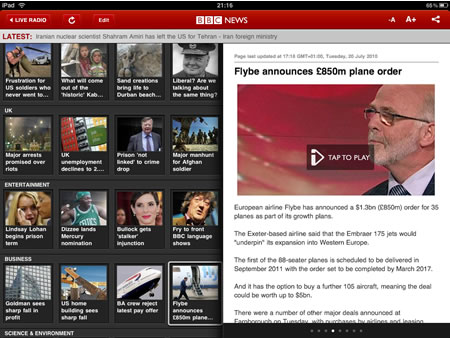
However…
UK media companies complained, so the BBC Trust said that the BBC News App would not be available in the UK, but they could make it available overseas!
Eventually after much deliberation and consultation the BBC Trust said that yes the App could be made available in the UK. Yay!
So what about the App itself?
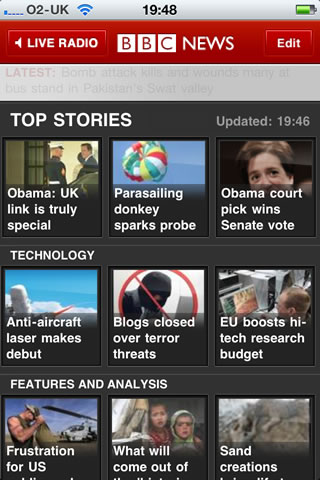
Basically it is similar to the website, the news is divided into sections.
The advantage over the website is that any video is in h.264 format so it plays! Not all the news and video though on the main BBC website is easy to find on the App though.
The user interface is much more iPhone like than the website so making it much quicker and easier to use.
This is a really good App, just a pity that it wasn’t available in the UK for so long…
I recently talked about how the age of mobile is now. In that post I talked about how I once had a Toshiba Libretto (long since sold on eBay).
Netbook News have posted that Toshiba have announced the release date of a new Libretto.
Toshiba have finally given a solid release date for the Toshiba Libretto W100 dual screen notebook “thing” over in Japan. Last we heard it would be arriving late August but the official word now is that the W100 will go on sale and ship on August 11 next week, so it’s certainly ahead of schedule
So currently Japan only, and no news if it will ever get to Europe. Lots of nice Sony devices have never arrived despite sucess in Japan, so I am holding out no hopes for the Libretto. The price is quite expensive too, about $1100.

What’s interesting about this device is that it has dual screens. One main screen like any other laptop and a touch screen that is used instead of a keyboard. Not sure how that would work in practice though.
I quite like the look of this, don’t think I will get one even so.
Bill Gates said at the recent Techonomy conference:
Five years from now on the web for free you’ll be able to find the best lectures in the world
His view is that young people will no longer go to university, but will get their “education” from the web.
He also blames BIG text books for many of the failings in the current US college system.
Read more on TechCrunch.
The problem with any kind of system that requires students to find the relevant content on the web is that it makes certain assumptions about learners and institutions:
I do like the concepts behind open education, free learning, openware, open educational resources, and all that is currently vogue in education and learning. However the real key is much more not about whether educational institutions are ready for these kinds of initiatives, but whether learners are ready, willing and able to take advantage of the opportunities on offer.

One of the things that the VLE can be used for is to capture the learner voice.
During inspection, Ofsted will look for evidence that providers have a learner involvement strategy and can show how learners are influencing the improvement of provision.
It provides an ideal location for learners to involve themselves in providing feedback and commentary on the provision in the college.
There are various tools that can be used for this, there could be an open discussion forum that allows learners to discuss the college and the provision. Though care must be taken in order for this open forum not to be abused and if moderation does take place that it is open and fair.
A closed discussion forum can also be useful in allowing evidence of discussion and feedback in one place. Within this kind of forum the only people who can see the discussion would be the learner and the college.
A further method of using the VLE would be to use something like the Feedback block on Moodle that allows users of the VLE to provide either a poll of some kind or more detailed feedback on the provision in the college.
The VLE will never be the only way in which colleges can capture the learner voice, however as one mechanism among many it can be useful tool.
Wonderful corporate video for the Polaroid SX-70.
Look out for the person photographing a picture in a book, tut, tut.
You Gotta See This! – iPhone 4 App of the Week

This is a regular feature of the blog looking at the various iPhone and iPad Apps available. Some of the apps will be useful for those involved in learning technologies, others will be useful in improving the way in which you work, whilst a few will be just plain fun! Some will be free, others will cost a little and one or two will be what some will think is quite expensive. Though called iPhone App of the Week, most of these apps will work on the iPod touch or the iPad, some will be iPad only apps.

This week’s App is You Gotta See This!
Ever been at a concert and wished your friends could experience the atmosphere with you? Ever been on a mountain top and wished your family could experience the same view? Ever thought “they’ve got to see this!” but simply taking a picture was not enough? Share your experiences with unique images taken in a unique way with your iPhone 4 (required) and “You Gotta See This!” Read on to learn how it works…
Simply start the recording in “You Gotta See This!”, swipe the scene up, down, left and right with the camera and share the image created by one of the five amazing themes on Twitter, Facebook or by email. Or simply save it to your camera roll for later presentation. (See a short tutorial video at our website.)
The app creates collages of images that you take by slowly moving the camera around in 3D space. The resulting images are somewhat similar to what is called “panography” or “Hockneyesque” (after the artist David Hockney).
“You Gotta See This!” uses the iPhone 4 gyroscope to determine the camera orientation while you record and positions the images it takes accordingly on a flat surface to create the spacial collages.
IMPORTANT NOTE: You Gotta See This! requires an iPhone 4. It will not run on iPhone 3GS, 3G and earlier models.
£1.19
I do seem to buy a lot of photo Apps, some I use quite regularly others I just use once or twice and others I kind of forget I bought!
So what of You Gotta See This!
This iPhone 4 App makes use of the camera and built in gyroscope to capture multiple images that are then placed in a collage. You can choose how the images are spread and then save the result to the iPhone or share via various social networking sites.

It’s a simple yet clever App that quickly creates an image that can be used to show off a place or an event.
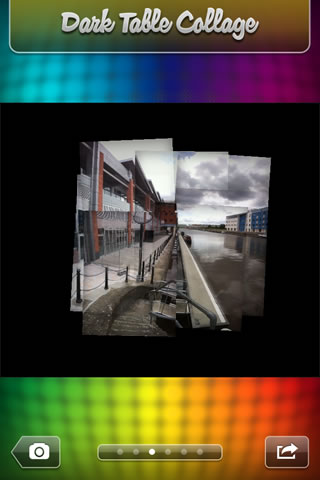
It must be remembered that this is not a Panorama App.
Stitched panoramas are not seamless. This is by design. ‘You Gotta See This!’ is not a panorama app. The purpose of the app is to create what is called panorama collages or panography.
It creates collages rather than panoramas. There are quite a few Panorama Apps in the iTunes store.
I do quite like this App, it is easy to use and creates a fun effect and the results can be used on websites, the VLE, presentations, student work, etc…