
Ancient city of Pompeii added to Google Street View

Google has added Pompeii to its Street View application, allowing internet users to take a 360-degree virtual tour of the ancient Roman city.

Read more

Google Street View can allow Travel and Tourism students a different view of tourist attractions. They may want to consider how Google Street View can be used as training materials for staff in tourist attractions.

Of course Google have also now expanded Street View to cover 95% of the UK.

e-Learning Stuff Podcast #039: Do you like books or do you like reading?

Do you like books or do you like reading? Are you a fan of e-Books? What about e-Book Readers? Will devices such as the iPad and Kindle change the way we feel about books and what impact will these new devices have on learning.

With James Clay and Chrissie Turkington.

This is the thirty ninth e-Learning Stuff Podcast, Do you like books or do you like reading?

Download the podcast in mp3 format: Do you like books or do you like reading?

Subscribe to the podcast in iTunes

Shownotes

Beware the big bill…

BBC reports that the EU cap for downloading data doesn’t come into effect until the 1st July.

The consumers’ association Which? is warning that people going abroad with smartphones can still face huge bills if they connect to the internet.

By 1 July, new rules will come into force in the European Union which will cap bills for downloading data.

But, until then, people travelling in Europe could face unlimited bills.

So beware the big mobile data bill if you travel to one of the foreign conferences…

A five stage model for using the VLE

VLEs have a huge range of functionality, a lot of criticism often laid against the VLE is that some users are not aware of those functions.

There is often too much information about the VLE for new users who may not understand many of the concepts or have the skills to fully utilise the functionality of the VLE.

Stage One

Upload to the VLE the course resources, handouts, assignments, scheme of work and links.

Now this is something that is often laid against VLEs as why they don’t work as they are merely used as respositories of materials. However practitioners who are unfamiliar with the VLE often need a starting point. To throw the full functionality of the VLE at a practitioner who may be apprehensive about using the VLE and unsure of the benefits, is similar to throwing a learner driver onto a Formula One racetrack!

Stage Two

Add more content try and put up new content at least weekly.

So then you’ll get asked what content should you put up. Well a lot depends on how the practitioner delivers learning, but could include:

  • All the pages from IWB sessions from the classroom;
  • Videos, either embedded, or uploaded, very easy to embed videos from services such as YouTube or Vimeo;
  • Links to e-Books in the virtual library or online libraries;
  • Audio recordings, these could be by learners or by practitioners, an overview of the lesson, topic or subject;
  • Learning objects from Jorum or the NLN.
  • Images and photographs.
  • RSS feeds that learners could subscribe to.
  • Photographs of paper based exercises, if you for example use flip charts for brainstorming sessions, taking photographs of them with digital cameras and uploading those images can make it easier for learners to remember what they did.
  • Don’t forget text!

Stage Three

Add interactivity to the course through the use of quizzes and feedback. Quizzes are often part of the core VLE system, sometimes external quizzes can be uploaded.

Stage Four

Add engagement by learners through the use of discussion forums. Online discussions can engage learners in a variety of learning activities.

Stage Five

Embedding.

By stage five usage of the VLE will be pretty much embedded into the delivery of the course. It will be much easier for the practitioner to offer the course through a blended approach and be more able to deliver learning in times of closure (say through snow).

100 ways to use a VLE – #51 Course News

We often have to tell learners many different things at different times.

What time the lessons are? What assignments are due and when? When there are special events, guest speakers, additional support? How to get an extension on that essay? Room changes, teacher changes… you know the kind of thing.

We may send them letters, give them notes, tell them verbally in the classroom, mention it to them in the corridor, e-mail them, post it to Facebook or Twitter, etc….

We may think we’ve told them but they may have been away that day, not listening or plain just forgot!

In order to ensure that not only they know what you’ve told them, but also ensure you know what you’ve told them, it makes a lot of sense to create a virtual noticeboard on the VLE for all the news about the course. And of course in following years you have a record of what news you posted in the previous year.

Using social media

Today I posted a couple of videos to the blog to demonstrate how quick and easy it is to use social media tools to create content and how RSS can be used to push that content to other sites, devices and even the VLE.

People have often said to me that they don’t have the time to engage with social media. Personally I think we are at the stage where you can’t afford not to. At the conference I was at today once more people were saying where do you find the time?

As I have said many times on this blog one of the core reasons I engage with social media is that it saves me time.

A recent example was when I was tasked with finding a particular e-safety video. A quick Google search did not turn anything up, so I posted to Twitter and was well pleased with the number and variety of responses I got.

Other examples include, posting photographs to Flickr, this means when someone asks to see photographs of the college or a particular piece of tech, then a quick e-mail and link will often suffice. More importantly as people know about my Flickr account they will go and look there without me even needing to worry about being involved.

The same goes for this blog, a place for me to set out my opinions, views and news. People can see what I am thinking and my recommendations, again without me needing to do too much once I have written the blog entry. Likewise if someone asks me for information, if I already have it on my blog, this can save time. Just a quick note about writing, one of the challenges that many people find is, finding the time to write or what to write about. I have found that it is easier to write lots than it is to write a little. This very blog entry has probably taken about twenty minutes, five minutes on the Tube on my iPhone and another fifteen minutes on the train on my laptop (used Evernote to transfer the text).

Another service I use is Delicious, a service that allows me to bookmark websites, a great way of organising my favourite websites. So if you want to know which websites I am looking at, Delicious allows you to do that.

Social media has the potential to make life easier and better, and like any tool, device or service, excessive use is not what it is about, it is about using the service to make life easier and better.

National Rail Enquiries – iPhone App of the Week

Update: Since this blog post was written, this app has been renamed UK Train Times and another app by a different company has been released which is called National Rail Enquiries. To add to the confusion the UK Train Times icon has changed, whereas the National Rail Enquiries app has a very similar (well identical) icon to the old icon of UK Train Times. Though National Rail Enquiries is free, having tried both, I do think UK Train Times is a much better app and you don’t get the ads you get on the free app.

National Rail Enquiries – iPhone App of the Week


This is a regular feature of the blog looking at the various iPhone Apps available. Some of the apps will be useful for those involved in learning technologies, others will be useful in improving the way in which you work, whilst a few will be just plain fun! Some will be free, others will cost a little and one or two will be what some will think is quite expensive. Though called iPhone App of the Week, most of these apps will also work on the iPod touch.

This week’s App is National Rail Enquiries.

National Rail Enquiries provides complete journey planning for journeys across the UK National Rail network and live departure information for all National Rail stations in the UK. This is an official application from National Rail Enquiries, with fully-licensed and accurate real-time information.

£4.99

For many users a 99p App is too expensive, this is a five pound App, so is it worth it? If you travel by train then in my opinion it is.

A simple example, I know that this App helped my college secure £40,000 of funding, so well worth the £4.99 I paid for it.

Really?

Well, let’s just say it certainly helped.

What’s the story?

I was on my way to London to be interviewed for a funding proposal we had put in.

The interview was at 11.00 and I had my train ticket and was intending to catch a train from my local station and arrive at 9.45 giving me just over an hour to get to the venue for the interview.

So there I was waiting…. waiting…. waiting…

I got out the iPhone and checked National Rail Enquiries.

It said that the train was running very late and would not be going to London! Confused I was to begin with. A few minutes later the “train” arrived. It wasn’t the big High Speed Train I was expecting, but a smaller local train. As it arrived the driver lent out the window and shouted that this was the next train to Bristol. What had happened was that the original London train had broken down and they were using this as a replacement. Arriving in Bristol later than expected and on checking the departures form Bristol on the iPhone via National Rail Enquiries, I knew that if I caught the Manchester train I could change at Bristol Parkway and catch a London train from there. This I managed to do with literally seconds to spare after running across the station; and eventually I was in London by 10.00! Only 15 minutes later than originally planned.

If I had relied on finding out trains from departure boards or information kiosks I would have been much later into London and would have been late for the interview.

Would it have made a difference? Don’t know for sure, but I am glad I was there in plenty of time.

So what about the App itself?

Simply it is a portable station display board. It tells you the departures and arrivals from any station on the national rail network. It can also tell you the whereabouts of your train, if it is running late or worse cancelled.
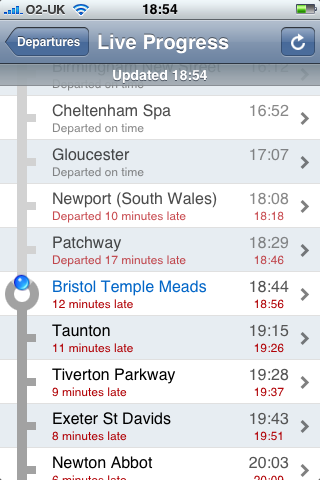
It can also be used for journey planning, though there are other websites that do that for free. For the immediacy of catching trains now, it works really well.

If you travel anywhere by train, then this is one useful app. True you can find the information online for free, but the user interface of this app beats most websites interfaces, which have been designed more often then not for use on a computer and not on an iPhone sized screen.

news and views on e-learning, TEL and learning stuff in general…