This is the age of the train…

About once or twice a month I find myself on a train travelling to some far flung exotic location, like London, Leeds or Birmingham! Though more often then not it is the First Great Western train to London.

As I travel I like to try and get some work done in the time I have available. One key aspect of my job is communication and for that I need a decent internet connection. First Great Western, unlike some other train operating companies does not provide wifi on their services.  So what is one to do?

I have over the last few years used different ways of getting online on the train, all of them though have involved 3G.

Well recent tests show, as reported by the BBC that:

Mobile broadband speeds are improving but coverage is getting more patchy, suggests a survey.

The survey was…

…carried out by analysts from comparison site Broadband Genie, the annual test involved using dongles from UK mobile operators during a long train journey.

Interestingly…

T-Mobile came out top in the tests because it racked up higher speeds and proved more reliable during the tests.

So how do I use 3G on the train and with what services?

My original way of getting online was with a 3G PC Card from Vodafone, however this went once I changed jobs back in 2006.

I then had an 3G Dongle from Vodafone. This actually worked quite well, some dropped connections, but once within a 3G area, a good speed both up and down. I did notice though that more often then not, I could not get 3G speeds and the connection dropped to GPRS speeds. The main problem with the dongle is that it sticks out and on cramped trains this can be problematic.

After getting a T-Mobile contract phone (with Walk’n’Web Plus) I was able to use the phone as a tethered Bluetooth modem to connect to the internet at 3G speeds. The main disadvantage with this process was the impact that both Bluetooth and 3G had on battery life of the phone. The upside for me was a more reliable and faster connection.

Using a Nokia N95 I was able to use JoikuSpot on the Nokia, this shares the 3G connection over WiFI. This has one key advantage JoikuSpot allows more than one device to connect. A simple idea which just works. Basically it turns my Nokia N95 into a wireless hotspot, allowing me to connect multiple wireless devices to my phone’s 3G internet connection. I start JoikuSpot and once started I can then join the wireless and surf the internet. This was really useful allowing both my laptop and an iPod touch to connect to the internet using the single 3G connection. The Light version only really does internet, it doesn’t allow e-mail or https for example, whereas the Premium version does; this is the reason I upgraded to the Premium version and very pleased I am with it. The main downside is the impact it has on the battery life on the Nokia N95, down to less than four hours, often less!

I used this process for a fair amount of time, made easier when First Great Western introduced power sockets on their trains. Swapping over to the Vodafone 3G dongle if the signal failed or was weak.

I have recently tried a couple of other options, the first was not as successful as I would have hoped and that was the MiFi.

So what’s the MiFi? A battery powered 3G wireless router. Using a 3G SIM it would connect to the internet and then allow  up to five wireless clients to connect and share that 3G connection. With a four hour battery life, could be charged via USB and about the size of a credit card. Using a SIM from a Vodafone 3G USB dongle it was very simple to set up and configure and I would recommend that you use the details from Ross Barkman’s excellent website on connection settings for GPRS/3G to save having to work out where the information is on your providers’ website.

However one of the downsides for me was that though the MiFi worked a treat in stationary location (say at a conference) it was less satisfactory when travelling by train. What seemed to happen was that when the MiFi lost its 3G connection, as does happen on a train, it would switch itself off. As a result you had to check now and again and see if it needed turning back on. This also had an impact on the WiFi connection on my Mac laptop, which even when the MiFi was back on would not re-connect back to the MiFi wireless. In the end the experience was so unsatisfactory that I stopped using the MiFi on trains as a wireless router. The nice thing about the MiFi is that it will work as a USB 3G dongle, so you can use the MiFi in your event and meeting as a wireless router and revert to the dongle mode when on the train.

I have recently switched from the Nokia N95 to the Google Nexus One that runs the Android operating system. There is no JoikuSpot for the Nexus One and I am not 100% on how or even if it is possible to use it as a Bluetooth modem. One thing I have tried is PDAnet that allows me to use the Nexus One as a tethered 3G modem.

One thing I have noticed though is that though my 3G connection from Bristol to London is pretty good, travelling on the Voyager trains from Bristol to Birmingham, the signal is really poor.

I initially thought this was just down to the route, but I have heard that the main issue is the construction of the train and the metallised windows. This basically blocks the 3G signal!

I have used various methods to get online on the train and though each have their disadvantages and advantages, I think I prefer the 3G dongle, though the wifi methods are neater.

100 ways to use a VLE – #13 Keeping a reflective journal

Learners always reflect on their learning, whether they learn or act upon that reflection is a different matter.

By keeping a reflective journal, a learner can record their reflections in a journal they will then be able to review their reflections and set themselves targets. They will then be able to improve their performance and succeed on their programme of study.

One of the most obvious places to keep a reflective journal is in a paper journal. However a paper journal requires every journal entry to be handwritten. By placing the journal on the VLE, the learner suddenly has much more choice when it comes to recording their reflections. They can type in text, record an audio file or upload a video. The choice allows learners to record their reflections on their studies at a time and place to suit them. If they want to quickly type something up they can, if they want to quickly record something using a mobile phone, they can and upload later.

Using a VLE doesn’t stop learners handwriting their reflective journal, very easy these days to use a TabletPC to write, or more simply, write it out on paper, photograph it and upload. Digital cameras and most cameraphones are now more than adequate to photograph text and for it to be readable on a screen.

Learners can also tag their journal entries, making them easier to sort and search later.

So why put it on the VLE?

Well reflection can be an individual process, but sometimes learners may want to share their thoughts, and read the thoughts of others. Tutors may want to be included in the process to allow them to better judge progress been made on the course. Using a VLE allows these users to engage with the reflective process.

Another option is to use third party tools and embed them into the VLE, this has the advantage of allowing learners to maintain their reflective learning journal once they have left the college.

Reflection and review of progress is an important part of the learning process, by using technologies like the VLE, we can ensure that the reflection is available to more if required and less likely to be lost or forgotten.

Picture source.

Increasing staff engagement with the VLE

A couple of months ago on the blog I posted a five stage model for using the VLE.

There is often too much information about the VLE for new users who may not understand many of the concepts or have the skills to fully utilise the functionality of the VLE.

It would seem that as would be expected others across the sector who use VLEs have come up with similar models or strategies.

Richard Booth and Dave Shearan from Shrewsbury College have devised ‘Moodle Maturity’ – a self-assessment process that enables tutors to evaluate their current position with Moodle, and how they can progress.

Their self-assessment consists of the following criteria:

  • Presence on Moodle
  • Course information
  • Layout and appearance
  • Course resources
  • Communication
  • Assessment
  • Student interaction

This is a great way of not just getting staff to assess where they are in using the VLE, but engaging them further by outlining the potential of the VLE.

There are many ways to use a VLE to enhance and enrich learning. Staff don’t always know what can be done or how it can be done. I have certainly come across this in my college, for example, I know one team that weren’t aware of how the assignment submission process worked in Moodle and as a result were creating themselves headaches and extra work trying to devise their own process. Practitioners aren’t always aware of how all the tools work on the VLE, and despite promotion or case studies don’t necessarily become aware of the potential of the tools. A self assessment process like this allows the practitioners and  teams to assess their progress in using the VLE to support, enhance and enrich learning.

See the full case study on the Excellence Gateway.

Jorum Learning and Teaching Competition 2010

Do you create open educational learning and teaching resources? If so, the Jorum Learning and Teaching Competition is for you.

Following on from last year’s successful competition, which resulted in six highly creative and valuable resources winning places, we are pleased to announce that the 2010 competition is now open and accepting entries.

The competition runs again in conjunction with the ALT-C conference in Nottingham, 7-9 September, and the six winning entrants will have the opportunity to present and showcase their resources at the conference.

The panel of judges will be looking for exciting and innovative resources created under a creative commons licence, and entries will be judged against a set of criteria – appropriateness, engagement, effectiveness and reusability.

We have engaged another great range of judges this year, including Russell Stannard and James Clay, who are both advocates of sharing resources openly.

Final judging will also take on a new twist this year, as the judges will be asked to rank their top ten resources, which will then be placed on the Jorum Community Bay to allow for a public vote – so never mind The X-Factor – vote for your choice of resource to win!

You will be able to vote from 19th August, and details on how to vote will be announced nearer the time.

There are three cash prizes up for grabs, along with three commended awards.

Closing date – Friday 25th June 2010

Full entry details on the Jorum Website.

Is the iPad a real game changer for education?

So is the iPad going to change how we use learning technologies in education?

Graham Brown-Martin thinks so…

The iPad marks a paradigm shift in mobile computing that until you’ve lived with one for a few days is difficult to grasp.

He also predicted that something like the iPad would replace desktops and laptops back in 2006!

At the Edinburgh Interactive Festival in 2006 in front of a large audience of hard core gamers with a penchant for overclocking their desktop PC’s and pimping them with neon strips I suggested that by 2010 desktop computers would be all but dead and that laptops would be on death row. Mistaking shock and disbelief for interest I was emboldened and suggested that much of our data would also be stored on remote servers with applications being remotely distributed.

Read (and watch) the rest of this interesting article.

What do you think? Is the iPad going to change education?

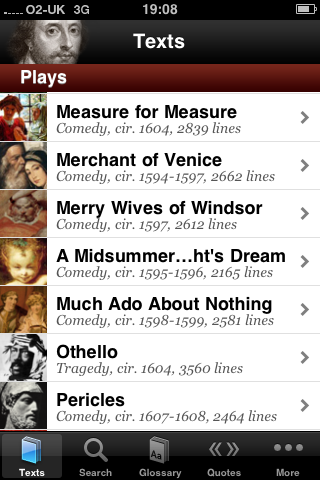
Shakespeare – iPhone App of the Week

Shakespeare – iPhone App of the Week

This is a regular feature of the blog looking at the various iPhone Apps available. Some of the apps will be useful for those involved in learning technologies, others will be useful in improving the way in which you work, whilst a few will be just plain fun! Some will be free, others will cost a little and one or two will be what some will think is quite expensive. Though called iPhone App of the Week, most of these apps will also work on the iPod touch.

This week’s App is Shakespeare.

A cooperative project between Readdle and PlayShakespeare.com, the free Shakespeare application puts the complete works of William Shakespeare literally at your fingertips.

Free

This is a nice App that incorporates the complete works of Shakespeare.

All of his plays and sonnets in one iPhone App, accessible and searchable.

So reading books on the iPhone is not the best way of reading books according to most people I have spoken to. However I never see books on the iPhone as a direct replacement for paper books, but as an enhancement and enrichment of the printed book.

For example, imagine a learner is studying Macbeth (or the Scottish Play); more than likely they will buy a printed copy of the play to use for their studies, one they can read, refer to, annotate and make notes in. Where they will find the Shakespeare App useful is having immediate and easy access to the complete works to compare writing, characters or other plays.

Reading books on the iPhone is never going to replace the printed book, but books on the iPhone (and the iPad) is not about replacing the printed version, but providing access to books at a time and place to suit the reader.

A enhanced version Shakespeare Pro with added features is also available.

Photo source.

You can order it now…

After much much waiting, Apple’s game changing iPad is now available to pre-order in the Apple store in the UK. Though it won’t be delivered until the 28th of May.

If you are thinking of getting an iPad, then you might want to consider pre-ordering rather than waiting for a while or waiting until the 28th, especially if you want to get one pretty much on or just after the release date.

As you might expect the iPad is currently the number one selling item in the Apple Store in the UK. If the same thing that happened in the US happens here then you may find it will have “sold out” and you will need to wait. I suspect that will certainly be the case with certain models.

So what about which model to buy?

This is quite a complex question, you need to consider how and where you will be using the iPad. If using just at home and in the office then the WiFi version will probably suffice. If you travel a lot, on the train, at conferences and events then the WiFi + 3G model may be a better bet. If you are going to be using more than just the iPad out and about, say take your laptop with you too, then you might want to consider a MiFi and just get the WiFi iPad.

One of the reasons for getting the 3G model is that it comes with GPS whereas the WiFi model doesn’t. If you are keen on using location services on your iPad, then the GPS is a must. This is probably less of an issue for myself as I do have the iPhone 3GS so that has the GPS capability that I might need. That is probably a key factor on which model is if you have an iPhone or not.

So what about size? 16GB, 32GB or 64GB?

I initially did consider getting a 16GB model as that should be enough for most activities, or so I thought. One thing that is coming out from the US is that iPad Apps are much bigger than most iPhone Apps and it is expected that they might get “bigger”. You can also watch HD movies on the iPad making use of the bigger screen and they are bigger than your average iPhone movie file. So the next consideration is 32Gb, but my first approach with any storage is think about what I might need and then double it. So 64Gb is probably the idea size for me.

I am pleased to see that the iBooks App and Bookstore will be available in the UK on the 28th and looking forward to reading a book on the iPad.

Will the iPad be the game changing device that I think it will be?

No one knows for sure, but it will have an impact regardless.