Ashen

Was it only a couple of weeks ago I wrote a blog post entitled “million-to-one chances happen nine times out of ten” in that I wrote about the impact of snow closures on educational institutions. I did write…

Even if it doesn’t snow really badly next year, other things may happen that result in the physical closure of the educational institution. It could be floods, high winds (remember 1987), flu or similar viral infections, transport strikes, fuel crisis, anything…

Over the last week we have seen not so much closures, but certainly some disruption due to the volcanic ash from Iceland and its impact on air travel.

Hitting the UK as it did at the end of the Easter break, many learners and staff were stranded overseas with no way of getting home.

As with the snow, little mention has been made of using technology to mediate the impact of the closure of UK airspace. One exception, BBC News reports on one teacher who is using a webcam to continue teaching despite been stranded in Spain.

A teacher from Oxfordshire stranded in Spain because of air restrictions is using an internet cafe to take lessons. He is using a webcam to make sure that his business studies A-Level students do not miss out on lessons.

Interestingly in the same article…

Meanwhile, 16 teaching staff from King Alfred’s School in Wantage have been left stranded because of the ban on flights. The school said it on its website that it would face “severe staffing shortages” and would only open for certain year groups during the week.

So it would appear that not everyone is coping with the disruption.

In the comments on the recording of our debate on this issue at the Plymouth e-Learning Conference was the following comment:

Irony time: In my mailbox this morning “Technology Enhanced Learning Workshop cancelled due to speaker unable to get a flight”. Missed opportunity for some “Technology Enhanced Learning” me thinks? The Sky is broken so use Skype?

I am aware of a few people who are stranded overseas, but are in fact continuing to work using e-mail and VPN to maintain contact and communication with colleagues back home. Time zone differences are causing a few issues, and I also know that many people rather than stay and work are travelling and trying to get home.

As far as I am aware no schools or colleges have closed because of the ash, but certainly some classes have been cancelled or disrupted due to the ongoing ash cloud issue.

Learning technologists have to be careful to ensure that they don’t appear smug about the role technology can play when we have issues such as snow and ash, but we as a community need to work with colleagues to ensure that when disruption happens we don’t worry so much, we keep calm and carry on…

Picture sources here and here.

Scrabble – iPhone App of the Week

Scrabble – iPhone App of the Week

This is a regular feature of the blog looking at the various iPhone Apps available. Some of the apps will be useful for those involved in learning technologies, others will be useful in improving the way in which you work, whilst a few will be just plain fun! Some will be free, others will cost a little and one or two will be what some will think is quite expensive. Though called iPhone App of the Week, most of these apps will also work on the iPod touch.

This week’s App is Scrabble.

Scrabble spells major F-U-N on your iPhone! Experience the realistic look and feel of Europe’s favorite board game.

£2.99

I recently discussed gaming and learning with Ron Mitchell and Kev Hickey in one of our podcasts.

Last week saw the Game Based Learning Conference, we didn’t go, but that didn’t stop us from talking about using games for learning and using gaming devices to enhance and enrich the learning process.

At the end of the recording we asked what was our favourite games, Scrabble came up twice!

Scrabble is a word game in which players get points for playing words on a board in a similar manner to a crossword.

Research from various universities has demonstrated that if learners play word and number games this can improve their literacy and numeracy skills. AS reported by The Telegraph:

Scrabble is just as good at improving mental sharpness as a Nintendo DS video games console and a copy of Dr Kawashima’s Brain Training, say researchers from the University of Rennes, Brittany.

Just on that article and research I have to admit I have always found it much easier to get 17 year olds to play games on the Nintendo DSi than I have getting them to play Scrabble!

Having said that I have “caught” learners in our Library playing Scrabble on the computers. I didn’t know if I should throw them off or congratulate them.

Scrabble requires players to use both word and number skills to maximise the points they earn, so has as demonstrated by the research to improve literacy and numeracy.

Scrabble on the iPhone can be played solo or with other players over wifi.

I quite like playing the game, even if the iPhone cheats and uses words that a) no one has ever heard of and b) no one would ever use!

When waiting for a train, or on a train, or to pass a few minutes away, Scrabble is a nicely executed iPhone game.

Promoting e-resources

In the past we had books, journals, magazines and newspapers in our institutional libraries. Places full of print media. We had individual desks and small tables.

Then computers arrived. In the main so that learners could use them to type up stuff or use “educational” software.

Then the internet arrived and lots of things changed.

Today the learner not only has access to all the traditional print media, they also have access to all the resources available online.

The Excellence Gateway has another useful case study on how promoting resources can increase usage of the library.

Hull College has increased library usage through the promotion of e-resources. The College is now able to cater to an increased number of learners and also tailor services to different types of learner, such as distance or part-time students, or learners with disabilities. e-Resources have made the library service more responsive to the needs of both learners and staff within College.

We have undertaken a recent review of our own promotion of e-books and have started to undertake new and exciting promotional activties to increase usage of e-books by learners and staff.

Key things we are doing include:

  • Letting staff know what new resources and e-books there are. We are using different channels, print publications, e-mail, VLE and importantly face to face conversations.
  • As well as letting them know what is available, we are also promoting how they can use the resources to support teaching and learning.
  • We are using similar methods with learners, using print, e-mail, SMS, VLE and social networking.
  • In the libraries themselves staff are ensuring that when learners ask for particular resources that as well as showing them the print publications they are also showing the learners relevant e-books and online resources.
  • We have also ensured that all the e-books we have are in our catalogue.

Having digital and online resources is not just about getting them or getting access to them, but also ensuring that learners and staff know about them.

How do you promote e-resources to your staff and learners?

In at number one!

Those of you who read the blog of a regular basis will know that as well as the blog I also (with a group of e-learning friends) record a podcast.

You can listen to the podcast on the blog, there is a simple Flash based player, so you don’t need to download it to listen to it.

You can download the mp3 file from the blog which then allows you to transfer it to a mp3 player, an iPod, burn it to CD, listen to it on your computer, or on your phone.

You can also subscribe to the podcast, either through the blog RSS feed (which incorporates all the blog postings and media files uploaded) or through the podcast RSS feed. You can subscribe via applications such as iTunes, Juice or your browser.

Finally you can subscribe to the podcast through the Apple iTunes Store. I submitted the podcast to the iTunes Store in October 2008 to the Educational Technology Podcasts section of the store.

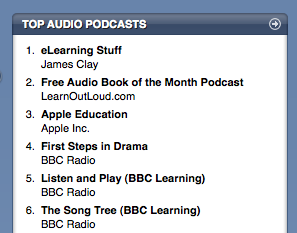
It is proving reasonably popular and the podcast is generally always in the top twenty, quite pleased though today to see it is in at number one!

Now if you go and look I suspect we may have dropped a fair few places, the top podcasts list does change on a daily basis dependent on how many subscribers you have and how many new people subscribe.

I am working on a workflow document which describes the process I use for recording the podcast, it is currently a work in progress but you can view it here.

Since Christmas I have been putting an episode out every week, which is a lot more challenging than you would think

Always interested to hear about topics people would like us to talk about or even those who would be interested in taking part.

e-Learning Stuff Podcast #043: Keep Calm and Carry on

Recording of the Keep Calm and Carry on debate at the Plymouth e-Learning Conference.

During the Second World War, the British government sought to use appropriate communications tools to convey policy to the populace, whether via posters, newspapers, radio, or legislation. Resource restrictions meant that there was not always a free choice in which to use.

Sound familiar? It should.

As James Clay indicated in a blog post on January 10th snow, floods and swine flu all have the potential bring our physical campus to a halt, for valid health and safety reasons. Institutions announce via local radio and the web that they are closed to students and staff. In most institutions such crises effectively bring the entire workforce to a halt. Despite the digital options available, the word ‘closed’ implies that no (formal) activity will take place, and sends the message to staff and students that they do not need to go to work, or even do any work, even if they could.

Culturally, most institutions do not incorporate online or virtual learning into everyday working cultures, at any level: management, staff or students. Those who do not routinely use digital options can’t see that closing the physical institution need not have a significant impact on the business of the institution, if that business can be carried out at home or online. The issue is not to focus upon contingency planning, but to focus on changing the way people work when there isn’t snow and changing the way people think when there is. Although this debate will centre largely upon Web 2.0 methods, it will take an outcomes-focused approach, rather than a tools focused approach, in line with William Morris’s quote “Have nothing in your house that you do not know to be useful, or believe to be beautiful”. We consider what is necessary, not just in times of crisis, but in implementing everyday e- practice to meet learning and teaching needs.

With a focus upon communities rather than machines, and a recognition that no tool offers “one size fits all”, each panellist will focus upon a specific relationship, specifically ‘Institutional Representation’, ‘Collaboration’ and ‘Teaching Purposes’. What institutional cultural factors will need to be addressed? What do electronic communications approaches offer that previous methods haven’t? What drawbacks are acknowledged in the use of each with regards to the outcomes required? Which tool is most appropriate for the outcome required, and what are its pedagogical purposes?

With James Clay, Bex Lewis and Carolin Esser and of course delegates from the Plymouth e-Learning Conference.

This is the forty-third e-Learning Stuff Podcast, Keep Calm and Carry on

Download the podcast in mp3 format: Keep Calm and Carry on

Subscribe to the podcast in iTunes

Shownotes

100 ways to use a VLE – #78 Taking a vote

Whoever said education was a democracy?

Most of the time learning is not a democracy, practitioners tell the learners what to learn, when to learn and how long they have to learn.

However over the last few years, the Learner Voice has become more important and relevant to the learning experience of many learners.

…learner involvement covers a wide variety of practices that seek to enable, equip and motivate learners to voice their views and actively shape their learning…

Developing a Learner Involvement Strategy, LSC, 2007

One way in which you can involve learner views is through a vote and many VLE systems now have voting systems built in or can be downloaded.

One such system is EasyVoter for Moodle.

No more Ning

No more Ning

Well that’s not factually correct, what the title should be is “No more free Ning”.

It would appear that Ning are phasing out the free service to allow them to focus on those customers who pay for the premium service.

So, we are going to change our strategy to devote 100% of our resources to building the winning product to capture this big opportunity.  We will phase out our free service.  Existing free networks will have the opportunity to either convert to paying for premium services, or transition off of Ning.  We will judge ourselves by our ability to enable and power Premium Ning Networks at huge scale.  And all of our product development capability will be devoted to making paying Network Creators extremely happy.

A mistake I think on Ning’s part.

Now I am not opposed to paying for premium services, if I like a free service and the Pro or premium version offers more and I perceive it as value for money I will pay.

On this blog for example I pay for the VideoPress and extra storage. I have a Flickr Pro account. I pay for the premium version of Remember the Milk. If I reached the limits I would probably pay for the premium version of Evernote.

If there are limitations on the free account or added features on the premium account then I will happily pay out money. It would appear that many others do the same.

However in all the examples I have given, as well as the paid Pro version there is also a free version. People will try out free services, if they like them and want the added functionality they will upgrade.

As Ning have decided to phase out the free version, I think this is where they are making a mistake. With no free version, you will find that key individuals won’t try the service and upgrade later… Well maybe Ning is already well known enough that this won’t be an issue. Hmmm I am not so sure. Anyone remember Gabcast? Originally a free service, went paid for only and now having checked recently it is hardly used compared to services such as Audioboo or iPadio.

Without a free version that can be upgraded I wonder if people will start using Ning or even continue using Ning if other services offer more for the same sort of cost.

So now I need to think about what to do about the Ning sites I have created. If there is a demand (and I can get funding) I may upgrade to the premium version, but I know this won’t be the case for all of the sites I have.

So what alternatives are there?

One that is been talked about on Twitter is Elgg.

Elgg is open source social networking software that provides individuals and organizations with the components needed to create an online social environment. It offers blogging, microblogging, file creation and sharing, networking, groups, news collection using feeds aggregation and a number of other features.

Wikipedia

Though of course though the software is free (open source) you will need a hosting service and the sort required for Elgg isn’t going to be free. If you are lucky your institution may have the capacity to host an Elgg service for you.

I have mentioned Crowdvine before on the blog, it was one of my top ten tools in 2008. I have used it at conferences like JISC and ALT-C.

As well as their premium services Crowdvine also have a free version.

CrowdVine builds simple and powerful social networks for events and groups to help people connect and meet. Use us for your conference, event, or organization.

Interesting though that JISC moved from Crowdvine to Ning for JISC 2010. Wonder what JISC will use for JISC 2011?

Another one that I have found, but not used is SocialGO.

SocialGO allows you to build a custom social network, whether you are a beginner or a seasoned developer.  No software, hosting or coding required, as our team offers full support for your social networking site.

As with Crowdvine there are cost plans and a free plan.

So Ning is no more, well the free Ning is no more.

Does it really matter that much?

I have  talked before about inappropriate advertising on services and why sometimes a paid for service may be better.

One of the issues with using any free Web 2.0 service is that they may not be here forever. Gabcast is no longer free, but Audioboo is. Jaiku is pretty much dead, but Twitter is alive and well. Etherpad has gone, but iEtherpad is up and running.

At the end of the day this is not about a service disappearing or now charging, it’s much more about how when using these services you don’t think about long term, but have the capability and the technical knowledge to move between different services as and when they become available.

Use what is now and in the future use what is then.

Just remember teachers are like starship captains…

Providing any e-learning service to staff in an institution is a challenge.

Providing a service that meets the varied needs of staff in an institution is also a challenge.

Providing a service that exceeds the expectations of staff in an institution is sometimes an impossible challenge…

…unless you manage the (sometimes) unrealistic expectations of staff.

I remember many years ago in my previous role at the Western Colleges Consortium (WCC) explaining to key stakeholders about how long it would take to process a course creation request on the shared VLE. The process was in place to remove the burden of the task from staff in the partner colleges, ensure that it was only visible to the relevant staff and learners and had some content in it! Once created it was handed over to the staff to add activities and more content.

I recall announcing that we would ensure that all requests would be   fulfilled within seven days.

But the cry came out…

“This is the internet, it’s available 24/7, why can’t you just do it there and then!”

The issue was not about doing it there and then, but managing expectations. We needed to be realistic based on the staff available to complete the requests, holiday, conferences, and levels of requests.

Usually we would complete requests the same working day, however if we said we would do a request within one day and we fulfilled that request in two days, we would have been seen to have “failed”.

By setting a service agreement of seven days, say we completed the request within three days we would be seen as a miracle worker!

It was all about managing expectations.

If your users expect you to complete something in seven days and you take less than seven days then you have exceeded their expectations. Likewise if you say within 24 hours and it takes 25 hours, you have failed in their eyes and not met their expectations.

Realistic service level agreements need to be in place to ensure that you meet and exceed expectations from users. The agreements you have in place should be based on staffing and other resources.

You can of course review and evaluate the agreements over time to ensure that they continue to be realistic, fair and working.

So don’t say within 24 hours and seen to be continually failing, set a level of five days and be seen as a miracle worker!

Why is this The Scotty Model of e-Learning Services, well….

Have a look at this video…

It should start at the correct timeframe of 2 mins into it.

Just remember teachers are like starship captains…

Annoyed with Apple

I am officially annoyed with Apple.

Why?

Yes you guessed it, a further delay on the iPad.

BBC News reports:

Apple is to delay the international release of its touchscreen tablet computer, the iPad, by one month.

It will now launch the device around the world, including the UK, at the end of May, and will begin accepting pre-orders on 10 May.

…and there I was expecting to get mine at the end of April!

As I have said before on this blog:

Part of me is sad that I didn’t go out to the states and buy an iPad, and part of me knows how sad that would be!

I have also discussed how I think I will be using the iPad too.

Since the iPad was announced and launched in the US, there have been numerous alternatives announced by other manufacturers and we also have Courier from Microsoft.

These “alternatives” have many more features than the iPad. They have cameras, front and back, built in SD card slots, USB ports, they can print, they can be tethered, they can tether, etc… etc…

So why oh why am I going to get an iPad then?

Firstly it’s not about the features its about the functionality and the user interface.

Despite many valiant attempts by other phone companies, none have come close to the way the user interface on the iPhone works. I remember getting the LG Viewty and feeling very short changed by the touch screen experience compared to the iPhone. Likewise, though I do like the Google Nexus One and it has compared to other touchscreen phones a fantastic touch screen and a very intuitive user interface, however even it does not match the iPhone interface. It is for this reason that the iPad will succeed over the alternative devices been proposed or released by other manufacturers will be the touch interface that Apple have managed to excel at on the iPhone and according to the reports from the US have likewise done with the iPad.

The Apps market, though a closed market seems to have been very successful. Though history says that open standards win over closed walled gardens (think of the internet versus AOL) proprietary closed markets do win now and again. Developers like the App Store and the ease by which consumers will purchase apps from it. The reason for this is quite simple, create one account, purchase from many developers. As a consumer I don’t want to have to create accounts everytime I want to buy an app and I certainly don’t want to do this using a mobile device if I can help it. Entering credit cards on my iPhone is something I would prefer not to do, on an iPad probably wouldn’t mind so much!

So even though this further delay in the iPad has annoyed me, I think I will still be getting one when they are eventually released in the UK!

Picture source.